Every enterprise that moves to AWS eventually runs into the same problem. That cloud bill used to feel like a steal compared to on-premise hardware. Then month after month, it just climbs higher. Engineering teams ship features faster. Workloads scale up and down automatically. And suddenly your CFO starts asking some pretty uncomfortable questions during the next quarterly review.
Your first instinct might be to cut resources everywhere. But slashing blindly is a bad idea. Performance drops. Latency jumps up. Customers get frustrated. The good news is that smart cloud cost optimization strategies can help most organizations find savings of 30% or more. Actual numbers depend on your workload maturity, how much you have already optimized, and what architectural changes you are willing to make.
This blog walks through ten proven methods. Engineering and finance leaders use these right now for AWS cost optimization while keeping their architecture ready to grow.
Why AWS Costs Spiral Out of Control?
Let us first understand why costs creep up. These are the usual suspects in any enterprise cloud cost optimization audit.
- Over-provisioning: Teams pick bigger instances just in case.
- Idle resources: Forgotten EC2 instances, unattached EBS volumes, orphaned snapshots.
- Lack of visibility: No tags means nobody takes responsibility.
- On-demand bias: You pay full price for predictable workloads. Reserved Instances AWS, or Savings Plans, would work better.
- Data transfer surprises: Cross-AZ traffic and egress charges. Nobody budgeted for those.
Cost optimization is not a one-time cleanup. It is a daily discipline. Here is how to build that discipline with a structured AWS cloud cost management approach.
Where to Start: A 4-Phase Framework
Before jumping into specific tactics, sequence your work properly. Skipping ahead is a common mistake. For example, buying Savings Plans before you understand your actual usage just locks in waste. The strategies below map to four phases. Each phase builds on the previous one. Start where you are. Do not skip Phase 1.
| Phase | Focus | Key Actions |
| Phase 1 - Visibility | See where money is going | Tagging strategy, Cost Explorer dashboards, AWS Budgets, Cost Anomaly Detection |
| Phase 2 - Fast Savings | Eliminate obvious waste | Idle resource cleanup, unattached EBS volumes, gp2-to-gp3 migration, S3 lifecycle policies |
| Phase 3 - Structural Savings | Deeper architecture changes | Right-sizing, Savings Plans, Auto Scaling, caching, serverless migration |
| Phase 4 - Governance | Lock in long-term gains | FinOps culture, CI/CD cost checks, Well-Architected reviews |

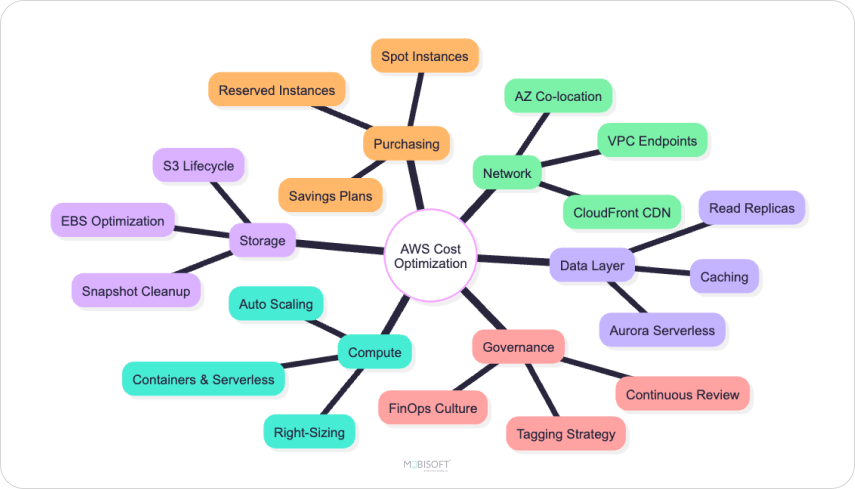
The 10 Pillars of AWS Cost Optimization
Right-Size Your Resources
The biggest source of waste in most AWS environments is over-provisioned compute. Teams pick an instance type during deployment. Then they never revisit that choice. Actual CPU and memory utilization often tells a very different story. Right-sizing is foundational to any serious AWS infrastructure optimization effort, particularly for analytics and pipeline environments where companies hire AWS data engineers to improve resource efficiency.
What to do:
- Use AWS Compute Optimizer. It gives ML-driven recommendations on instance sizing. Check CloudWatch metrics for sustained low utilization. Under 40% CPU is a red flag. Note that EC2 memory metrics are not collected by default. Install the CloudWatch Agent or enable Compute Optimizer's enhanced infrastructure metrics to see memory utilization.
- Match workloads to the right instance family. Memory-optimized workloads need R-series. Compute-optimized needs C-series. General purpose fits M-series.
- Consider Graviton-based instances. These use ARM architecture. They offer up to 40% better price-performance on supported workloads. That is a solid EC2 cost optimization win.
Right-sizing alone typically delivers 20 to 30% savings on compute spend. That assumes your environment has not been actively optimized before. Results depend on how over-provisioned your baseline actually is.
Adopt Smart Purchasing Strategies
AWS gives you several ways to pay for compute. The default option, On-Demand, is the most expensive one. A blended purchasing model is how mature enterprises drive serious AWS cost saving strategies.
- Reserved Instances AWS: Commit to 1 or 3-year terms for predictable workloads. You can save up to 72% compared to On-Demand. But the largest discounts require 3-year all-upfront commitments.
- AWS Savings Plans: These come in two flavors. Compute Savings Plans are the most flexible. They apply across instance families, sizes, regions, OS, tenancy, and even Fargate and Lambda. EC2 Instance Savings Plans are locked to a specific instance family in a specific region. They offer slightly deeper discounts, up to 72%. Pick based on how stable your workload shape is.
- Spot Instances: Use spare AWS capacity at up to 90% discount. These are perfect for batch processing, CI/CD runners, data analytics, and stateless workloads. Just know that they can tolerate interruption. AWS can reclaim Spot instances with only 2 minutes' notice.
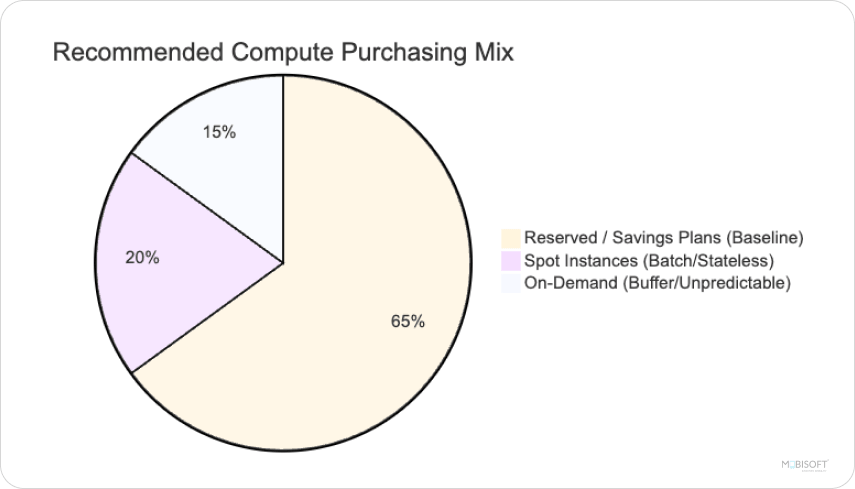
Pro tip: Do not lock everything into one model. A healthy mix is roughly 60 to 70% Reserved or Savings Plans for baseline load. Let Spot and On-Demand handle the rest.
Build for Elasticity with Auto Scaling
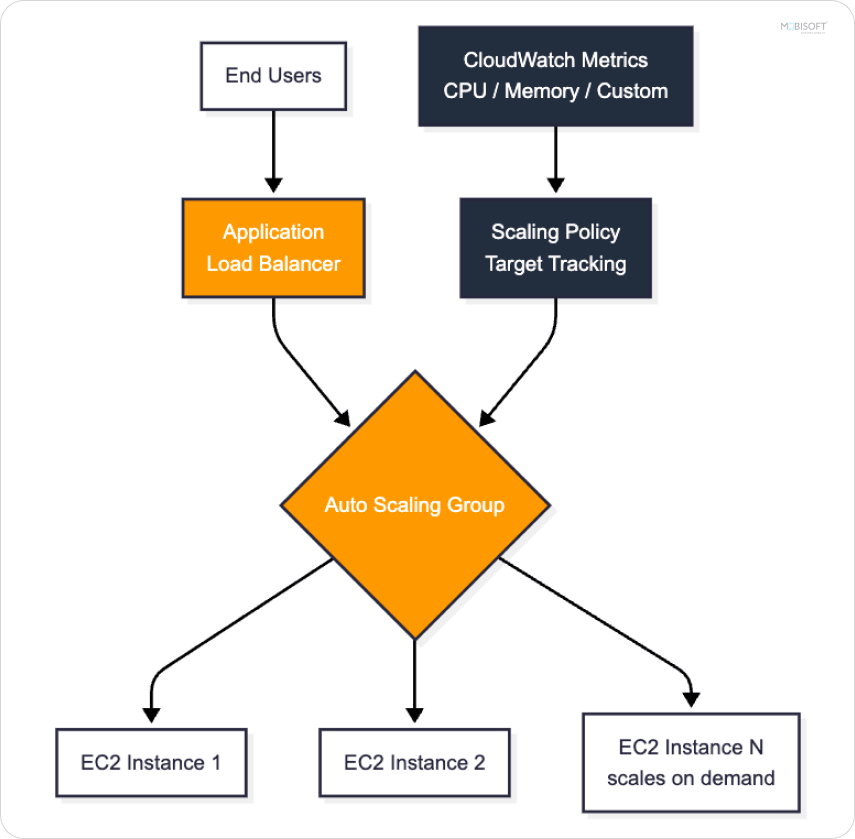
Static infrastructure is the enemy of cost efficiency. Imagine your peak load is ten times your average load. Paying for peak capacity 24/7 means you waste money 90% of the time. AWS auto scaling is one of the most effective ways to match provisioned capacity to real demand. AWS autoscaling cost optimization works by scaling resources up only when needed.
Best practices:
- Implement Auto Scaling Groups with target tracking policies. Use CPU, memory, or custom CloudWatch metrics.
- Use scheduled scaling for predictable patterns. For example, scale down dev environments after 7 PM.
- Combine Auto Scaling Groups with an Application Load Balancer for seamless traffic distribution.
- For containerized workloads, leverage Karpenter or Cluster Autoscaler in EKS. That is a strong Kubernetes cost optimization tactic.
Done right, AWS auto scaling closely matches your provisioned capacity to actual demand. In practice, you will always carry some overhead. Minimum capacity floors exist. Warm-up time and cooldown periods add buffer. You also need some slack to handle scale-up lag. The goal is not a perfect cost-to-demand fit. It is eliminating that 90% gap between average and peak provisioning.

Optimize Storage Aggressively
Storage costs are easy to overlook. A few terabytes here, a forgotten snapshot there. Suddenly, S3 eats a meaningful chunk of your bill. Aggressive S3 cost optimization through lifecycle policies and tier management is one of the fastest wins.

Quick wins:
- Enable S3 Intelligent-Tiering. It automatically moves data between access tiers based on usage patterns.
- Set lifecycle policies to transition data from Standard to Infrequent Access. Then to Glacier. Then to Deep Archive.
- Audit and delete unattached EBS volumes monthly. Also, delete old EBS snapshots.
- Switch from GP2 to GP3 EBS volumes. You get better performance at 20% lower cost.
- Compress and deduplicate data before storing it, where possible.
In environments with significant cold or archival data, lifecycle policies alone can reduce S3 spend by 30 to 50%. The exact savings depend on what fraction of your data is genuinely cold versus actively accessed.
Tame Your Network and Data Transfer Costs
Data transfer charges are one of the most overlooked sources of AWS waste. Cross-AZ traffic adds up. NAT Gateway fees add up. Egress charges add up. These costs are often invisible until the bill arrives. Here are strategies to reduce AWS cloud costs on networking.
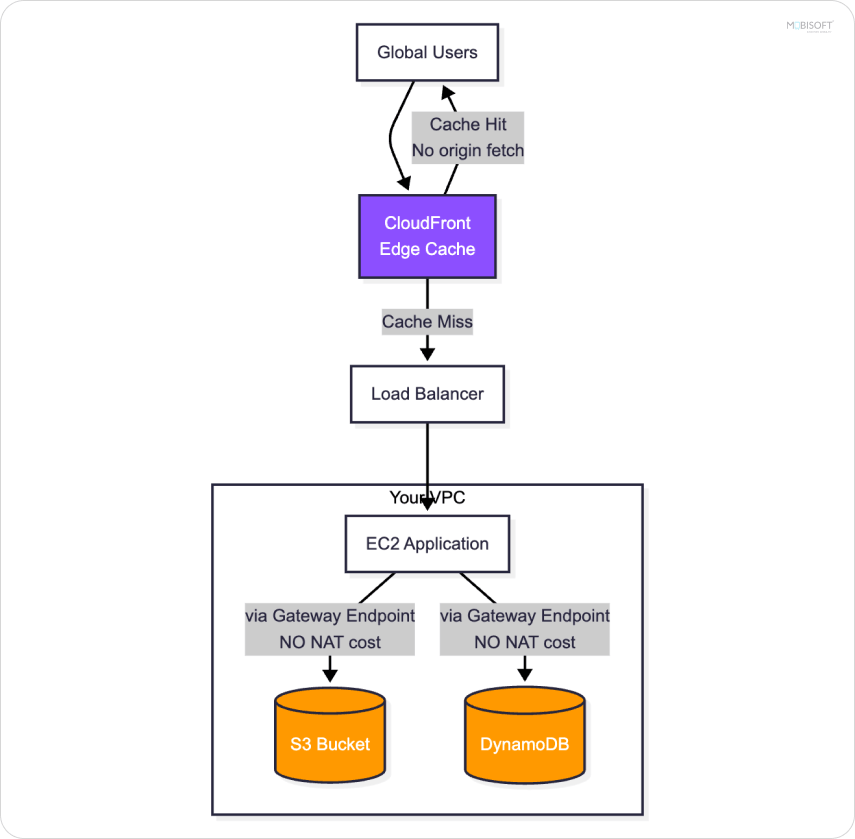
- Co-locate chatty, tightly coupled services in the same Availability Zone. Do this only where the resilience trade-off is acceptable. For example, an application tier talking to a cache. But do not collapse stateful or critical-path components into a single AZ. Multi-AZ deployment remains essential for high availability. The cost savings are not worth the resilience loss for production workloads.
- Use Gateway VPC Endpoints to route traffic to S3 and DynamoDB without going through NAT Gateways. These are free. They represent the highest-impact network optimization for most workloads. For other AWS services such as SQS, KMS, and Secrets Manager, use Interface VPC Endpoints powered by PrivateLink. These carry hourly and data processing charges. Evaluate the cost before deploying them everywhere.
- Deploy CloudFront to cache content at the edge. This reduces origin fetches and improves global latency simultaneously.
- Consider AWS PrivateLink for service-to-service communication across VPCs.
A single VPC Endpoint for S3 can save thousands per month for data-heavy applications.
Embrace Containers and Serverless
The fastest-growing AWS customers are moving away from always-on EC2 instances. They prefer consumption-based models. This is where container optimization, AWS, and serverless architectures deliver their strongest value.
Container strategies:
- Migrate to ECS or EKS with mixed Spot and On-Demand capacity.
- Use AWS Fargate to eliminate the overhead of managing EC2 hosts entirely.
- Bin-pack containers efficiently. Small, well-utilized hosts beat large, half-empty ones.
Serverless strategies:
- Use AWS Lambda for event-driven, intermittent workloads. You pay only per invocation and execution time. That is the core of serverless cost optimization.
- Adopt Step Functions to orchestrate serverless workflows without managing infrastructure.
- Leverage API Gateway and Lambda for low-traffic APIs. Those APIs do not justify a dedicated server.
For workloads with low average utilization or highly unpredictable traffic, serverless can deliver savings of 50 to 70% compared to equivalently provisioned infrastructure. The economics flip for steady, high-utilization workloads. There, reserved EC2 capacity usually wins. Match the model to the workload shape.
Build a FinOps Culture with Tagging
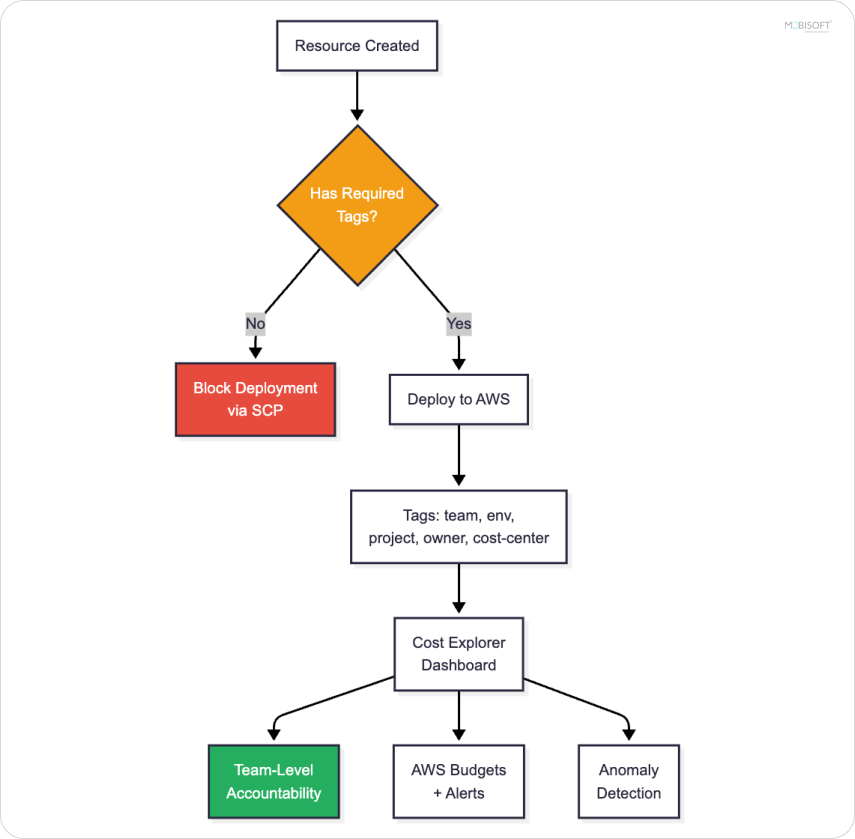
You cannot optimize what you cannot measure. Without proper tagging and cost attribution, every cost-saving initiative becomes guesswork. This is the foundation of any mature cloud cost management services approach.
Foundational practices:
- Enforce mandatory tags. These should include environment, team, project, owner, and cost-center.
- Use a layered enforcement approach. AWS Organizations Tag Policies define standardized tag keys and values across accounts. Service Control Policies (SCPs) block resource creation without required tags for services that support the aws: RequestTag condition keys. AWS Config rules detect and remediate non-compliant resources after the fact.
- Build dashboards in AWS Cost Explorer categorised by team and project.
- Enable AWS Budgets with alerts at 50%, 80%, and 100% thresholds.
- Use cloud monitoring tools like Cost Anomaly Detection to catch unexpected spikes early.
FinOps is not just a finance function. It is an engineering discipline. The teams that ship the code should also own its cost.
Optimize Database Costs
Databases often take a meaningful share of an AWS bill. For data-heavy applications, they can account for 20 to 40% or more. And they are frequently over-provisioned because nobody wants to cause downtime. Focused database cost optimization, AWS can deliver some of the most defensible savings.
Optimization tactics:
- Use Aurora Serverless v2 for variable workloads. It scales capacity in fine-grained increments.
- Right-size RDS instances based on actual IOPS and connection metrics.
- Offload read traffic to Read Replicas instead of vertically scaling the primary.
- Archive cold data to S3 and Athena instead of keeping years of history in expensive RDS storage.
- Use DynamoDB On-Demand for unpredictable workloads. Use provisioned with Auto Scaling for steady ones.
A well-tuned database tier is often where the biggest, most defensible savings live.
Cache Strategically to Reduce Compute Load
Every uncached request costs you compute, database time, and potentially data transfer fees. Caching is one of the highest-ROI investments in cloud architecture.
Where to cache:
- Use ElastiCache (Redis or Memcached) for session data, frequently-accessed queries, and computed results.
- Use CloudFront at the edge for static and dynamic content.
- Use API Gateway caching for repeated API responses.
- Use application-level caching with libraries like Caffeine for Java or Redis clients.
Done well, caching reduces the load on your backend services so dramatically that you can scale down compute and database tiers. That compounds savings across the entire stack.
Make Cost Governance Continuous
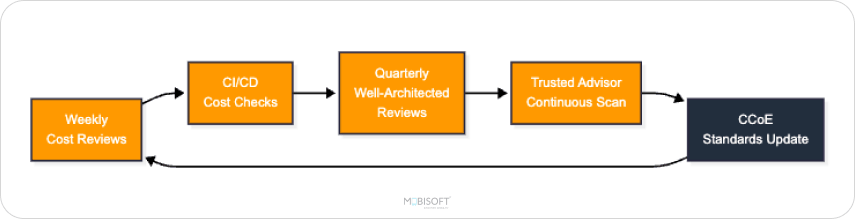
The biggest mistake enterprises make is treating cost optimization as a one-time project. AWS changes constantly. Your workloads evolve. Yesterday's optimization is tomorrow's waste. Continuous governance separates mature cloud infrastructure cost optimization programs from one-off exercises.
Build continuous governance:
- Run weekly cost review meetings with engineering leads.
- Integrate cost checks into CI/CD pipelines using tools like Infracost. Infracost has the strongest support for Terraform, Terragrunt, and Pulumi. For CloudFormation shops, use the AWS Pricing Calculator API or third-party tools.
- Schedule quarterly AWS Well-Architected Reviews focused on the Cost Optimization pillar.
- Use AWS Trusted Advisor to surface low-hanging fruit continuously.
- Establish a Cloud Center of Excellence (CCoE) to drive standards across teams.
Cost optimization works best when it is baked into how engineers design, deploy, and operate every system. See how Terraform infrastructure automation helped a US SaaS company regain full cost visibility and scale their cloud infrastructure efficiently.
The FinOps Mindset: Cost as a First-Class Engineering Concern
The enterprises that truly master how to reduce AWS costs for enterprise applications are not the ones with the smartest scripts. They are not the ones with the biggest Reserved Instance portfolios. They are the ones who made cost a shared responsibility. Visible to every engineer. Owned by every team. Reviewed as rigorously as performance or security.
Performance, scalability, and cost are not competing priorities. They are three sides of the same well-architected system.
Final Thoughts
You don’t have to cut down on infrastructure, workforce, or performance to lower your AWS cloud costs. Start by building smarter, right-sizing your infrastructure, and buying capacity strategically. Design for elasticity. Create a culture where every engineer thinks about cost as part of their craft.Start with the highest-impact areas first. Compute right-sizing, Savings Plans, and storage lifecycle policies usually deliver the fastest wins. Then build the FinOps muscle to make optimization continuous. The cloud rewards those who architect with intention. Cloud cost optimization is just one of those rewards.

This content is for informational purposes only and may include AI-assisted research or content generation. While we strive for accuracy, information may evolve over time. Readers are advised to independently verify critical information before making decisions.

Pratik Kale
Read more
Pratik Kale leads the Web and Cloud technology team at Mobisoft Infotech. With 14 years of experience, he specializes in building complex software systems, particularly focusing on backend development and cloud computing. He is an expert in programming languages like Java and Node.js, and frameworks like Spring Boot. Pratik creates technology solutions that not only solve current business problems but are also designed to handle future challenges.
 Pratik Kale
 May 21, 2026