A developer opens a bug report where a tool call comes back with the wrong result, and the easy explanation is that the model made a mistake. Then someone traces the request and finds the agent sent the wrong arguments to the server, or never checked them at all. The fault was never in the model. It was sitting in the layer between the model and the tool.
One plain sentence explains almost everything that goes wrong in that layer. The LLM proposes, and the agent disposes. A model can suggest a tool and a set of arguments, but it has no hands of its own, so only the agent wrapped around it can open a connection, read a file, or query a database. Hold onto that distinction, and the most confusing behavior in MCP tool calls starts looking like an engineering problem rather than magic.
Here is a question worth sitting with. The Model Context Protocol standardizes how tools get discovered and invoked, so why do two teams building on the same MCP server end up with such different reliability? The protocol fixes the format. It says nothing about validation, security, or stopping a runaway tool loop, and this guide walks through where each of those choices actually lives, from the three participants in every exchange to a full worked example and what it means for rolling out MCP integration across a team.
Why This Topic Matters Now
Usage of the Model Context Protocol is accelerating across coding agents, browser agents, and enterprise platforms. By 2026, the protocol operates under Linux Foundation stewardship, with working groups shaping transports, agent communication, and enterprise readiness. Community servers built on the MCP protocol now number in the thousands, covering everything from calendars to internal databases.
Teams are wiring up an MCP server faster than they are learning how the protocol behaves under real load. A working demo says little about a system running thousands of tool calls a day. Misunderstanding who does what, the model or the agent, leads directly to security gaps and tools that fail without warning. Companies planning a wider rollout often start with AI consulting for businesses to frame these priorities before a single line of code gets written.
A clear mental model of the lifecycle is now a practical skill. It is no longer an academic detail reserved for protocol authors.
The stakes keep rising as more production work routes through agents rather than static scripts. A single confusing bug in MCP tool calls can cost a team days if nobody knows which phase to check first. A shared vocabulary for the lifecycle turns that search from guesswork into a short, repeatable process.
The Three Participants in Every MCP Interaction
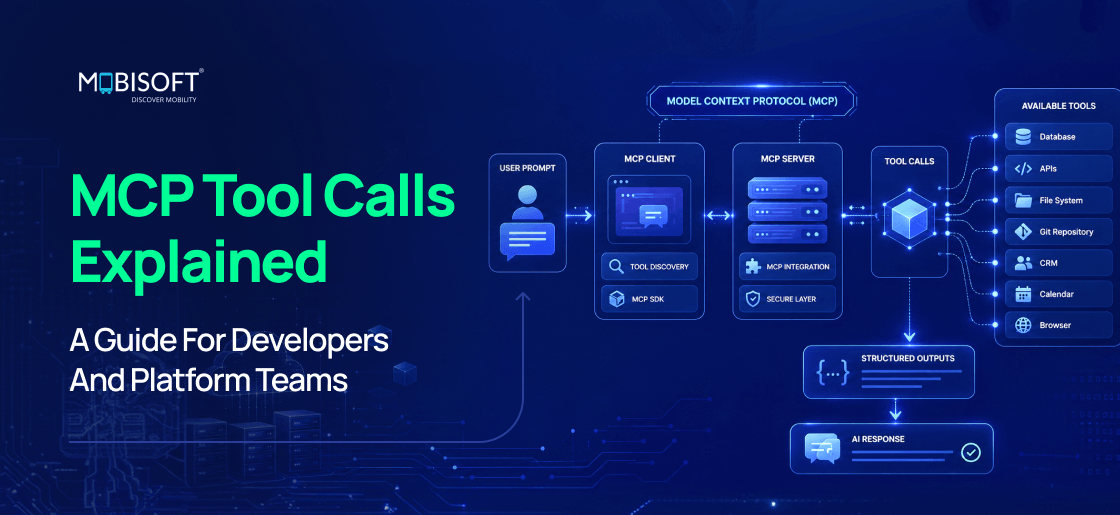
Every MCP exchange involves three participants: the AI agent, the LLM, and the MCP server. One distinction matters more than any other. Only the agent touches the network. The LLM only reasons and writes text.
The Agent Harness: The Orchestrator
The agent, often called the MCP client, connects to MCP servers, holds the conversation, calls the LLM, and performs the real tool calls. It owns every guardrail along the way, including validation, permission checks, timeouts, retries, and approval steps. It is also the only component a company can actually govern and audit, since the model itself leaves no code trail to inspect.
The LLM: The Reasoner
The LLM reads the user request against the available tool schemas. It decides whether a tool is needed and requests one through a structured block. It never executes anything on its own. It only proposes an action and waits for a response.
The MCP Server: The Tool Provider
The MCP server exposes tools behind a standard protocol. It advertises what it offers and runs the underlying function once asked. An MCP server can sit behind a company firewall, inside a third party vendor, or on a personal machine, and the calling agent treats all three the same way. Building one that holds up under production traffic takes real engineering effort, which is why many teams bring in specialized MCP server development partners rather than starting from a blank file.
Why This Separation Matters for Security and Design
The LLM cannot enforce a permission boundary because it cannot enforce anything on its own. It only writes text. Every safety property has to live in the agent, not in a prompt instruction aimed at the model. This separation is what makes multi-vendor tool ecosystems possible without custom trust code for every single provider.
This is also why two teams building on the same Model Context Protocol server can end up with such different reliability. One team treats the agent as a thin pass-through and hopes the model behaves. The other team treats the agent as the real product and builds validation, permissions, and logging into it from the start. The protocol gave both teams the same wire format. Only one team did the engineering that makes the format trustworthy in production.
Phase One: How Tool Discovery Shapes Every MCP Tool Call
Registration happens before any user query arrives, usually once at startup. The agent and server complete an initialization handshake, followed by a request that returns every tool the server currently exposes. This exchange is the foundation of tool discovery, and everything downstream depends on getting it right.
What a Good Tool Definition Contains
A strong tool definition needs three things. A name that states intent clearly, such as get_weather rather than tool1. A natural language description the LLM uses to decide when the tool applies. A precise schema that types every argument rather than leaving it loose.
Why Descriptions Are Doing More Work Than They Look Like
The LLM has no other information about a tool beyond its name and description. A vague description leads directly to wrong tool selection or malformed arguments. Treat tool descriptions as a specification, not as a passing comment.
When and How Tool Lists Refresh
Static registration at startup covers most simple integrations well. Servers can also signal a change and trigger a refreshed list mid-session. Long-running agents need tool discovery that handles a catalog changing while a conversation stays open.
Phase Two: A User Request Enters the System
A person asks a question, and the agent receives it first. The agent, acting as the MCP client, now carries two jobs at once: hold the conversation and prepare the next call to the model.
Passing the Query and the Tool Schemas Together
The agent sends the user message alongside every tool definition gathered during registration. Schemas get translated into whatever function calling format the specific model expects. Anthropic and OpenAI use different field names for the same underlying idea, so a serious MCP implementation needs a translation layer that keeps this consistent, and most teams reach for an official MCP SDK rather than writing that layer by hand.
Context Window Considerations at This Stage
Every registered tool schema consumes tokens before the conversation even begins. Large tool catalogs can crowd out space needed for reasoning and history. This is the first place teams should look when a system feels expensive or slow. Firms that offer broader AI development services often catch this problem early, since it shows up as latency long before anyone notices it in a bill.
What Happens When the LLM Decides on a Tool
The LLM reads the request next to the tool descriptions and reasons about the best next step. From here, two branches open up: answer directly or request a tool.
Anatomy of a Tool Use Block
A tool use block is a structured request containing a tool name and a set of arguments. Picture a weather lookup with a city and a date filled into clean, typed fields. This differs sharply from the model simply writing prose, since the output here is data the harness can parse without guessing.
Why This Is Only an Intention
No network call has happened at this point. The model has only proposed an action and handed control back to the agent. This is the step most developers building an MCP implementation misunderstand first, and it explains a large share of confusing bug reports.
How Tool Descriptions Shape the Decision
Clear, specific descriptions materially improve which tool the model picks. Overlapping or ambiguous tools cause the model to guess between them. Good naming and scoping reduce the need for prompt-level workarounds later on.
Phase Four: How the Harness Executes MCP Tool Calls
The LLM did not call the MCP server. It cannot. Only the agent can. The agent takes the proposed tool name and arguments and issues the real request behind every one of these MCP tool calls.
Validating Arguments Before Anything Runs
The harness checks the model supplied arguments against the schema before sending anything. It rejects malformed calls early instead of letting a bad request reach the server. Treat this validation step as a security boundary, not a formality you can skip under deadline pressure.
Guardrails That Live in the Harness
Permission checks decide whether this agent, in this context, may call this tool at all. Timeouts and retries protect against slow or flaky servers on the other end. Human approval covers actions carrying real consequences: a payment, a deletion, a message sent straight to a customer. Teams that connect agents to sensitive systems often bring in dedicated AI agent development services to design this guardrail layer correctly from day one.
What Happens on the Server Side
The MCP server receives the call request over its configured transport. It executes the underlying function, a weather lookup, a database query, or a file read. It returns either structured outputs or a clearly formed error, and that shape decides how well the next step goes.
Phase Five: The Result Travels Back to the LLM
The agent packages the server response as a result block and appends it to the running conversation history. The model sees this result on its very next turn.
Structuring Results the Model Can Use
Prefer structured outputs over unformatted text dumps whenever the server can produce them. Keep results focused on what the task actually needs and nothing more. A large or noisy result makes the next reasoning step harder, not easier.
Handling Errors Gracefully
Distinguish a tool that failed cleanly from one that failed silently with no signal at all. Give the model enough information in the error to attempt a sensible next step. Avoid swallowing errors inside the harness where nobody, human or model, ever sees them again.
Context Growth and Why It Matters
Every request and result pair adds to the conversation the model sees next. Long tool chains can fill the context window faster than the raw conversation itself. This is where offloading large outputs to storage starts to matter for longer-running tasks.
Phase Six: The Agentic Loop and the Final Answer
The two branches from phase three come back together here, another tool call or a finished answer. Reason, act, observe, repeat; this loop sits underneath nearly every agent built on MCP tools.
When the Loop Repeats and When It Stops
The model keeps requesting tools as long as it judges that more information is needed. The loop ends the moment it produces prose with no further request attached. A multi step task, search, then summarize, then save, simply chains several of these cycles together.
Who Actually Decides the Limits
The harness, not the model, enforces maximum iterations and timeouts on any run. Loop detection catches an agent that keeps repeating the same failing call. These limits are a governance lever that a company can tune without touching the model at all.
A Worked Example: Tracing One MCP Tool Call End to End
Picture a realistic developer scenario. An agent gets asked to check a calendar and summarize the day's meetings. Every phase from above becomes concrete once you follow one continuous trace through real MCP tool calls.
Step-by-Step Trace With Annotations
Registration happens first, the calendar MCP server advertises a list_events tool with a date argument. Next comes the request; the user asks what their afternoon looks like. The model reaches a decision and emits a request for list_events with today's date filled in. Execution follows; the agent validates the date argument and calls the server over its transport. The result returns as a structured list of meetings, complete with times and attendees. The loop then closes; the model either asks for another tool or writes a final summary for the person to read.
What Could Go Wrong at Each Step
A missing or malformed date argument gets caught by validation before it ever reaches the server. A server timeout gets retried or reported by the harness rather than left to hang silently in the background. A tool result that is too large pushes older conversation history out of the window. Each failure points back to one specific phase, and the fix belongs there and nowhere else.
Why Transport Choices Matter for MCP Architecture
Transport choice defines how an MCP architecture behaves under real traffic. As of 2026, the specification centers on Streamable HTTP for remote servers, with stdio reserved for a single machine running a single agent process. Earlier implementations relied on a separate HTTP plus Server Sent Events transport, and most of the ecosystem has since migrated, since Streamable HTTP folds equivalent streaming behavior into one simpler connection.
Streaming Partial Results
Streamable HTTP still lets a server emit output as it becomes available, much like the event streaming approach it replaced. This suits tools that take real time, a long search, or a large file read. Perceived responsiveness improves without changing the underlying lifecycle at all.
Long Lived Connections and Session State
A Streamable HTTP connection can remain open across multiple calls, and server session state can track context across that sequence. The tradeoff is straightforward: more capability against more infrastructure to operate and monitor. Working groups inside the Model Context Protocol community are already refining this behavior, focused on stateless scaling for load balancers and clearer session handling when a server restarts mid-conversation.
Choosing Between stdio and HTTP
Local stdio servers suit a single machine and a single agent process well. HTTP-based servers suit shared, remote, or multi-tenant deployments instead. Companies standardizing MCP integration across many teams usually converge on HTTP for anything shared across groups or regions.
Designing MCP Tools That Agents Can Actually Use Well
Shift the lens now toward developers building MCP tools rather than only consuming them.
Naming and Describing Tools for the Model
Choose names that state intent, and avoid generic labels like tool1 or helper. Write descriptions the way you would brief a new teammate, plainly and completely. Include the constraints the model needs to know before it ever calls the tool.
Input Schema Design
Type every argument, and avoid free text where a structured field would work better. Mark required fields clearly and keep optional fields genuinely optional. Add constraints, enums, and ranges directly in the schema instead of burying them in prose.
Returning Structured and Predictable Output
Consistent output shape lets the model reason about results reliably across repeated calls. Avoid mixing formats across similar tools from the same server. Structured outputs also make downstream validation and logging far simpler for the team maintaining the server.
Failing Loudly With Useful Errors
A clear error lets the model attempt a sensible recovery on its very next turn. A silent or generic failure leaves the model guessing and the user waiting. Treat error messages as part of the tool's interface, not as an afterthought bolted on later.
Where Does the Real Risk Live in MCP Protocol Security
An agent with tool access can take real actions with real consequences attached.
Guardrails Belong in the Harness, Not the Prompt
Asking a model nicely not to do something is not a security control. Every consequential boundary needs enforcement in code, sitting between the proposed action and the actual call. The agent disposes of every action, so the agent must also defend against the bad ones.
Preventing Excessive Agency
Grant the minimum tool access a task requires, and expand only with a clear reason attached. Watch for tool descriptions that could smuggle instructions into the model's reasoning process. Apply deny-by-default rules rather than trying to enumerate every bad action in advance.
Auditing and Logging Every Tool Call
Record every call request, its arguments, and result without exception. Full traces turn a nondeterministic system into something a team can actually debug. Audit trails matter for compliance as much as they matter for everyday engineering, and they matter most for MCP tool calls that touch money, health data, or customer communication. Enterprise-focused working groups within the protocol community now treat audit trails and gateway-style routing as first-class concerns rather than an afterthought bolted on later.
Vetting Third Party MCP Servers
Treat an external MCP server the way you would treat any third-party dependency with code execution rights. Review what data a tool can access and what actions it can take before adoption. Prefer servers with clear documentation, versioning, and a track record over convenience alone.
Rolling Out MCP Integration Across an Organization
Move now from a single integration to a shared platform many teams rely on daily.
Centralizing MCP Servers as a Shared Platform
One vetted, monitored set of servers beats dozens of unmonitored team-specific integrations. Centralizing this layer keeps permission policy and logging consistent across an entire MCP architecture. Teams still choose which tools to enable for their own specific agents.
Avoiding Server Sprawl and Shadow Integrations
Unmanaged servers spun up by individual teams create blind spots fast. Establish a review process before any new server reaches production traffic. Track which agents use which servers so a compromised tool gets isolated quickly.
Versioning and Change Management for Tool Schemas
A schema change on the server side can silently break every agent that depends on it. Version tools deliberately and communicate breaking changes well ahead of time. Test schema changes against real agent traffic before committing to a full rollout.
Cost and Latency at Scale
Every registered tool adds tokens to every request, multiplied across an entire organization. Chatty tool chains add latency that compounds across a long sequence of MCP tool calls. Track cost and latency per tool the same way a company tracks cost per API endpoint.
Common Failure Modes in the MCP Tool Call Lifecycle
A practical catalog you can map straight back to the sections above.
- Wrong tool selected: fix this with clearer, less overlapping tool descriptions.
- Malformed arguments reaching the server: fix this with strict validation inside the harness.
- Silent tool failures: fix this with structured, informative error responses.
- Context overflow from large tool results: fix this through offloading and trimming.
- Runaway tool loops: fix this with turn limits and loop detection built into the agent.
- Unauthorized or excessive tool access: fix this with deny-by-default permissions.
- Breaking schema changes: fix this through deliberate versioning and staged rollout.
A Practical Checklist for Developers and Teams
Minimum Viable MCP Implementation
Start with a small set of clearly named, well-described MCP tools. Add argument validation in the harness before any call request goes out. Log every tool call and its result from the very first day.
What to Add as You Scale
Layer in permissions, audit trails, and centralized server governance next. Add loop detection, turn limits, and context offloading for longer-running tasks. Bring in versioning discipline and a review process for new servers joining the platform.
Conclusion: The Protocol Is Simple, The Engineering Is Not
The thesis holds from the first paragraph to the last. The LLM proposes, the agent disposes, and every real safeguard lives in that second half of the sentence. Discovery, decision, execution, result, loop, and the guardrails threaded through each phase, this is the shape of nearly every reliable system built on MCP tool calls today.
As more of your company's work routes through tool calling agents, a fair question remains open. Who is actually reviewing what those agents are allowed to do?
Pick the MCP integration your team trusts the least, and trace one real tool call through all six phases this week.

Frequently Asked Questions
What is the difference between an MCP client and an MCP server?
The MCP client is the agent. It holds the conversation, calls the LLM, and executes tool calls. The MCP server exposes the tools themselves. A calendar, a database, and a file system, and runs them when asked. The client decides whether and how to call a tool. The server just does the work once called.
Can the LLM call an MCP tool directly?
No. The LLM can only propose a tool call by naming a tool and its arguments. It has no way to open a network connection or reach a server on its own. The agent, sitting between the model and the server, is what actually makes the call.
Why did MCP move from HTTP with Server-Sent Events to Streamable HTTP?
The older transport needed two separate connections and made session handling harder to scale. Streamable HTTP folds the same streaming behavior into a single connection, which simplifies deployment behind load balancers and proxies while keeping the ability to stream partial results.
What causes most MCP tool call failures in production?
Three patterns show up again and again: a vague tool description that leads the model to pick the wrong tool, missing argument validation that lets a malformed request reach the server, and tool results large enough to push older context out of the window. All three are harness problems, not model problems.
Is MCP the same thing as function calling or tool_use?
Not quite. Function calling and tool_use are how a specific model format expresses the intent to call a tool. MCP is the protocol that standardizes how that intent turns into an actual tool call and how a server responds, so the same MCP server works across different models and their different function calling formats.
This content is for informational purposes only and may include AI-assisted research or content generation. While we strive for accuracy, information may evolve over time. Readers are advised to independently verify critical information before making decisions.

Mobisoft Team
Read more
Get the latest insights, industry trends, and expert perspectives from the Mobisoft Infotech team. Stay updated with our teams collective knowledge, discoveries, and innovations in the dynamic realm of technology.
 Mobisoft Team
 July 7, 2026