Enterprise cloud migrations fail in predictable ways. The migration project team undervalues the complexity of its application's dependency requirements. Instead of modernizing its workload's architecture, which would enable leveraging of cloud services, the migration team migrates it as is to pay for cloud-based applications using an on-premise pricing model. The security and compliance measures put in place for the on-premise environment are not set up to protect the cloud before migrating the workload to it. The post-migration cost optimization activities required to validate the migration business case are never carried out, as the migration team is already working on its next big priority project.
Mobisoft's enterprise cloud migration practice is built on a structured framework: the AWS MAP Migration Acceleration Programme phases, the AWS migration strategy 7 Rs, AWS MGN application migration for automated server replication, AWS DMS database migration for database migration, and the AWS Well-Architected Framework review for post-migration architecture review. This framework prevents each of these failure modes systematically.
Why Enterprise Cloud Migrations Fail: The Five Structural Failure Modes and How a Structured Framework Prevents Them
Enterprise cloud migration projects have a higher failure rate than most enterprise technology initiatives. This is not because the technology is unreliable. AWS infrastructure is significantly more reliable than the on-premises infrastructure most enterprises are migrating from. The problem is that the migration approach consistently underestimates the complexity of the enterprise's application portfolio and consistently overestimates the readiness of the organisation's people and processes for the post-migration operating model.
The Five Structural Migration Failure Modes
The table below maps each failure mode to its financial consequence and shows how the MAP framework prevents it systematically.
| Failure Mode | How It Manifests | Financial Consequence | How MAP Prevents It |
| Portfolio underestimation |
|
|
|
| Architecture replication |
|
|
|
| Security and compliance gaps |
|
|
|
| Database migration underestimation |
|
|
|
| Post-migration stagnation |
|
|
|
The AWS MAP Migration Acceleration Programme: Three Phases That Prevent Migration Failure
The AWS MAP Migration Acceleration Programme is the structured framework that Mobisoft applies to every enterprise cloud migration engagement. MAP is not a consulting methodology. It is a framework with specific deliverables, specific tools, and specific checkpoints that must be completed at each phase before the programme progresses to the next. The discipline of the MAP framework is what prevents the five failure modes described above.
Phase 1: Assess: Portfolio Discovery, Business Case, and Application Dependency Mapping
The Assess phase replaces assumptions with data. Every migration commitment made after this phase is grounded in an actual inventory of the enterprise's application portfolio.
- Application portfolio discovery: AWS Migration Evaluator (formerly TSO Logic), AWS Application Discovery Service (ADS), and optional tools including Cloudamize, or Movere generate a complete inventory of all servers (physical and virtual), operating systems and versions, application binaries and configurations, installed software, network connections and ports, storage usage, and CPU and memory utilisation over 30-90 days. Migrations built on manual spreadsheets consistently discover 20-40% more servers than the initial inventory. Each undiscovered server is a cutover risk.
- Application dependency mapping: AWS Migration Hub dependency visualisation and AWS Application Discovery Service network topology produce a map showing. Servers use it to call other servers, and applications use it to share database infrastructures. Migration waves that separate interdependent applications create production failures.
- AWS cloud migration business case development: AWS Migration Evaluator analysis of on-premises TCO, including server, storage, network, power, cooling, data centre space, licensing, and other operations. AWS pricing calculator, on the other hand, produces a quantified 3-year business case. Migration programmes without a quantified business case lose executive sponsorship at the first cost overrun.
- AWS migration strategy 7 Rs classification: Each application in the portfolio is classified as Rehost, Relocate, Replatform, Refactor, Repurchase, Retire, or Retain. The categorisation depends on priority ordering for migration waves, and per-application migration tooling and timeline. Applications classified incorrectly create expensive mid-migration discoveries.
- Security and compliance baseline assessment: AWS Well-Architected Tool security pillar assessment and compliance framework mapping (PCI-DSS AWS cloud migration compliance, HIPAA AWS cloud migration compliance, SOC 2, ISO 27001) to the AWS Shared Responsibility Model identifies which controls must be implemented before migration begins.
Phase 2: Mobilize: Landing Zone, Skills Readiness, and Migration Planning
The Mobilize phase builds the AWS landing zone Control Tower and prepares the organisation's team before any production workload moves. The landing zone is the most critical infrastructure deliverable of the entire migration programme.
| THE AWS LANDING ZONE: SECURITY AND GOVERNANCE FOUNDATION |
| A multi-account AWS environment structured for security, governance, and operational efficiency. Built before the first production workload migrates. The landing zone is the cloud equivalent of the data centre's physical and network infrastructure. |
| Account Structure (AWS Control Tower) |
| Management account: AWS Organizations root; consolidated billing; no workloads |
| Audit account: centralised CloudTrail log archive; security findings; read-only access |
| Log archive account: centralised S3 log storage with S3 Object Lock (write-once) |
| Shared services account: Active Directory integration, DNS, shared monitoring |
| Security tooling account: Security Hub, GuardDuty, AWS Config, Inspector |
| Network account: Transit Gateway, VPN/Direct Connect, shared VPC |
| Workload accounts (Production/Staging/Dev): one or more per business unit |
| Security Controls Established in the Landing Zone |
| IAM Identity Centre (SSO): centralised human identity management across all accounts |
| SCPs (Service Control Policies): preventive guardrails applied at the OU level (e.g., prevent disabling CloudTrail, prevent creating public S3 buckets) |
| AWS Config Rules: detective controls with automatic remediation for compliance rules |
| GuardDuty: ML-based threat detection across all accounts from Day 1 |
| Security Hub: aggregated security findings from all accounts in a single view |
| CloudTrail: immutable API call log across all accounts; forwarded to the audit account |
| VPC Flow Logs: network traffic logs for all production VPCs |
| Why the Landing Zone Must Be Built Before Migration Begins |
| Retrofitting a landing zone to an existing multi-workload AWS environment is significantly more complex than building it before the first workload arrives. SCPs applied to an OU that already has workloads can break running applications if not tested carefully. CloudTrail and Security Hub added after migration miss the pre-landing-zone period in the security audit trail. |
Phase 3: Migrate and Modernize: Wave Planning, Execution, and Optimisation
Wave planning is not simply scheduling. It is a risk sequencing framework that ensures the migration team's tooling, procedures, and skills are most mature by the time mission-critical applications are at risk.
- Wave 1: Non-production and low-risk workloads first (dev, test, QA environments; non-customer-facing tools; archived workloads with no live traffic). Wave 1 is the programme's risk calibration mechanism. Failures discovered here are resolved before production workloads are at risk.
- Wave 2: Production workloads with low business criticality (internal business applications, HR systems, internal portals, reporting tools). Wave 2 tests production migration procedures with a bounded blast radius.
- Wave 3: Production workloads with medium business criticality (customer-facing applications with defined SLAs; applications with high transaction volumes but existing disaster recovery plans). Runbooks and rollback capabilities must be verified in Wave 2 before Wave 3 begins.
- Wave 4: Mission-critical applications last (revenue-generating customer-facing applications; applications with strict SLA requirements; applications with complex database dependencies; regulated applications requiring compliance attestation). AWS migration wave planning enterprise best practice is to migrate these last because the migration tooling, procedures, and team skills are most mature after multiple prior waves.
- Dependency-driven wave composition: applications that call each other must be in the same wave, or the calling application must tolerate a temporary on-premises-to-cloud call via VPN. The dependency map from the Assess phase drives wave composition. VPC architecture must support hybrid on-premises-to-cloud connectivity during the migration period.
AWS Application Migration Service (AWS MGN): Architecture and Operating Model for Automated Server Migration
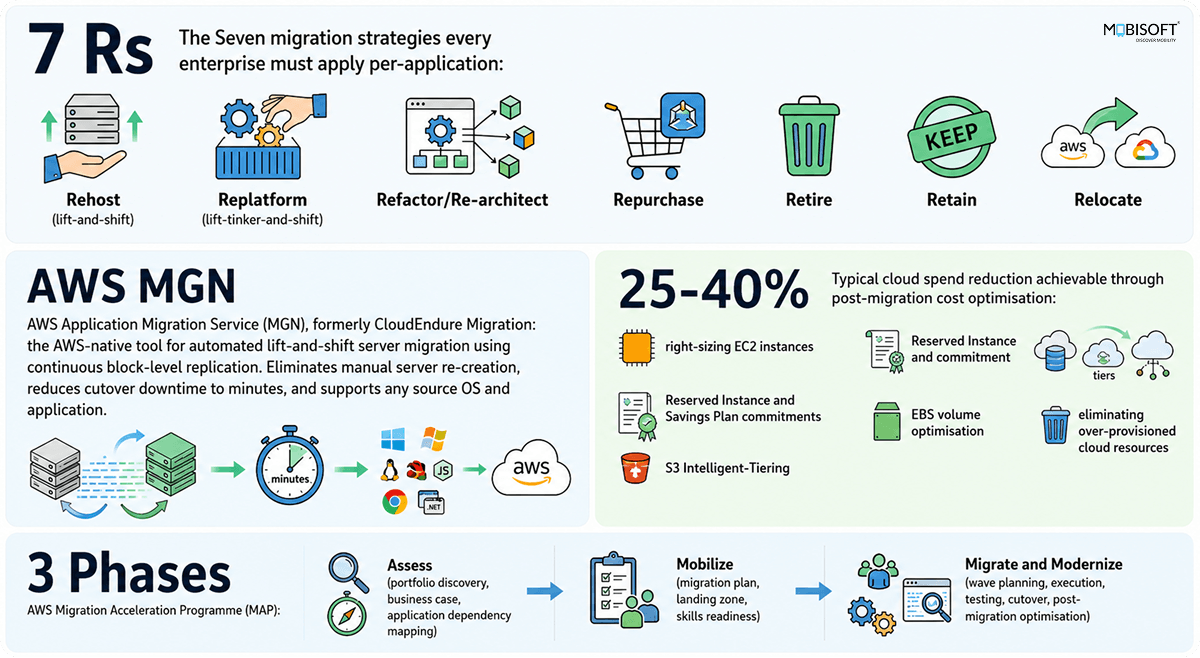
AWS MGN application migration (formerly known as CloudEndure Migration) is the AWS-native service for automated lift and shift AWS migration. MGN uses continuous block-level replication to keep a synchronised copy of the source server in AWS, enabling migration cutovers in minutes rather than hours. It is the primary tool Mobisoft uses for Rehost-strategy applications in enterprise cloud migration programmes.
How AWS MGN Works: The Four-Stage Replication Architecture
Agent installation and initial sync
The AWS MGN Replication Agent runs on each of the source servers. It scans all volumes and connects to the AWS MGN service via TCP ports 443 (HTTPS) and 1500 (data replication). The initial sync copies data from source volumes to the staging area in AWS. Time depends on the amount of data and bandwidth. With a 1TB source volume and a 100 Mbps Internet connection, it takes 22 hours. The agent doesn't require reboots and doesn't use the source server storage I/O path. The staging area EC2 instance is a cheap Replication Server (by default t3.small), which receives data and writes it to EBS volumes in the staging area.
Continuous replication (steady state)
After the initial sync completes, MGN enters steady-state continuous replication. All write operations on the source server's volumes are captured and replicated to the staging area EBS volumes in near real-time (typically sub-second lag). The staging area is updated continuously while the source server continues to operate normally. Production traffic is not interrupted. The replication is crash-consistent: application-consistent snapshots can be configured for databases.
Testing
Before any production cutover, MGN launches a test instance from the staging area in a test VPC isolated from production. The migration team performs application testing on the test instance while the source server continues to serve production traffic. Testing can be performed multiple times before cutover. Each test launch creates a new EC2 instance from the current point-in-time state of the staging area.
Cutover
When the migration team initiates cutover: MGN completes a final replication of any changes made since the last continuous sync. It then launches the cutover instance in the production VPC and target subnet. The migration team redirects traffic via DNS update, load balancer target group change, or network reconfiguration. AWS MGN cutover downtime minutes: total cutover window is 10-30 minutes for most applications. The source server is decommissioned after validation. The final replication at cutover captures only the delta since the last continuous sync point. If continuous replication is current (sub-second lag), the final replication is near-instantaneous.
AWS MGN Configuration and Optimisation for Enterprise Migrations
The following configuration parameters govern AWS MGN replication agent setup enterprise deployments. Correct configuration prevents replication bottlenecks and ensures the cutover window stays within the planned 10-30 minute target.
| AWS MGN CONFIGURATION PARAMETERS FOR ENTERPRISE-SCALE MIGRATIONS |
| Replication Server Sizing |
| Default: t3.small (2 vCPU, 2GB RAM) per 15 source servers |
| High-throughput migrations (large volumes, many concurrent servers): t3.medium or t3.large Replication Servers |
| High write throughput (database servers, video processing): r5 family Replication Servers for memory-optimised replication |
| Staging Area Subnet Design |
| Staging area subnet must be in the same AWS Region as the target VPC |
| Subnet sizing: minimum /26 (64 IPs); for large migrations: /24 (256 IPs) |
| No internet access required; MGN uses the AWS network backbone |
| Private connectivity: VPN or Direct Connect from source data centre to staging area (recommended for sensitive data) |
| Bandwidth and Throttling |
| MGN supports bandwidth throttling per source server to prevent replication traffic from saturating the network link |
| Set to 70-80% of available bandwidth during initial sync; increase to 90% after initial sync completes |
| Scheduled throttling: reduce replication throughput during business hours; allow maximum throughput during off-hours for initial sync acceleration |
| Launch Settings (Target Instance Configuration) |
| Instance type mapping: use EC2 instance types in the same family as on-premises equivalent (c5 for compute-optimised, r5 for memory-optimised), right-sized based on 30-90 day utilisation data from the Assess phase |
| EBS volume type mapping: GP3 for all general-purpose volumes; io2 for high-IOPS database volumes |
| OS licence: Bring Your Own Licence (BYOL) for Windows Server, or Licence Included (AWS automatically applies the licence) |
| Cutover Settings |
| Final replication timeout: 120 seconds (configurable); if the source server writes faster than MGN can replicate in the final sync window, extend the timeout |
| Post-cutover: archive the source server rather than immediately deleting; retain for 30-60 days for rollback capability |
AWS MGN vs Alternatives: When to Use Each
The choice of migration tooling depends on the application's migration strategy classification. AWS MGN vs alternatives is not a binary choice. Each tool has a specific scope. The table below describes when Mobisoft uses each option.
- AWS MGN (Application Migration Service): best for any OS, any application, Rehost strategy. Continuous block-level replication minimises cutover downtime with minimal disruption to the source server. Does not modernise the application during migration. Mobisoft uses this as the primary tool for all Rehost-classified applications unless excluded by licensing, OS version, or migration strategy.
- AWS Database Migration Service (DMS): best for heterogeneous database migration (Oracle to Aurora PostgreSQL, SQL Server to MySQL) and continuous change data capture for near-zero cutover downtime. Not a server migration tool; it migrates data and schema, not server configuration. Requires application-level changes when the database engine changes.
- AWS Elastic Disaster Recovery (DRS): positioned as an ongoing DR service, not a migration tool. Higher ongoing cost than MGN for pure migration use cases. Mobisoft deploys this as a long-term DR solution post-migration for critical workloads and as an interim DR solution before a formal DR architecture is established.
- VMware Cloud on AWS (VMC): the execution path for the Relocate strategy. Best for organisations with a significant VMware investment that want to move to AWS at the hypervisor level — using VMware HCX for bulk/live VM migration with no conversion to native EC2 and near-zero downtime. Does not eliminate VMware licensing costs and does not modernise the application. Mobisoft uses this for a 'Relocate now, Replatform/Refactor later' strategy where a fast data-centre exit is the priority.
- AWS Server Migration Service (SMS): deprecated by AWS. No new migrations should use SMS. Existing SMS migrations should be converted to MGN.
- Native cloud-native migration (manual): for Refactor/Re-architect applications where migration involves deploying a new cloud-native architecture (ECS, Lambda, Aurora Serverless, S3/CloudFront) rather than replicating an existing server. Requires development work in addition to infrastructure migration. Mobisoft uses this for all Refactor-classified applications.
The Seven Migration Strategies (7 Rs): How Mobisoft Classifies Every Application in the Enterprise Portfolio
The AWS cloud migration 7 Rs classification portfolio framework is the taxonomy that determines what happens to each application in an enterprise cloud migration programme. Applying the wrong strategy to an application is one of the most expensive migration mistakes an enterprise can make. Applying Rehost to an application that requires Refactor creates a technically correct migration that immediately accumulates technical debt. Applying Refactor to an application that should be retired wastes engineering resources on a system that will be decommissioned.
The Complete 7 Rs Framework with Decision Criteria
| Strategy | Description | When to Apply | Tooling | Post-Migration Outcome |
| Rehost(Lift-and-Shift) | Move to AWS as-is; no modifications to code, database, or architecture. | No planned modernisation; complex legacy code; retirement within 12-24 months; or as a first step before Refactor. | AWS MGN (primary) | Runs on EC2; architecture identical to on-premises; cloud benefits limited to pay-as-you-go billing and reliability. |
| Relocate(Hypervisor-Level Lift) | Move VMs or containers to AWS at the infrastructure layer with no change to OS, application code, or operations; no conversion to native EC2. | Large existing VMware estate; need a fast data-centre exit with minimal risk and retraining; want to preserve current VMware tooling and operating model; or as a bridge before a later Replatform/Refactor. | VMware Cloud on AWS (VMC) with VMware HCX for bulk/live VM migration; Amazon EKS for relocating self-managed Kubernetes. | Near-zero downtime, no code/OS change; runs on VMware-managed infrastructure on AWS; does not remove VMware licensing costs or deliver native-cloud benefits until a later modernisation step. |
| Replatform(Lift-Tinker-and-Shift) | Minor modifications to use managed services without changing core architecture. Example: migrate self-managed MySQL to Aurora. | Specific components replaceable with managed services without code changes; databases on EC2 migratable to RDS. | AWS MGN for server migration + AWS DMS for database; Elastic Beanstalk for app tier. | Benefits from managed services (auto patching, backups, HA); reduced operational overhead; not fully cloud-native. |
| Refactor /Re-architect | Full redesign for cloud-native services: monolith to microservices, serverless, containers. | High strategic value; scalability/performance requirements current architecture cannot meet; active development. | Re-deployment of a new cloud-native implementation: ECS, Lambda, Aurora, S3, CloudFront, API Gateway, DynamoDB. | Highest cloud benefit; maximum TCO reduction and agility; highest migration complexity and engineering investment. |
| Repurchase | Replace with a SaaS solution. Example: self-hosted CRM replaced by Salesforce; on-prem email by Microsoft 365. | Commodity business functions with leading SaaS solutions; high maintenance overhead and low differentiation. | SaaS vendor migration tools; data export/import; user migration and training. | Eliminates application from migration portfolio; reduces infrastructure footprint; increases SaaS vendor dependency. |
| Retire | Decommission without replacement; end-of-life or functionality covered by another system. | Fewer than 20 active users; duplicates functionality of another application; zero CPU utilisation over 30+ days. | Decommission runbook; data archival or destruction per retention policy. | Reduces migration scope and cloud footprint; cost savings from retiring applications often fund part of the programme. |
| Retain | Keep on-premises for now; revisit in a future migration wave. | Regulatory/compliance constraints; end-of-life within 12 months; unresolved licensing constraints; too complex for current wave. | No migration tooling; hybrid connectivity (VPN or Direct Connect) for integration with migrated workloads. | On-premises application continues; hybrid connectivity maintains integration; retain decision reviewed each programme cycle. |
Note: The distinction between Rehost and Relocate is the conversion: Rehost (via AWS MGN) converts servers into native EC2 instances, while Relocate (via VMware Cloud on AWS and HCX) keeps them as VMs on AWS-hosted VMware and never converts them.
How Mobisoft Applies the 7 Rs to a Typical 200-Server Enterprise Portfolio
Typical distribution across a 200-server enterprise portfolio:
- Rehost (35-50%): the largest single category. Typically includes all applications that are not actively developed, have no available SaaS equivalent, and are not planned for retirement. AWS MGN is the primary tool.
- Replatform (15-25%): applications where database migration to RDS, application server migration to Elastic Beanstalk, or storage migration to S3/EFS is achievable without code changes. Delivers the highest ROI for the development effort required.
- Refactor/Re-architect (5-15%): reserved for the highest-value applications where modernisation investment is justified by strategic importance. Typically, the organisation's revenue-generating customer-facing applications.
- Repurchase (10-20%): commodity business applications (HR, payroll, CRM, project management, email, collaboration) that have better SaaS equivalents. Frequently overlooked in technical migrations focused on server migration.
- Retire (15-25%): dormant or duplicate applications. Frequently, 15-25% of the enterprise portfolio has not had meaningful usage in the last 12 months. Retiring these applications before migration reduces the migration portfolio and the cloud footprint.
- Retain (5-15%): compliance-constrained applications, extremely complex legacy system maintenance, or applications with 12-month retirement plans. The retain category should be actively managed and minimised over successive migration waves.
- Relocate (0–10%, materially higher for VMware-heavy estates): applications running on VMware that move to VMware Cloud on AWS via HCX without conversion to native EC2. The split between Rehost and Relocate depends heavily on the size of the VMware footprint in a VMware-dominated data-centre exit, Relocate can be the largest single category and Rehost correspondingly smaller; in estates with little VMware, it may be zero. Typically used as a fast-exit bridge before a later Replatform or Refactor.
Database Migration with AWS DMS: Managing the Most Complex Component of Enterprise Cloud Migration
AWS DMS database migration is the most failure-prone component of enterprise cloud migration because databases have the highest combination of data criticality, technical complexity, and cutover sensitivity. Losing or corrupting production data is catastrophic. Schema compatibility, stored procedure syntax, trigger behaviour, character encoding, and replication mechanisms vary significantly across database engines. The window during which data is being transferred and the source and target are not in sync must be minimised.
The AWS DMS Architecture for Continuous Replication
Replication instance
An EC2 instance managed by AWS DMS that runs the replication software. Sits between source and target databases; reads from the source and writes to the target. Use r5.xlarge or larger for production databases; r5.2xlarge for databases above 1TB. Multi-AZ replication instance for production DMS tasks (automatic failover).
Source endpoint
Connects DMS to the source database. For source databases with binary log replication (MySQL) or WAL replication (PostgreSQL), DMS reads the transaction log for change data capture. Oracle: enable Supplemental Logging at the schema level. SQL Server: enable MS-CDC. MySQL: enable binary logging (log_bin=ON, binlog_format=ROW). PostgreSQL: set wal_level=logical. The source database must be configured to support CDC before the DMS task starts.
Target endpoint
Connects DMS to the target database with settings optimised for the bulk load and ongoing replication phases. Target bulk load settings: disable foreign key checks, disable triggers, set max_allowed_packet (MySQL), and use parallel load. For Aurora targets: use Multi-AZ deployment from the start. For RDS targets: enable automated backups before starting the DMS task.
Full load task
Initial bulk transfer of all existing data from source to target. DMS reads each table and loads data in parallel. The number of parallel load threads is configurable (typically 8-16 for large databases). LOB handling mode: limited LOB for most cases; full LOB only when LOBs cannot be truncated. Batch apply size: 500-1000 rows for balanced throughput. Target table prep mode: truncate (do nothing) to ensure a clean target before load.
Change data capture (CDC)
After the full load completes, DMS reads the source database's transaction log and applies all changes (inserts, updates, deletes) to the target in near real-time. Maintains synchronisation between source and target during the pre-cutover period. Key metric: replication latency. Acceptable cutover window: target latency consistently below 5 seconds for 30+ minutes. Monitor CDCChangesDiskSource and CDCChangesDiskTarget CloudWatch metrics.
Schema Conversion Tool (SCT)
Converts database schema and code objects (stored procedures, functions, views, triggers) from one database engine's syntax to another. Required for heterogeneous migrations (Oracle to PostgreSQL, SQL Server to MySQL). AWS DMS Schema Conversion Tool stored procedures: SCT assessment report classifies conversion issues as Simple, Medium, or Complex. Simple items convert automatically. Plan for 20-40% of stored procedures to require manual code changes in heterogeneous migrations.
The Database Migration Cutover Checklist
The AWS DMS cutover checklist database migration below reflects what Mobisoft validates before every production database cutover.
| AWS DMS CUTOVER READINESS CHECKLIST |
| Pre-Cutover Validation (at least 48 hours before cutover) |
| DMS CDC task running with target latency below 5 seconds for 30+ consecutive minutes |
| Row count validation: source and target row counts match for all tables |
| Checksum validation for critical tables (use AWS DMS data validation task) |
| All stored procedures, functions, and views converted and tested in the target |
| Application integration tests passing against the target database |
| RDS automated backups enabled and at least one backup completed |
| RDS parameter group settings match the source database's critical parameters |
| Security groups allow application tier access to the target database endpoint |
| RDS Performance Insights enabled for post-cutover monitoring |
| CloudWatch alarms configured: CPU, connections, storage, replication lag |
| Cutover Window Execution |
| 1. Quiesce the source application (put in maintenance mode or stop write-capable instances while read-only remains available) |
| 2. Wait for DMS CDC to reach zero replication lag |
| 3. Stop the DMS CDC task (mark the exact stop time in the runbook) |
| 4. Run final row count validation and spot-check checksum for critical tables |
| 5. Update the application's database connection string to the target endpoint |
| 6. Perform smoke test against the target database |
| 7. Enable the write-capable application instances |
| 8. Monitor RDS CloudWatch metrics for 30 minutes post-cutover |
| Rollback Plan (Pre-Agreed Before Cutover Begins) |
| Maximum rollback decision time: X minutes from cutover start (agree this time box before the cutover begins) |
| If rollback is required: revert the application's connection string to the source database; validate that the source database is in a consistent state. The source database has been the ground truth throughout (DMS writes to target only). |
Security and Compliance During AWS Cloud Migration: Maintaining Security Posture Through the Migration Window
The migration window is the highest-risk period in the enterprise cloud journey from an AWS cloud migration security compliance perspective. During migration, workloads exist in a hybrid state, with some on-premises, some in AWS. There exist network connections between the two environments that create an attack surface, which did not exist before migration. The organisation's security team is simultaneously responsible for both the on-premises security posture as well as the emerging cloud security posture. Compliance attestations must be maintained through the migration without a gap.
The AWS Shared Responsibility Model: What Changes in the Cloud
The AWS Shared Responsibility Model changes, which security controls the organisation is responsible for. The following covers each domain, what changes, and what action is required before migration.
Physical security
- On-premises: Organisation responsible for physical data centre security (access control, CCTV, environmental controls).
- In AWS: AWS is responsible for the physical security of AWS infrastructure (ISO 27001, SOC 2, PCI-DSS certified).
- Required action: No action required; physical security is inherited from AWS; document in the compliance audit trail.
Hypervisor and infrastructure security
- On-premises: Organisation responsible for hypervisor patching and configuration.
- In AWS: AWS manages the EC2 hypervisor, underlying hardware, network, and virtualisation layer.
- Required action: No action required; inherited from AWS; document in the compliance audit trail.
Operating system security
- On-premises: Organisation responsible for OS patching, hardening, and monitoring.
- In AWS: Organisation responsible for OS security on EC2 instances (same as on-premises).
- Required action: Establish AWS Systems Manager Patch Manager for automated OS patching before migration; define patch baseline and patch schedule.
Network security
- On-premises: Organisation controls data centre network (firewall rules, network segmentation, VLAN configuration).
- In AWS: Organisation controls VPC security groups, NACLs, route tables, and VPC peering while AWS manages the underlying network.
- Required action: Design VPC architecture with security groups and NACLs that replicate or improve upon on-premises network segmentation; test before the first production wave.
Data encryption
- On-premises: Organisation responsible for data encryption at rest and in transit.
- In AWS: Organisation responsible for application-level and volume-level encryption; AWS provides encryption primitives (KMS, ACM, EBS encryption).
- Required action: Enable EBS encryption at rest on all migrated volumes (using AWS KMS CMK); enable RDS encryption; establish certificate management using ACM.
Identity and access management
- On-premises: Organisation manages Active Directory, LDAP, or on-premises IAM.
- In AWS: Organisation manages IAM roles, users, and policies in AWS; AWS Identity Centre for SSO across accounts.
- Required action: Implement AWS IAM Identity Centre before migration; federate with existing AD or IdP; implement least-privilege IAM roles; eliminate long-lived access keys.
Logging and monitoring
- On-premises: Organisation manages SIEM, syslog, and on-premises security monitoring.
- In AWS: Organisation responsible for CloudTrail, CloudWatch, VPC Flow Logs, and security monitoring in AWS.
- Required action: Enable CloudTrail in all accounts from Day 1 of landing zone creation; configure VPC Flow Logs; integrate CloudWatch with the organisation's SIEM; configure Security Hub for centralised findings.
Compliance Framework Mapping for AWS Migrations
PCI-DSS AWS cloud migration compliance:
- Key AWS services: AWS WAF, ACM for TLS certificates, VPC with private subnets for the CDE, CloudTrail for audit logging, AWS Config (PCI rules), AWS KMS for encryption key management, Security Hub (PCI-DSS standard), and GuardDuty for threat detection.
- Critical pre-migration control: define the Cardholder Data Environment (CDE) AWS accounts and VPCs. Enable AWS Security Hub PCI-DSS standard before migrating CDE workloads. Implement AWS WAF in front of all CDE-facing endpoints.
- Resources: AWS PCI-DSS Compliance Quick Start; AWS Artifact for PCI-DSS Attestation of Compliance.
HIPAA AWS Cloud Migration Compliance
- Key AWS services: AWS CloudHSM or KMS for PHI encryption, private VPCs with no internet gateway for PHI workloads, CloudTrail for audit requirements, S3 with server-side encryption for PHI storage, RDS with encryption for PHI databases, and Amazon Macie for PHI discovery in S3.
- Critical pre-migration control: Execute the AWS Business Associate Agreement (BAA) before migrating PHI workloads. Enable encryption across EBS, RDS, and S3. Configure CloudTrail with immutable S3 Object Lock log storage.
- Resources: AWS HIPAA Compliance Whitepaper, AWS HIPAA Eligible Services List, and AWS Artifact for BAA.
SOC 2 Compliance
- Key AWS services: CloudTrail for auditability, AWS Config for configuration management, GuardDuty for threat detection, IAM for access controls, CloudWatch for availability monitoring, and AWS KMS for encryption.
- Critical pre-migration control: Map SOC 2 Trust Services Criteria to AWS controls. Document shared responsibility ownership. Establish CloudWatch dashboards and monitoring baselines before migration.
- Resources: AWS SOC 2 Compliance Whitepaper and AWS Artifact for AWS SOC Reports.
ISO 27001 Compliance
- Key AWS services: AWS Control Tower for governance, AWS Config for information security management, CloudTrail for audit trails, Security Hub for security monitoring, and IAM for access control management.
- Critical pre-migration control: Map ISO 27001 Annex A controls to AWS services. Expand the ISMS scope to include AWS infrastructure. Implement Control Tower guardrails for access control and operations security requirements.
- Resources: AWS ISO 27001 Compliance Whitepaper, AWS Artifact for ISO 27001 Certificate, and AWS Control Tower.
Post-Migration Well-Architected Review and Cost Optimisation: Making the Migration Business Case Real
Six cost optimisation techniques drive the 25-40% cloud spend reduction that justifies the migration business case:
| Technique | How It Works | Typical Savings | When to Apply |
| EC2 right-sizing | Post-migration CloudWatch data (CPU, memory, network) reveals actual consumption. Instances resized to smallest type keeping peak CPU below 70% and memory below 80%. AWS Compute Optimizer provides data-driven recommendations. | 20-30% EC2 cost reduction; 40-60% of enterprise servers run below 20% average CPU. | Minimum 4 weeks post-migration; implement during scheduled maintenance windows. |
| Reserved Instances and Savings Plans | EC2 Reserved Instances: up to 72% discount vs On-Demand for 1- or 3-year commitment. Savings Plans: up to 66% discount for a $/hour spend commitment. Compute Savings Plans apply across EC2, Fargate, and Lambda. | 50-72% cost reduction on committed workloads. Combined with right-sizing, delivers the 25-40% overall cloud spend reduction. | After right-sizing is complete (4-8 weeks post-migration); start with 1-year convertible RIs for flexibility. |
| S3 Intelligent-Tiering | Automatically moves objects between Frequent and Infrequent Access tiers. Objects not accessed for 30 days move to Infrequent Access (40% lower cost); 90 days to Archive Instant Access (68% lower). | 30-60% reduction in S3 storage costs for mixed-access buckets. | All S3 buckets with objects larger than 128KB and unpredictable access patterns. |
| EBS GP2 to GP3 conversion | GP3 costs 20% less than GP2 and allows independent IOPS and throughput configuration (baseline 3,000 IOPS and 125MB/s at no extra cost). Snapshot Archive for long-retention snapshots reduces costs by 75%. | 20% reduction on converted volumes; 75% reduction on archived compliance snapshots. | Convert all GP2 volumes to GP3 immediately post-migration; archive snapshots older than 90 days. |
| Auto Scaling and Graviton | Auto Scaling Groups scale stateless tiers based on actual demand rather than peak provisioning. Graviton3 instances provide 25-40% price/performance improvement over equivalent x86 instances. | Auto Scaling: 20-50% for variable-demand workloads. Graviton3: 25-40% price/performance improvement. | Auto Scaling: stateless tiers immediately post-migration. Graviton3: after confirming OS and runtime compatibility (Linux only). |
| Data transfer and NAT Gateway | VPC endpoints for S3 and DynamoDB eliminate data transfer charges for EC2-to-service traffic. AZ-aligned caching reduces cross-AZ data transfer costs. | Data transfer costs can be 15-25% of total spend for data-intensive workloads; VPC endpoints eliminate this for EC2-to-S3 traffic. | Implement VPC endpoints for S3 and DynamoDB before migration begins to avoid charges from Day 1. |
The Reliability Pillar: Designing for AWS-Native High Availability
Rehosted workloads on single EC2 instances have the same availability characteristics as on-premises servers: single points of failure mitigated only by AWS's underlying infrastructure reliability. Post-migration reliability improvements are the highest-value architectural changes for the reliability pillar.
- Multi-AZ deployment for stateful tiers: RDS Multi-AZ provides automatic failover to a synchronous standby in a different Availability Zone (RPO near-zero, RTO 1-2 minutes for most failure scenarios). ElastiCache Multi-AZ for in-memory caching. EFS Multi-AZ for shared file storage. The highest-impact single reliability improvement for Rehost workloads is migrating from self-managed databases on EC2 to RDS Multi-AZ, which provides automatic failover without any application changes.
- Auto Scaling Groups for stateless tiers: stateless application servers (web tier, API tier, worker processes) placed behind an Application Load Balancer with an Auto Scaling Group. The ASG replaces unhealthy instances automatically and scales based on demand.
- AWS Backup for consistent backup management: AWS Backup provides policy-based backup for EC2 (EBS snapshots), RDS, DynamoDB, EFS, and other AWS services from a single console. Backup policies are defined once and applied via AWS Organizations to all accounts. This replaces the heterogeneous backup tools typically used on-premises.
- Chaos Engineering with AWS Fault Injection Simulator (FIS): FIS enables controlled fault injection experiments (terminate instances, inject network latency, fail over RDS) in the AWS environment to verify that the system handles failures as designed. Mobisoft recommends FIS experiments after each WAF reliability review to validate that reliability improvements are working as expected.
Mobisoft's AWS Cloud Migration Practice: Engagement Model, Team, and Differentiators
Mobisoft's cloud migration consulting enterprise practice brings together AWS migration expertise, application development capability, and domain knowledge in regulated industries to deliver AWS cloud migration services that go beyond infrastructure relocation to genuine cloud-native modernisation. The practice is not an AWS reseller or an infrastructure management firm. It is a product engineering company that applies engineering discipline to cloud migration and post-migration modernisation.
What Makes Mobisoft's Cloud Migration Practice Different
Application development capability alongside migration expertise
Most cloud migration consultancies have infrastructure expertise but not application development capability. When a Refactor migration requires code changes, they subcontract to a development team. Mobisoft's AWS data engineers perform both the migration infrastructure work and the application modernisation work in a single integrated engagement. Refactor migrations require code changes (monolith decomposition, database engine change, serverless conversion) that infrastructure-only migration teams cannot deliver. Mobisoft removes this boundary.
Domain expertise in regulated industries
Mobisoft's domain practices (healthcare HIPAA, logistics FMCSA, fintech PCI-DSS, enterprise SaaS) mean that the cloud migration team understands the compliance requirements affecting the landing zone design, application architecture, and data handling before the first conversation about technical architecture. A generic cloud migration team that encounters a HIPAA-covered healthcare application mid-migration must discover PHI encryption, BAA, and audit logging requirements as they go. Mobisoft's healthcare domain team designs these requirements into the landing zone from the assessment phase.
AWS Well-Architected Review as a deliverable, not an aspiration
Every Mobisoft cloud migration engagement includes a formal AWS Well-Architected Review for each migrated workload, completed and presented to the client's technical leadership within 30 days of migration completion. The WAF review includes a prioritised remediation plan with estimated cost savings and estimated effort for each finding. Most cloud migration projects declare completion at cutover and move on. The cost optimisation and reliability improvements that justify the migration business case are in the post-migration WAF review. Mobisoft's engagement model does not allow the WAF review to be skipped.
AWS Migration Acceleration Programme (MAP) funding eligibility
For eligible enterprises, AWS provides MAP funding to offset migration programme costs. AWS has committed hundreds of millions of dollars annually to MAP funding for enterprise migrations. Mobisoft, as an AWS Partner, can support clients through the MAP application process and maximise MAP funding eligibility based on portfolio size, migration wave, and post-migration commitment. MAP funding can offset 20-40% of the total migration programme cost for eligible enterprise clients.
Post-migration managed services and FinOps
Mobisoft's engagement model includes an optional layer of post-migration cloud maintenance and support services: ongoing Well-Architected reviews, cost optimisation monitoring (Savings Plan coverage, right-sizing recommendations), security posture monitoring (Security Hub findings, GuardDuty alerts), and incident response. The most common post-migration failure mode is cost overrun due to a lack of ongoing FinOps discipline. Reserved Instance and Savings Plan coverage requires active management as the workload changes over time. Mobisoft's FinOps practice maintains the 25-40% cost reduction achieved at migration rather than allowing it to erode.
The Mobisoft Cloud Migration Engagement Phases
| Phase | Duration | Deliverables | Investment |
| Cloud Migration Assessment | 2-4 weeks | Portfolio discovery report; 7 Rs classification; 3-year TCO business case; migration risk register; recommended wave plan; landing zone architecture design. | $15,000-$35,000 depending on portfolio size; often partially offset by AWS MAP Assessment funding. |
| Landing Zone Build and Mobilize | 3-6 weeks | AWS Control Tower multi-account landing zone; IAM Identity Centre SSO; Security Hub, GuardDuty, CloudTrail, Config; VPC and network architecture; Direct Connect or VPN connectivity; pilot migration (2-5 servers). | $20,000-$50,000 depending on complexity; often partially offset by AWS MAP Mobilize funding. |
| Migration Execution (per wave) | 2-6 weeks per wave (20-50 servers) | Wave planning and scheduling; AWS MGN deployment and agent installation; continuous replication monitoring; test instance launch and application testing; cutover execution per runbook; post-cutover validation; source server decommission plan. | $5,000-$15,000 per server depending on complexity. Database migrations: $10,000-$25,000 per database for heterogeneous migrations. |
| Well-Architected Review and Optimisation | 2-4 weeks post-migration per workload group | AWS Well-Architected Review report (six pillars); prioritised finding list with effort and saving estimates; right-sizing recommendations from Compute Optimizer; RI/SP purchase plan; architectural remediation plan. | $10,000-$30,000 for a comprehensive review of a 50-100 server migration. Cost optimisation findings typically generate 5-10x the review cost in annual savings. |
| Ongoing Managed Services (optional) | 12-month initial term, renewable | Monthly AWS Cost Explorer and Savings Plan reporting; monthly Security Hub and GuardDuty review and remediation; quarterly Well-Architected Review; annual RI renewal optimisation; 24/7 CloudWatch alarm monitoring with incident response. | $3,000-$15,000 per month depending on AWS environment scale and managed services scope. |
The Cloud Migration That Justifies Its Business Case: What Success Looks Like at 12 Months
A successful enterprise AWS cloud migration within 12 months looks specific. The majority of the application portfolio is running in AWS. The cloud spend is 25-40% below the equivalent on-premises TCO. The security posture is measurably better than on-premises: Security Hub findings are tracked and resolved, GuardDuty threats are being detected and responded to, and IAM least-privilege is enforced. Application reliability is measurably better: RDS Multi-AZ has been implemented for critical databases, Auto Scaling is managing the stateless tiers, and AWS Backup is managing the backup policy. The team has the skills and processes to operate the cloud environment without the specialist consultants who led the migration.
Getting to that 12-month outcome requires the AWS MAP Migration Acceleration Programme discipline: the Assess phase that builds the AWS cloud migration business case on actual portfolio data rather than assumptions; the Mobilize phase that builds the AWS landing zone Control Tower and the team's skills before the first production workload migrates; the Migration and Modernize phase that executes in waves with the mission-critical applications last; and the post-migration AWS Well-Architected Framework review that converts the infrastructure relocation into the cloud economics and cloud agility that justified the migration in the first place.Mobisoft's cloud migration consulting enterprise practice starts with a 2-4 week assessment engagement that produces a quantified business case, a complete portfolio inventory, an AWS migration strategy 7 Rs classification for every application, and a migration wave plan. Whether the enterprise proceeds with Mobisoft for the full migration or uses the assessment output to manage an internal migration, the assessment is the most valuable first step any enterprise can take before committing to a cloud migration programme.

Frequently Asked Questions
What happens when an application doesn't fit neatly into a single migration strategy?
This is more common than many teams expect. An application may look like a straightforward Rehost candidate at first, then reveal a database that's better suited for Replatforming or a reporting module that should be retired entirely. Good migration programs classify components, not just applications. We've seen a single business system span three different strategies. Forcing everything into one category might simplify planning, but it often creates unnecessary cost and technical debt later.
How much network bandwidth is needed before AWS MGN replication begins?
Bandwidth planning is frequently underestimated. A migration may appear straightforward until dozens of servers begin replicating simultaneously and compete with production traffic. The real question is how much bandwidth remains available after normal business activity. Most teams run a network assessment before deployment, then stagger replication schedules and apply throttling rules. A little planning here can prevent weeks of frustration later.
What are the most common reasons migration cutovers miss their planned window?
Surprisingly, infrastructure is rarely the core issue. More often, delays surface at the application, such as undocumented dependencies, failed user acceptance testing, DNS propagation issues, or firewall rules. Database validation findings discovered at the last minute also cause serious damage. That's why experienced migration teams spend far more time rehearsing the cutover than executing it. A cutover window should feel almost boring. If it feels adventurous, something was probably missed earlier.
How should enterprises handle applications running on unsupported operating systems?
Legacy operating systems create difficult decisions. Sometimes the application cannot be upgraded without significant redevelopment, yet keeping it unchanged introduces operational and security concerns. In these situations, organizations often use migration as a temporary bridge rather than a permanent destination. The workload moves to AWS to reduce infrastructure risk, while a separate modernization or replacement initiative is planned. Not ideal, perhaps, but often the most practical path forward.
Why do some organizations fail to achieve cloud cost savings after migration?
A surprising number of companies complete the migration and stop there. The servers are running, the project is closed, and everyone moves on. Unfortunately, that's usually when the optimization work should begin. Oversized instances, unused storage, idle resources, and missed Savings Plan opportunities can accumulate quickly. The organizations that realize meaningful savings treat migration as the starting line. The ones that don't often discover that cloud costs mirror old infrastructure habits.
This content is for informational purposes only and may include AI-assisted research or content generation. While we strive for accuracy, information may evolve over time. Readers are advised to independently verify critical information before making decisions.

Nitin Lahoti
Read more
Nitin Lahoti is the Co-Founder and Director at Mobisoft Infotech. He has 15 years of experience in Design, Business Development and Startups. His expertise is in Product Ideation, UX/UI design, Startup consulting and mentoring. He prefers business readings and loves traveling.
 Nitin Lahoti
 June 5, 2026