Every team adding generative UI to a product makes one early decision that's hard to reverse. Will the model choose from components your team built? Or will it write interface code itself? The first option keeps design, accessibility, and security with your team. The second covers far more requests, yet every screen it produces is one nobody reviewed.
Most production apps land between the two. Where they land depends less on the model than on the contract around it. That contract is a typed component catalog, strict schemas, and server-side checks. Our generative AI development services start there, then connect models and agents to it. The models themselves will keep changing. A well-designed contract can outlast several of them.
What follows covers three patterns and four architecture layers. It also compares current frameworks and the guardrails each one needs. Use it to pick a starting pattern and scope a first release.
What Is Generative UI?
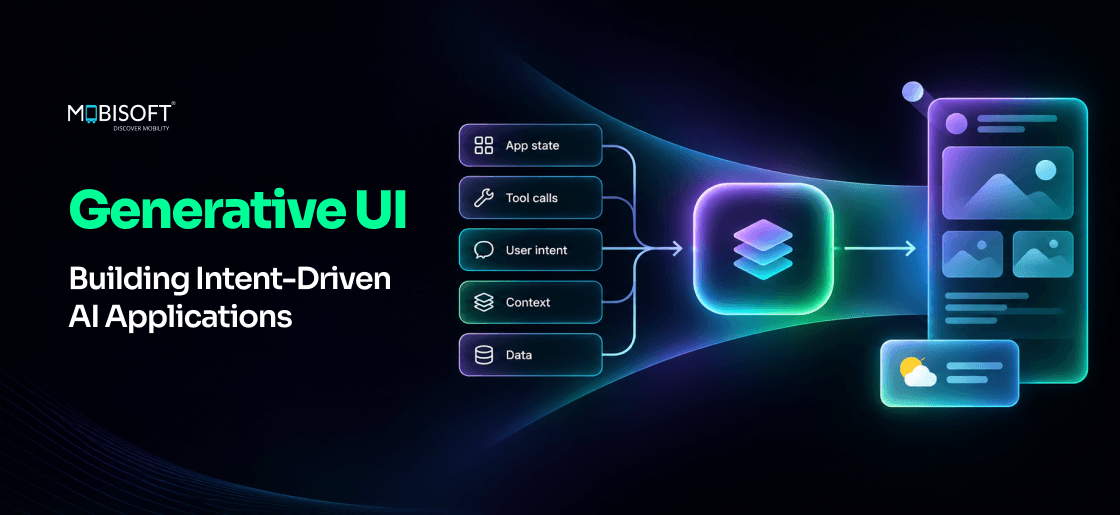
With this approach, an LLM chooses what the user sees next. It decides the screen as well as the words. Ask about flights, and you'll get a fare card you can tap. A sales question might return a chart with a date filter. The model picks the interface. Your application renders it.
How It Differs From a Chat Window
A chatbot answers in text, so users read, compare, and retype. Say a sales manager types, "Which deals slipped this quarter?" A text reply lists twelve names and amounts. An AI-generated UI returns a sorted and more role-specific data table instead. Each row carries a button to email the deal owner. The data hasn't changed, yet the second answer can save several follow-up prompts.
Google Research published its own approach in November 2025. It now runs in the Gemini app's dynamic view. Google Search's AI Mode uses it too. Human raters in Google's tests strongly preferred these interfaces to standard text output. There's one caveat in that result, and we'll come back to it.
Where Intent-Driven UI Fits
Most product screens are designed around features. An interface built around intent works differently. It starts from the job a user wants done now. The same request can need different screens for different people.
Take "Show me last month's returns." A warehouse lead might need a list by SKU. A finance analyst might want refund totals by channel. A fixed dashboard serves one of them well. A generated screen can serve both. It just has to use parts your team already trusts.
Agentic products need this most. An agent that books or reconciles work has to show its plan first. Our AI agent development services pair each agent action with a component users can review. Nothing runs until they approve it.
What It Doesn't Replace
Should checkout ever change from one visit to the next? We'd say no. Login, payment, and regulated forms work best when every user sees the same screen. Keep those hand-built. A customer who sees the "Pay now" button move between visits may stop trusting it. Generated interfaces help most where requests' intent varies, and menus slow people down.
Three Patterns of Dynamic UI Generation
Not every team needs the model to write interface code. Generated interfaces cover a spectrum. At one end, the model picks a ready-made component. At the other, it produces a whole page. CopilotKit's guidance groups this into three patterns, each trading control for flexibility.
Controlled: The Model Picks a Component
Your team builds a fixed set of components. The model chooses one and fills in its data. A "showFlightOptions" tool, for example, always renders the same fare card. Only the flights change. Design, accessibility, and testing stay with your team. The weak point is coverage. When nothing fits a request, the user just gets plain text.
Declarative: The Model Composes From a Catalog
Here the model returns a structured description of a screen. It might ask for "a card with a date picker and two buttons." The client then maps each element to its own native widget. Google's A2UI protocol works this way. It sends data rather than code. As a result, the agent can't run anything on the client. Version 0.9 of the spec arrived in April 2026.
Open-Ended: The Model Writes the Interface
This is AI interface generation in its fullest form. The model writes markup and script for every response. Ask Google's AI Mode "how RNA polymerase works," and it can build an interactive explainer on the spot. Gemini's dynamic view works like this. MCP Apps sits nearby. Its tools return an HTML interface. The host then shows it inside a sandboxed iframe. Flexibility peaks here. So does the review load, since each screen is brand new.
| Pattern | Who controls layout | Typical standard | Best fit |
| Controlled | Your team | AG-UI, AI SDK tool parts | Repeated tasks |
| Declarative | Shared | A2UI, Open-JSON-UI | Varied requests, many platforms |
| Open-ended | The model | MCP Apps, custom HTML | Internal tools, learning |
Which Pattern Should You Start With?
For most B2B products, we'd start controlled. Move to declarative once the component set settles. Open-ended screens suit internal tools better than customer workflows. Your security team will ask, "Can we trust a screen nobody reviewed?" You'll want an answer ready before launch.
Generative UI Architecture: Four Layers That Do the Work
A working setup has four layers. The model sits in only one. Ordinary engineering covers the rest and decides whether output is safe and correct. These are the disciplines behind any production-grade AI application architecture, plus a renderer.
Layer 1: Intent Interpretation
The first layer works out what the user wants and which context applies. Who's asking? Which screen are they on? What data can they see? A request like "compare these two" means nothing without the current selection. Pass that state to the model directly. Don't make it guess from chat history.
Layer 2: The Component Catalog
This layer lists the components the model may call. Each entry gets a name, a plain description, and a typed schema. Descriptions matter more than teams expect. "Shows one metric over time as a line chart" beats a design-system code name.
We'd recommend a first catalog of eight to twelve components. Tables, charts, cards, and forms usually make the cut. The catalog sets the limits of what your generative UI can show. A bigger one gives the model more ways to choose wrong. Let usage logs justify each addition.
A mature design system gives you a real head start. Our digital product engineering services often begin there. We turn existing components into a catalog that a model can call safely.
Layer 3: The Contract Between Model and Renderer
LLM tool calling links the model to the catalog. Each component becomes a tool, and its inputs travel inside the call. If they're malformed, nothing renders. A chart can't plot "twelve" when it expects the number 12. That risk was real. OpenAI's own evals put an older GPT-4 model below 40 percent on complex schema following.
Strict schemas address this. With structured outputs, the provider constrains the model to your JSON schema. OpenAI launched strict enforcement in August 2024. Anthropic's version became generally available in February 2026.
Schema conformance isn't the same as correctness, though. Picture a chart that matches its schema but plots "refunds" when the user asked for "returns." Validate values on the server too. Check that each ID exists and every date falls in range. Then confirm the user may see that data.
Layer 4: Rendering and State
The renderer turns validated inputs into real components. It's also in charge of what happens next. Say a user edits a form that the model created a moment ago. That edit should flow back as state. Sending it as a fresh chat message loses context. AG-UI handles this with an event stream between agent and frontend. Without a state model, edits can vanish on the next turn.

Which Generative UI Framework Should You Use?
You don't need to build the plumbing yourself. A good framework handles streaming, tool rendering, and state sync. The right one depends on your frontend stack. It also depends on how much freedom the model gets.
| Option | What it handles | Pattern | Notes |
| Vercel AI SDK UI | Streaming, typed tool parts | Controlled | React, Vue, Svelte, Solid |
| CopilotKit with AG-UI | Agent events, shared state | All three | React and Angular clients |
| A2UI | Declarative UI spec | Declarative | Apache 2.0 licence |
| MCP Apps | UI from MCP tool servers | Open-ended | Sandboxed iframes |
Building in React With the AI SDK
For React teams, the AI SDK is a common starting point. Its useChat hook returns each message as a list of typed parts. A tool named displayWeather arrives as a "tool-displayWeather" part. Your code maps that part to a component. Each part reports its state too. That way, a skeleton can show while inputs are still streaming.
Here's one caution. The SDK's older RSC package, built around streamUI, is still marked experimental. For React generative UI in production, Vercel recommends AI SDK UI. If a tutorial opens with streamUI, check its date.
When a Protocol Matters More Than a Library
Your mobile lead may ask, "Can the agent's screens render natively on iOS?" If so, a protocol like A2UI or AG-UI earns its keep. The agent's output then stays free of any one client's code. MCP Apps plays a similar role across AI hosts. It became the first official MCP extension in January 2026. Claude, ChatGPT, and VS Code support it today. Shipping a single React app? A library alone is usually enough.
Guardrails for LLM-Powered User Interfaces
Generated screens fail in ways static ones don't. A layout can change between visits. A field can appear that no designer approved. Four guardrails cover most of the risk.
Treat Model Output as Untrusted Input
OWASP's 2025 Top 10 for LLM applications covers this. It lists improper output handling as a major risk. For interfaces, that means never injecting model-written HTML straight into a page. Render from your catalog instead. Any generated markup belongs in an isolated iframe. Actions carry even more risk. A generated "Approve refund" button needs the same server-side permission check as a hand-built one.
Keep Layouts Stable for Accessibility
WCAG 2.2 has no criterion for streamed content. Its existing rules still apply, though. Status updates must reach screen readers through an aria-live region. That region has to be in the page before any content arrives. Imagine filling in "Delivery date" while the fields reorder around you. We'd stream data into a fixed layout and keep the layout itself still. For products sold in the EU, the European Accessibility Act has applied since June 2025.
Hold the Design System Line
Users notice when a button looks different every time. Consistency is what makes generative UI feel like part of your product. Limit styling to your design tokens. Let the model choose components and content but never colours or spacing. A request like "make it pop" belongs in a design review. It has no place in a prompt.
Plan for Latency
Remember the caveat in Google's result? Raters preferred generated interfaces when generation speed was set aside. Live products can't do that. Text starts streaming almost at once, while a generated screen often waits for the whole tool call. Users won't sit long watching "Loading your view..." on screen. Show a skeleton of the chosen component as soon as its name arrives. For common requests, cache the component choice and fetch only fresh data.
How Do You Know an AI-Generated UI Is Working?
Engagement alone doesn't prove much. A novel screen gets clicks in week one. It'll get them whether it helps or not, which tells you little. What you want to know is simpler. Did the task get done faster, with fewer errors?
We'd track these five numbers from day one:
- Task completion: the share of sessions where users finish without retyping the request.
- Follow-up prompts: prompts needed per task, compared with a text-only baseline.
- Fallback rate: how often no component fit and the system returned text.
- Validation failures: tool calls your server rejected, listed by component.
- Time to first render: the wait before the first component appears, at the 95th percentile.
Suppose the fallback rate sits at 30 percent for one team's requests. That usually points to the catalog. The model's probably doing its job. Read the logs, find the recurring request, and design a component for it. A generated interface improves mostly through its catalog. Prompt tweaks tend to help less.
A Rollout Path for Generative UI Development
It's safest to roll this out in small, measured steps. This sequence keeps risk contained while your team learns.
Step 1: Pick One High-Variance Workflow
Look for a screen users keep bending to their needs. Frequent spreadsheet exports are a strong clue. So are tickets asking, "Can I get a report that shows this?" Choose one such workflow. A whole product is too much for a first release.
Step 2: Build the Catalog Before the Prompt
Design and test each of your generative UI components with fixed data first. It has to render correctly and pass an accessibility check. Code review comes next. Ask your QA lead, "What does this card show with zero rows?" Only then should a model be allowed to call it. We'd treat an untested component like an unreviewed API.
Step 3: Ship Behind a Text Fallback
Every generated response needs a plain-text version. Say validation fails on a chart at 9 am on a Monday. The user still gets the numbers as text. MCP Apps builds this in. When a host can't display the interface, it falls back to text. That's what makes dynamic UI generation safe to ship early.
Step 4: Review the Logs Every Week
Which requests fell back to text this week? Which tool calls failed validation? Add components where the same request keeps coming back. Retire the ones the model rarely picks. Requests like "same as last week, but for Germany" often point to the next component worth building. Expand to a second workflow only once the first one's numbers hold steady.
Build In-House or Work With a Partner?
This work touches frontend, backend, security, and model behaviour at once. Some teams can handle generative AI application development alone. They usually have a strong design system and an AI platform group. Others struggle where the pieces meet. State sync and permission checks on generated actions are common trouble spots.
Three questions help here. Does your team own a documented component library? Can your backend check every tool call against user permissions? Is someone accountable for model evaluation after launch? If any answer is no, outside help can shorten the first release. It's cheaper to fix a contract before launch than after.
At Mobisoft Infotech, we start with one workflow and agreed success measures. From there, we build component catalogs, schema contracts, and agent integrations. Our generative AI development services also set up the evaluation loop that keeps those parts improving.
Start With the Screen Users Keep Rebuilding
A generated screen is only as good as the parts the model can choose from. The rules for using them matter just as much. Teams often spend weeks comparing models, yet the catalog and the contract decide far more of what users see.
Three steps can start this month:
- Pull last quarter's support tickets and export logs. Find the one report users keep rebuilding by hand.
- Draft the components that the request would need. Give each a typed schema and a plain description.
- List every action your LLM-powered user interfaces could trigger. Mark which ones need a server-side permission check.
Then run that first workflow behind a text fallback for a few weeks. Compare task completion with the current screen. If the generated version doesn't win on that number, fix the catalog before touching the model. A clear result on one workflow is what earns generative UI the budget for its next one.

Frequently Asked Questions
Will generative UI make our product feel inconsistent?
Only if the model controls styling. Lock colours and spacing to your design tokens. The model then chooses components and content, and you test each one before launch. That's what makes generative UI feel like part of your product.
Can a generated screen let our users do something forbidden?
Not if the server decides & guardrails are in place. A generated "Approve refund" button gets the same server-side permission check as a hand-built one. The model only requests the action. Your backend confirms the user's rights first, which keeps LLM-powered user interfaces safe.
How would Mobisoft Infotech scope our first release?
We'd start with one workflow users keep rebuilding by hand. Success measures get agreed before any build begins. After launch, we review fallback logs weekly as part of our generative AI development services. Missing components get added from those logs.
Will generated screens feel slower to our users?
Often, at first. Text streams at once, while a screen waits for the whole tool call. Show a skeleton of the chosen component the moment its name arrives. Caching the choice for common requests tames dynamic UI generation latency.
We have no design system. Can we still start?
Yes, but build the parts first. Create eight to twelve components, each with a typed schema and plain description. Test each one with fixed data first, including the zero-rows case. Don't let a model call these generative UI components before then.
What if the model picks the wrong component for us?
Server checks reject bad values, like an ID that doesn't exist. The user then gets the same numbers as plain text. Watch how often that happens. A fallback rate near 30 percent means your catalog is missing a component.
This content is for informational purposes only and may include AI-assisted research or content generation. While we strive for accuracy, information may evolve over time. Readers are advised to independently verify critical information before making decisions.

Nitin Lahoti
Read more
Nitin Lahoti is the Co-Founder and Director at Mobisoft Infotech. He has 15 years of experience in Design, Business Development and Startups. His expertise is in Product Ideation, UX/UI design, Startup consulting and mentoring. He prefers business readings and loves traveling.
 Nitin Lahoti
 November 18, 2026