Executive Summary
Event shuttle operations fail for one reason more than any other. Not because there are too few vehicles on the ground, but because the ones already there are not being used well enough.
A shuttle sitting idle at a low-demand zone while a queue builds three zones away is a dispatch problem. The vehicle exists, and so does the demand. What is missing is the visibility and the protocol to connect the two in real time through effective event shuttle management.
This playbook is written for dispatchers and operations leads who manage event shuttle operations and want to close that gap without increasing fleet size or budget.
It covers five specific dispatch levers that reduce wait times using the existing fleet, a pre-event transportation planning that maps demand before the first vehicle moves, real-time protocols for the four highest-risk moments in an event day, and a post-event review structure that makes each successive event easier to manage than the last.
By the end of this playbook, any dispatcher or ops lead should be able to walk into their next event with a clearer plan, sharper redeployment instincts, and a structured approach on how to reduce shuttle wait times at events before passengers even notice them building. Discover how our event shuttle management software gives dispatchers real-time control to reduce wait times and streamline operations.
Why Event Shuttles Fail Before the Day Even Starts?
Most event shuttle problems are diagnosed on event day. The queue builds, the radio crackles, and the dispatcher starts making calls. But the failure rarely starts on event day. It starts in the planning room, days or weeks before the first vehicle moves, during early event logistics management discussions.
Schedules Built on the Wrong Assumptions
The most common planning mistake is building a shuttle schedule around attendee count rather than attendee behavior. Knowing that 8,000 people are registered tells you very little about when they will move, from where, and in what volume.
A schedule that does not account for session end times, hotel cluster distances, and peak egress windows is simply a guess with vehicles attached. Many operations teams rely on event transportation scheduling software to better align schedules with expected movement patterns.
When the schedule does not reflect how attendees actually move through the event day, the dispatcher spends the event day reacting to entirely predictable surges.
Fixed Routes Applied to a Dynamic Crowd
Attendees do not move on fixed schedules. Sessions could run long, or keynotes might end early. Registration queues back up and delay the morning arrival flow. A rigid timetable that cannot absorb these variations creates wait time problems the moment reality diverges from the plan, which it always does.
The dispatcher working from a fixed route schedule with no redeployment authority is managing a plan that stopped being accurate before the day started.
No Pre-Mapped Demand Curve
When the dispatcher has no advanced picture of when and where demand will spike, managing transportation for large events becomes difficult.
But it is not. A 2,000-person session ending at 11:15 am will generate a predictable surge at the adjacent pickup zone between 11:20 am and 11:40 am. That is not a crisis, but a scheduled event that the dispatch plan should already account for.
Better preparation and planned event transportation operations allow dispatch teams to prepare for these spikes before they occur.
The absence of a demand map means the dispatcher has no basis for acting on them before they arrive.
Communication Lag Between the Zone and the Desk
By the time a zone supervisor radios in a building queue, the queue is already there. If the dispatcher receives that information 5 minutes after the condition develops, the response vehicle arrives 10 minutes after that. The passenger has now been waiting 15 minutes for a problem that started as a manageable 3-minute delay.
Using real time shuttle tracking for events can significantly reduce this lag by giving dispatch teams instant visibility into vehicle positions and developing queues.
Unstructured communication between field supervisors and the dispatch desk consistently turns small problems into visible service failures.
The Core Argument
More vehicles do not fix any of these problems. Better planning, better visibility, and better protocols do. That is what the rest of this playbook covers.
Reading the Event Schedule Like a Demand Map
The programme is not just an agenda. For a dispatcher, it is the closest thing to a demand forecast that exists before event day. Every beginning session, ending keynote, and every lunch break is a transport event with a predictable passenger volume and a predictable pickup zone. The dispatcher who reads the schedule that way enters event day with a plan. The one who does not enter the event day with a timetable. This approach is a fundamental step in event transportation planning.
Identifying Peak Demand Windows
Start by pulling the full schedule and marking every moment where large volumes of attendees will move simultaneously. These are the high-risk windows that the dispatch plan needs to explicitly account for.
The four factors that consistently generate the highest demand spikes at events are:
- The morning arrival rush covers the first 90 minutes after the venue opens, when hotel shuttle demand peaks across multiple pickup zones at once.
- Post-keynote egress produces the highest single-point demand surge of the day, concentrated at one or two zones in the minutes immediately after a large-format session ends.
- Lunch break dispersal spreads attendees across several zones simultaneously, as guests head to hotels, restaurants, and offsite venues at the same time.
- The end-of-day departure surge is the most sustained high-demand window of the event day, building progressively as sessions conclude and airport transfer demand rises in parallel.
Each of these windows has a different demand profile and requires a different dispatch response. Treating them as one generic busy period is how dispatchers get caught underprepared at each one. Effective event shuttle management relies on anticipating these distinct peaks.
Mapping Session Capacities to Pickup Zones
Once the peak windows are identified, map each major session to its nearest pickup zone and estimate the egress volume. A 2,000-person keynote ending at the north hall generates a predictable surge at Zone A for approximately 8 to 12 minutes after the session ends. That window is the dispatcher's preparation time, not their response time.
Key mapping steps to complete before event day:
- List every session with an attendance above 500 people and note its scheduled end time.
- Identify the nearest pickup zone for each session hall.
- Estimate the share of attendees likely to use shuttle transport based on hotel distance and available alternatives.
- Mark the 8 to 15-minute post-session window as the active surge period for that zone.
This mapping is a critical input for shuttle fleet management and ensures vehicles are positioned effectively.
Finding Stagger Opportunities
Not every moment in a schedule creates a surge. Back-to-back sessions ending in different halls at slightly different times distribute demand naturally across zones. The dispatcher who identifies these stagger opportunities in advance can use them to smooth vehicle deployment rather than concentrating resources on one zone at the expense of others.
Look specifically for:
- Sessions that are ending 10 to 15 minutes apart across different halls, which allow the same vehicle to serve two sequential surges on a single loop.
- Low-attendance breakout sessions that run concurrently with high-attendance keynotes, creating a natural demand offset between zones.
- Scheduled networking or exhibition periods that flatten movement patterns and create a window for repositioning reserve vehicles.
This helps improve overall event transportation management efficiency without adding vehicles.
The Demand Map Output
Everything above feeds into a single working document that the dispatcher uses on event day. It does not need to be complex. A one-page timeline is enough. It should show expected passenger volume at each zone across the full event day, with peak windows marked and reserve vehicle pre-positioning notes attached.
This document is reviewed at the morning briefing, updated if the schedule changes on event day, and kept visible at the dispatch desk throughout the event. It is the difference between a dispatcher who anticipates the next surge and one who discovers it. Incorporating shuttle dispatch software can make this document live and actionable in real time. Learn advanced strategies for event transportation planning for large events to map demand and optimize shuttle deployment at enterpise scale.
The Five Dispatch Levers That Cut Wait Times Without Adding Vehicles
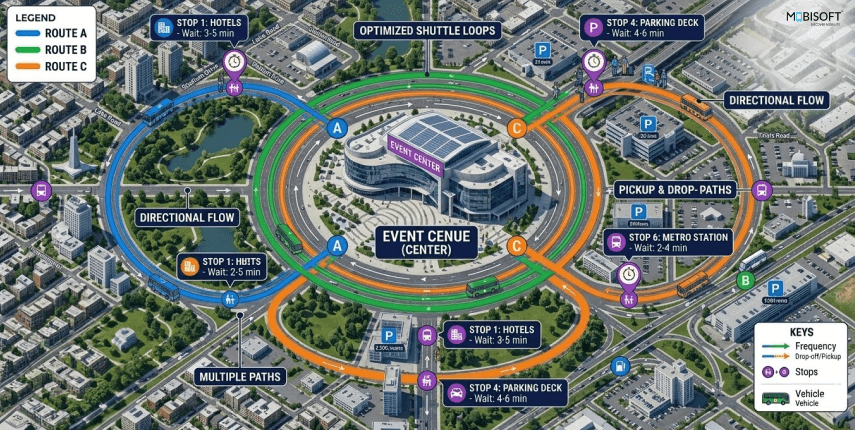
Every dispatcher working the event shuttle operation has more control over wait times. The fleet is fixed, and the schedule is set. But within those constraints, five specific levers directly reduce wait times using the vehicles already on the ground. All that is required is visibility, preparation, and the willingness to act before a situation becomes a queue.
Lever 1: Headway Compression During Peak Windows
Headway is the time interval between consecutive shuttles on the same route. A route running on a 20-minute headway serves each pickup zone three times per hour. Compressing that headway to 10 minutes during a peak window doubles service frequency without a single additional vehicle.
The mechanism is straightforward. During a peak demand window identified on the demand map, the dispatcher temporarily pulls one vehicle from a low-utilization route and adds it to the high-demand route. Service frequency increases in the congested zone. The low-demand route runs at a slightly reduced frequency for the duration of the surge, which passengers on that route experience as a minor inconvenience rather than a service failure.
To execute this cleanly:
- Identify the two highest-demand routes for each peak window from the demand map before event day.
- Pre-calculate the headway compression needed to bring wait times within the 8-minute target.
- Confirm which low-demand routes can absorb a temporary vehicle reduction without creating secondary queue problems.
- Set the rebalancing trigger so vehicles return to their original routes once the peak window closes.
This lever is a cornerstone of shuttle management software strategy.
Lever 2: Dynamic Zone Redeployment
When a zone supervisor reports a building queue, the dispatcher has a narrow window to act before the situation becomes visible to passengers as a service failure. Dynamic redeployment means moving a vehicle from a low-demand zone to a high-demand one in real time, before the queue hits the threshold where passengers start to complain.
This lever only works with two things in place: a live view of all vehicle positions and utilization rates, and a pre-defined redeployment threshold that removes the judgment call from the decision.
A workable threshold for most event transportation operations:
- Queue depth exceeding 40 passengers at any zone triggers an immediate redeployment assessment.
- If a vehicle within 5 minutes of the affected zone is running below 50 percent utilization, it is reassigned.
- The reassignment instruction goes through the platform app instead of a phone call, and the driver confirms receipt within 60 seconds.
Without live vehicle visibility, this lever does not exist. The dispatcher is guessing at positions and utilization rates, which means redeployment decisions arrive too late to prevent the queue from building.
Lever 3: Staging Optimization
Where reserve vehicles wait between runs determines how fast they can respond when a redeployment is triggered. A vehicle staged at a terminal stop on the far side of the venue takes 12 minutes to reach a congested zone near the main entrance. The same vehicle staged at a central holding point takes 4 minutes.
Pre-event staging decisions directly affect response times on event day and are a critical part of shuttle fleet management:
- Identify a central holding zone within the venue footprint where reserve vehicles stage between runs.
- Ensure the holding zone is accessible to all active pickup zones without requiring vehicles to navigate through pedestrian-heavy areas.
- Avoid staging reserve vehicles at terminal stops where they become absorbed into fixed route operations and lose their availability as a flexible resource.
- Brief all reserve vehicle drivers on the holding zone location and the redeployment protocol before the event opens.
Lever 4: Passenger Communication as a Load Management Tool
This lever is underused because it doesn't seem to be a dispatch decision, even though it is. Passengers who know a shuttle is 6 minutes away stay at the pickup zone and queue in an organized way. Passengers with no information start moving, asking zone supervisors questions, and creating secondary crowd pressure that slows loading times and extends the effective wait even when a vehicle is close.
Real-time ETA communication at pickup zones does three things for the dispatcher and improves event transportation management:
- Keeps passengers stationary and organized in the zone, which reduces loading time when the vehicle arrives.
- Reduces the volume of questions in the zone supervisors' field, freeing them to focus on crowd flow management and check-in reporting.
- Lowers the perceived wait time, which affects satisfaction scores independently of the actual wait duration.
The practical implementation is straightforward. QR codes posted at each pickup zone link to a live ETA display that pulls directly from the shuttle dispatch software. No app download or manual updates are required from the dispatcher. The display updates automatically as the vehicle moves.
Lever 5: Split Routing During Surge Windows
A shuttle running a full 20-minute loop serves a congested zone once every 20 minutes. During a post-keynote surge, that frequency is not enough to prevent a queue from building. Split routing temporarily divides a long route into two shorter loops, each covering half the original circuit.
The result is that the congested zone receives a vehicle every 10 minutes instead of every 20, effectively doubling service frequency for the duration of the surge without adding a vehicle to the fleet.
Conditions where split routing works well:
- Routes with a clearly identifiable high-demand zone at one end and a lower-demand zone at the other.
- Surge windows with a defined end point, such as post-keynote egress, where the split can be reversed once demand normalizes.
- Operations where drivers have been briefed on split route protocols before event day and can execute the shorter loop without real-time navigation support.
Conditions where it does not work:
- Routes where both ends generate comparable demand, as splitting creates an underserved zone rather than solving one.
- Venues where the route cannot be cleanly divided due to road layout or access restrictions.
- Operations where the driver app does not support real-time route updates, as drivers will need to be briefed verbally, which introduces delay and the risk of miscommunication.
Using these techniques in combination improves event shuttle management and ensures maximum efficiency during high-demand periods.
Using the Five Levers Together
These levers are most effective when they are used in combination rather than in isolation. A post-keynote surge, for example, might call for headway compression on the keynote hall route, a staging redeployment from the central holding zone, and a passenger communication push to the affected zone simultaneously. Each lever addresses a different dimension of the same problem. Together, they resolve the surge faster and with less visible impact on passengers than any single lever used alone.
Pre-Event Dispatch Planning Checklist
The difference between a dispatcher who manages an event smoothly and one who spends the day firefighting is almost always traceable to what happened before event day. The protocols, the demand map, the staging plan, and the communication setup all need to be in place before the first vehicle moves. This checklist ensures robust event transportation operations.
48 Hours Before the Event
This is the strategic preparation window when the dispatcher is not yet in execution mode. This is the time to build the plan, identify the risks, and make the decisions that will remove judgment calls from event day.
- Review the full schedule and complete the demand map, marking all peak windows, session capacities, and corresponding pickup zones.
- Identify surge vulnerability windows where simultaneous session ends across multiple halls create concurrent zone demand.
- Set headway compression plans for each peak window, confirming which routes will increase frequency and which will temporarily reduce.
- Define redeployment thresholds for each zone, specifically the queue depth or wait time that triggers a vehicle reassignment.
- Confirm reserve vehicle count and identify the central staging position within the venue footprint.
- Review hotel cluster distances and confirm route assignments reflect actual travel times, instead of estimated ones.
- Confirm airport transfer schedules are loaded into the dispatch system and linked to flight timing buffers.
24 Hours Before the Event
This is the coordination window where the plan is already built. Now it needs to be communicated to everyone who will execute it.
- Brief zone supervisors on their check-in protocol, reporting cadence, and the specific conditions they need to flag immediately, rather than at the next scheduled check-in.
- Confirm all driver app assignments are loaded, route overlays are active, and every driver can access their zone assignment and navigation without assistance.
- Walk all pickup and drop-off zones physically to confirm signage placement, loading positions, and pedestrian flow paths align with the staging plan.
- Test passenger-facing communication tools, confirming QR codes at pickup zones link correctly to live ETA displays from transportation dispatch software.
- Confirm the dispatch dashboard is configured with the alert thresholds defined during the 48-hour preparation window.
- Share the demand map with the Transport Operations Lead and confirm alignment on surge response protocols.
Morning of the Event
This is the activation window. Everything that was planned now gets confirmed as live and operational before the venue opens.
- Open the dispatch dashboard and confirm live GPS feeds are active for every vehicle in the fleet.
- Run a final demand map review against any last-minute schedule changes issued by the organizer.
- Conduct the full team briefing covering zone assignments, surge protocols, redeployment thresholds, and communication channels.
- Confirm every reserve vehicle is in its designated staging position and the driver is connected to the platform.
- Activate passenger-facing ETA displays at all pickup zones before the venue opens to attendees.
- Confirm the escalation matrix is understood by every member of the command centre team.
One Thing Most Dispatchers Skip
The physical zone walkthrough at the 24-hour mark is the step that gets dropped most often when time is tight, but it shouldn't be. A staging plan that looks clean on paper can have real problems on the ground, including blocked loading bays, poorly positioned signage, or pedestrian flow paths that funnel crowds away from the designated queue area. Finding these issues 24 hours before the event means fixing them before they affect passengers, improving readiness in shuttle fleet management.
Real-Time Dispatch Protocols for the Four High-Risk Moments
Every event day has predictable high-risk windows. The demand map identifies when they are coming. Each protocol is built around a specific demand profile and a specific set of dispatcher actions. Using these protocols with real time shuttle tracking for events ensures swift and coordinated responses.
Moment 1: Morning Arrival Rush
The morning arrival rush is the first test of the dispatch plan. It runs from venue open for approximately 90 minutes and concentrates the highest arrival volume across the fewest pickup zones. The biggest challenge here is the uneven distribution of that volume across hotel clusters at different distances from the venue.
Hotels close to the venue generate smaller, more frequent loads. Hotels further away generate larger, less frequent loads that arrive in concentrated bursts when the shuttle completes its longer loop. A dispatcher treating all hotel routes equally during this window will consistently underserve the distant hotel clusters while over-serving the nearby ones.
Protocol for the morning arrival rush:
- Deploy maximum frequency on routes serving hotels beyond a 15-minute travel radius from the venue.
- Reduce headway on short-haul hotel routes and reallocate those vehicles to distant hotel routes for the first 90 minutes.
- Monitor zone supervisor reports at 15-minute intervals for any unexpected queue build-up at secondary zones.
- Rebalance vehicle allocation at the 90-minute mark when arrival volume begins to flatten across all zones.
- Keep one reserve vehicle in active standby rather than route assignment for the full duration of the arrival window.
Moment 2: Post-Keynote Egress
Post-keynote egress is the highest single-point demand spike on an event day. Thousands of attendees leave one hall simultaneously and converge on one or two pickup zones within a narrow time window. The dispatcher who waits for the queue to form before responding has already lost the window to prevent it.
The entire protocol for this moment runs before the session ends, not after.
- Pre-position two reserve vehicles at the keynote hall zone 15 minutes before the scheduled session end.
- Compress headway on the keynote hall route to maximum frequency starting 10 minutes before the end of the session.
- Push a passenger notification to all registered attendees with the updated shuttle dispatch software before the session closes.
- Assign the zone supervisor at the keynote hall zone a 5-minute check-in cadence for the 25-minute post-session window.
- Begin reverting to standard headway 25 minutes after session end, once the zone supervisor confirms the queue depth is normalizing.
The pre-positioning step is the most important one. A vehicle already at the zone when the crowd arrives absorbs the first wave of demand before a queue forms. A vehicle dispatched in response to the crowd arrives in an already pressured zone. This is a core principle of effective event shuttle management.
Moment 3: Lunch Break Dispersal
Unlike post-keynote egress, lunch break movements are multi-directional. Attendees move to hotels, restaurants, and offsite venues at the same time, creating demand across multiple zones simultaneously rather than a concentrated surge at one point. The dispatcher managing this moment is not dealing with one large problem. They are dealing with several smaller ones at the same time.
Protocol for lunch break dispersal:
- Activate split routing on the two highest-demand routes for the 30-minute peak lunch window.
- Reduce headway on short-haul hotel routes where lunch traffic is lighter and reallocate to mixed-destination zones.
- Hold one reserve vehicle on active standby for rapid redeployment to any zone where the queue depth exceeds the redeployment threshold, using shuttle fleet management insights.
- Monitor all zone supervisor reports simultaneously during this window rather than sequentially, as conditions can change across multiple zones at once.
- Begin restoring standard routing 30 minutes into the lunch window as multi-directional demand starts to flatten.
The lunch window also serves a secondary purpose for the dispatcher. It is the clearest opportunity during the event day to reposition reserve vehicles and reset staging ahead of the afternoon session schedule. A dispatcher who uses the lunch window reactively misses the preparation window for the post-afternoon surge.
Moment 4: End-of-Day Departure Surge
The end-of-day surge is the most sustained high-demand window of the event day. It does not resolve in 25 minutes the way post-keynote egress does. It builds progressively as sessions end across multiple halls, attendees check out of the venue, and airport transfer demand increases simultaneously. A dispatcher who applies the same protocol used for post-keynote egress to the end-of-day surge will find it insufficient within the first 20 minutes.
This moment requires the most preparation and the longest active management window of any protocol in the playbook.
Protocol for end-of-day departure surge:
- Begin headway compression 20 minutes before the last scheduled session ends.
- Activate all airport transfer vehicles from their staging positions and confirm flight-linked timing buffers are loaded in the event transportation software.
- Assign a dedicated zone supervisor to the main departure zone with a 5-minute check-in cadence from the point of headway compression.
- Move all reserve vehicles from terminal staging to active standby positions within the venue footprint.
- Maintain surge protocols until the zone supervisor confirms the queue depth has dropped below the redeployment threshold at all active zones.
- Close the dispatch window only after the last airport transfer vehicle has confirmed passenger drop-off and returned to base.
The end-of-day surge is also where multi-modal coordination becomes most critical. Event transportation management requires managing shuttle buses, dedicated guest vehicles, and airport transfer vehicles simultaneously. The dispatcher managing all three modes from a single dashboard has a materially different level of control than one working across separate systems or phone calls. For insights on optimizing event transportation logistics across multiple zones and peak windows, see our detailed guide.
The Dispatcher's Dashboard: What to Watch and When to Act
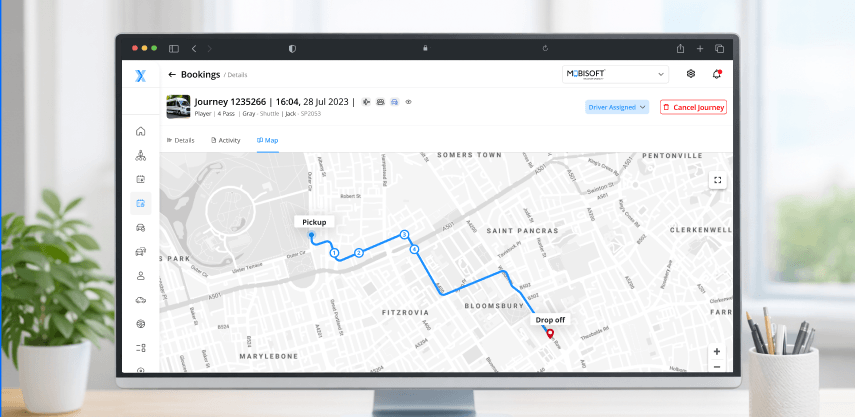
A dispatch dashboard is only useful if the dispatcher knows what to look for and what to do when they see it. A screen full of data that no one has been trained to read under pressure becomes a distraction in event shuttle management. This section covers the four data points that matter most during an operation, the alert thresholds that should be configured before event day, and the difference between a dispatcher who monitors and one who manages.
The Four Data Points That Matter Most
Not everything on a dispatch dashboard requires equal attention. During a live event operation, the dispatcher needs to maintain focus on four core data points above everything else.
Vehicle Position and Status
Every active vehicle should be visible on the dashboard with its current GPS position and operational status: en route, loading, idle, or offline. This is the foundational data point. Every redeployment decision, every headway compression call, and every staging adjustment starts here. Without real time shuttle tracking for events, these protocols cannot be executed effectively.
Zone Queue Depth
Reported by zone supervisors on their scheduled check-in cadence, queue depth is the ground-level data point that tells the dispatcher what the vehicle position data cannot. A vehicle showing as en route to Zone B looks fine on the dashboard. A zone supervisor reporting 60 passengers already waiting at Zone B tells the dispatcher that en route is not fast enough and a redeployment is needed now.
Route Utilization Rate
Check which routes are running near capacity, and which have headroom. This data point is what makes headway compression and dynamic redeployment possible. Without a live utilization picture across all active routes, the dispatcher cannot identify which route to pull a vehicle from. Without this data, it creates a secondary problem at the route they are pulling from.
ETA Variance
The gap between a vehicle's scheduled arrival time at a stop and its actual projected arrival time based on live GPS data. ETA variance is the earliest warning signal available to the dispatcher. A vehicle running 4 minutes behind schedule is a monitor situation. The same vehicle running 8 minutes behind schedule during a peak window is an action situation.
Alert Thresholds to Configure Before Event Day
Pre-configured alerts remove the need for the dispatcher to watch every data point simultaneously. The platform flags the conditions that require attention, and the dispatcher responds. These thresholds should be set during the pre-event setup window, instead of adjusting on the event day under pressure.
Recommended alert thresholds for event shuttle operations:
- ETA variance beyond 5 minutes: triggers driver contact and zone supervisor notification at the affected stop.
- Zone queue depth beyond 40 passengers: triggers a redeployment assessment using live route utilization data
- Vehicle idle time beyond 10 minutes past the scheduled window: triggers a status check with the driver through the platform app
- Route utilization below 30 percent during a peak window: flags the vehicle as a redeployment candidate
- Any vehicle SOS alert: triggers immediate ops lead notification and reserve vehicle deployment simultaneously
These thresholds are starting points. The dispatcher should adjust them based on venue size, fleet composition, and the demand map before each event. A threshold that works at a 5,000-person event may not be appropriate at a 15,000-person one.
Monitoring Versus Managing
This is the most important distinction in the section. A dispatcher who watches the dashboard and waits for alerts to fire is merely monitoring the operation. A dispatcher who reads the dashboard proactively, cross-references vehicle positions with zone queue reports and the demand map, and makes redeployment decisions before alert thresholds are crossed is doing effective event shuttle management.
The difference shows up in wait times. A monitoring posture means the dispatcher responds after the queue has already formed. A managing posture means the dispatcher acts during the window between the queue starting to build and it becoming visible to passengers.
The protocols in Sections 3 and 5 are built for the managing posture. They assume a dispatcher who is reading the demand map, watching ETA variance trends, and cross-referencing zone reports rather than waiting for an alert to tell them something has already gone wrong.
A few practical habits that support the managing posture:
- Review the demand map at the start of each event phase, not just at the morning briefing.
- Cross-reference zone supervisor reports with vehicle position data every 15 minutes during peak windows for real time shuttle tracking for events.
- Flag any ETA variance trend that is moving in the wrong direction before it crosses the alert threshold.
- Use the route utilization data from transportation dispatch software to identify redeployment candidates proactively rather than reactively.
A Note on Platform Selection
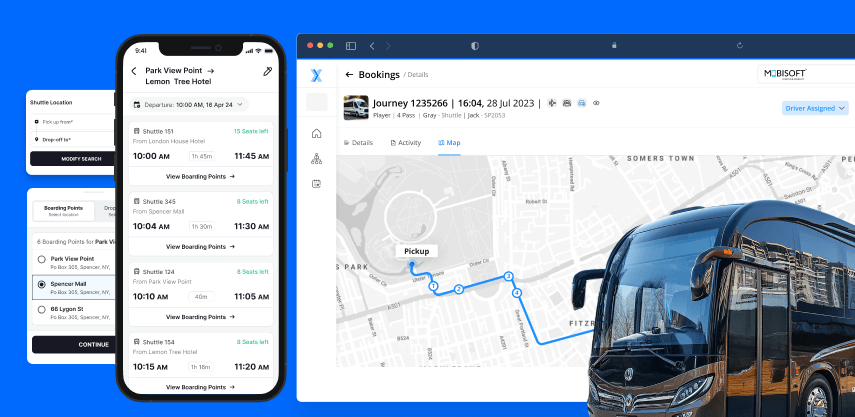
The managing posture described above is only possible when the dispatch platform provides live, accurate data across all four core data points simultaneously. A platform that updates vehicle positions every 3 minutes relies on manual zone queue entry. If it doesn't support configurable alert thresholds, it forces the dispatcher into a monitoring posture regardless of how well-prepared they are.
For dispatchers evaluating platforms, the right question is straightforward. Does this platform give me the information I need to act before the queue forms, or does it tell me what already happened in event transportation operations? Choosing the right transportation management system ensures dispatchers act proactively rather than reactively during critical event moments.
Communication Protocols That Reduce Wait Times Indirectly
Wait time is partly a logistics problem and partly an information problem. A dispatcher can execute every redeployment correctly and still face avoidable queue pressure if the communication structure around the operation is loose. Unstructured communication between the dispatch desk, zone supervisors, drivers, and passengers creates delays, misunderstandings, and secondary crowd management problems that add to wait times without any vehicle being in the wrong place during event transportation operations.
The protocols in this section do not replace the dispatch levers covered earlier. They protect them.
Zone Supervisor to Dispatch Communication
The quality of information flowing from zone supervisors to the dispatch desk determines how early the dispatcher can act on developing conditions. A zone supervisor who calls in when something feels wrong gives the dispatcher a crisis. A zone supervisor working from a structured reporting protocol gives the dispatcher a pattern they can act on before the crisis develops.
Every zone supervisor should enter the event day with three things confirmed:
- Their reporting channel: dedicated radio frequency or in-app reporting through the event transportation management platform, not personal phones or general group chats
- Their check-in cadence: every 15 minutes during peak windows, every 30 minutes during low-demand periods, and an immediate flag protocol for conditions that cannot wait for the next scheduled check-in
- Their reporting format: queue depth at the zone, last vehicle arrival time, and any developing condition the dispatcher should know about
The reporting format matters more than most ops teams realize. A zone supervisor who reports "it's getting busy here" gives the dispatcher an impression. One who reports "queue depth at Zone C is 45 passengers, last vehicle departed 11 minutes ago" gives the dispatcher a decision.
Dispatcher to Driver Communication
All dispatch instructions should move through the platform app during active event operations. No phone calls during peak windows, as it pulls the driver's attention from the road. It creates a communication record that cannot be reviewed after the event, and introduces the risk of the instruction being misheard or misunderstood.
Platform-based communication gives the dispatcher three advantages that a phone call does not:
- The instruction is delivered in writing, removing ambiguity about the route change or zone reassignment.
- The platform logs the instruction with a timestamp and confirms driver receipt, creating an auditable record.
- The dispatcher does not lose focus on the dashboard during the time it takes to make and complete a call.
For urgent situations where a driver needs to be reached immediately, the event shuttle management platform should support a priority alert function that flags the message as requiring immediate acknowledgment. This preserves the speed of a phone call without the operational cost.
Passenger-Facing Communication
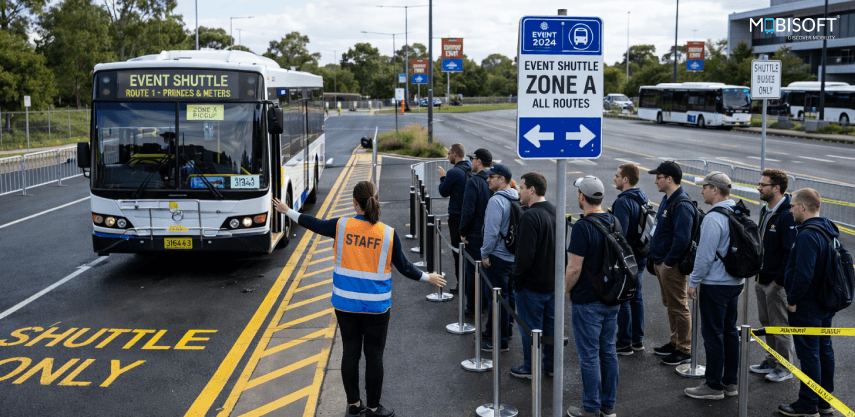
Uninformed passengers are a crowd management problem. When attendees standing at a pickup zone have no information about when their shuttle is arriving, they start moving, asking questions, and spreading across the zone in ways that slow loading when the vehicle does arrive. The dispatcher who treats passenger communication as a customer service feature rather than an operational tool is leaving one of the most effective wait time levers unused.
Passenger communication capabilities that directly affect dispatch operations:
- Real-time ETA displays at every pickup zone, linked to live fleet data and updated automatically as vehicles move, accessible via QR code with no app download required (real time shuttle tracking for events)
- Push notifications for route changes, zone reassignments, or delays are delivered to passengers before they reach the wrong zone.
- Accessibility rider notifications that confirm dedicated vehicle assignments and provide direct driver contact when the vehicle is 5 minutes away.
The ETA display is the highest-impact passenger communication tool available to the dispatcher. It keeps passengers stationary and organized, reduces the volume of questions zone supervisors field during peak windows, and lowers perceived wait time independently of actual wait duration. A passenger who knows their shuttle arrives in 7 minutes experiences that wait differently from one who has been standing at a zone for 7 minutes with no information.
Keeping Communication Channels Clean
One of the fastest ways a command centre loses operational effectiveness is channel bleed, where instructions, updates, and queries start mixing across channels that were designed to carry different types of information. A driver asking a question on the zone supervisor radio channel, a client liaison relaying a VIP request through the dispatch line, or a zone supervisor texting the dispatcher directly instead of using the reporting app. These all create noise and slow response times.
Before event day, every team member needs confirmation on two things:
- Which channel carries which type of communication?
- What is the protocol for situations that fall outside normal parameters?
Clean channels keep the dispatcher focused during event shuttle operations. Cluttered ones pull attention in multiple directions at exactly the moments when focused attention matters most.
Post-Event Dispatch Review: Turning Data Into a Better Next Event
The dispatch review is the step that separates operators who improve event over event from those who repeat the same problems with slightly more experience. It is not an administrative formality, but a process that converts event-day data into a more accurate demand map. It offers sharper redeployment thresholds and cleaner communication protocols for the next event.
The review should happen within 24 hours of the event's closing, while the operational detail is still fresh and the platform data is complete.
What to Pull From the Platform Immediately After Event Close
The dispatch platform holds a complete operational record of the event day. These are the reports to pull first:
- On-time arrival rate by zone and by route across each event phase: arrival, mid-day, post-keynote, and departure.
- Average wait time at each zone during peak windows versus non-peak windows, to identify where the demand map was accurate and where it was not.
- Redeployment log: every vehicle reassignment that was triggered during the event, the response time from trigger to reassignment confirmation, and the outcome at the affected zone.
- ETA variance report: which routes and which windows generated the highest deviation between scheduled and actual arrival times.
- Communication log: every dispatcher-to-driver instruction, zone supervisor check-in, and platform alert that fired during the event day.
- Incident log: every situation that was escalated beyond the dispatcher's authority, with resolution times and outcomes.
Three Questions the Review Must Answer
Raw data without a framework for interpreting it produces observations instead of improvements. The review should be structured around three specific questions that connect the data to decisions about the next event.
The first is whether the demand map was accurate. If actual surge windows arrived earlier or later than the pre-mapped demand curve predicted, or if zones that were not flagged as high-risk generated unexpected queue depth, the map needs to be updated before it is used again. A demand map that reflects actual attendee behavior at a specific venue is significantly more useful than a generic one built on assumptions.
The second is whether redeployment thresholds were set correctly. If the redeployment log shows vehicles were consistently reassigned after queues had already exceeded the threshold, the trigger needs to come down. If vehicles were reassigned from routes that subsequently became underserved, the threshold needs adjustment in the other direction. Either way, the data tells the dispatcher exactly where the calibration was off.
The third is where communication gaps created operational problems. Look specifically for:
- Any dispatcher-to-driver instruction that required a follow-up call to confirm or correct.
- Any zone supervisor report that arrived too late to act on before the condition it described had already developed into a queue.
- Any passenger notification that went out after the situation was communicated had already resolved itself.
- Any alert that fired but did not generate a response within the target window.
Turning the Review Into a Pre-Event Asset
The post-event review is not just a debrief document. It is the starting input for the next event's pre-event planning window. Every finding from the review should translate directly into a specific update to the demand map, the redeployment threshold settings, the communication protocol, or the staging plan.
A dispatcher who enters the next event with a demand map refined by actual data from the previous event at the same venue is working from a materially stronger foundation than one starting from scratch. Over three or four events at the same venue, the demand map becomes precise enough that surge windows can be anticipated to within a few minutes and redeployment decisions can be pre-planned rather than reactive.
That compounding improvement is what the post-event review is building toward. It is not just a better debrief, but a better event transportation operation as well.
The Dispatcher Is the Variable
Fleet size is a procurement decision made weeks before the event. Wait time is a dispatch decision made in real time on event day. These are not the same problem, and have different solutions.
The argument this playbook has built from the first section to this one is straightforward. The vehicles to run a better event shuttle operation are almost always already on the ground. What is missing is the structure to use them correctly:
- A demand map that converts the event schedule into a predictable surge timeline
- Redeployment thresholds that remove judgment calls from time-sensitive decisions
- Communication protocols that keep information flowing cleanly between the zone and the dispatch desk
- A platform that gives the dispatcher live visibility to act on all of it before passengers notice a problem forming
None of that requires a larger fleet. It requires a better-prepared dispatcher working from better tools. Our bus fleet management software ensures every vehicle is optimally deployed during peak demand windows without adding fleet size.
What a Dispatcher Looks Like With This Playbook in Place
The difference between a reactive dispatcher and a prepared one shows up in specific operational moments:
- They review the event transportation demand map at the morning briefing and enter event day knowing exactly when and where the four high-risk windows will hit
- They have redeployment thresholds configured in the platform before the venue opens, so the first surge triggers a protocol rather than a phone call.
- They compress headway on high-demand routes before the queue forms, not after zone supervisors report it.
- They push passenger ETA notifications before post-keynote egress begins, keeping passengers organized at the zone before the crowd arrives.
- They close the event with a complete data record that makes the next event easier to manage than this one.
The Platform Behind the Playbook
Every protocol in this playbook assumes one thing: the dispatcher has access to live vehicle positions, configurable alert thresholds, platform-based driver communication, and real-time passenger-facing ETA tools within a single integrated system.
Without that visibility, the five dispatch levers become manual workarounds. The four high-risk protocols become reactive responses. And the post-event review becomes a conversation about what went wrong rather than a data-driven plan for what to do differently.
Purpose-built event dispatch platforms now make this level of operational capability accessible without enterprise budgets or lengthy implementation timelines. For agencies and operators, a white-label platform means this capability deploys under their own brand for every client engagement. It strengthens their service offering without rebuilding the technology for each event.
The playbook is the structure. The platform makes executing it possible under the pressure of event shuttle operations. The next event is the place to put both to work. Mobisoft's smart event mobility platform integrates live fleet tracking, passenger ETAs, and driver communication for seamless event operations.
Your Fleet Is Already Enough. Let's Prove It.
Most event transportation operations lack visibility and protocol. The dispatchers who consistently deliver short wait times and clean operations are not working with bigger fleets. They are instead working with better tools and sharper pre-event preparation.
Mobisoft's white-label event dispatch platform gives dispatchers and ops teams exactly what this playbook describes.
- Real-time fleet visibility across every active vehicle, route, and zone from a single dashboard.
- Dynamic redeployment tools that move vehicles between zones in under 60 seconds through the platform app.
- Configurable alert thresholds that flag developing situations before they become queues.
- Passenger-facing ETA displays linked directly to live fleet data, accessible via QR code at every pickup zone.
- Driver communication app with turn-by-turn navigation, in-app messaging, and one-button SOS reporting.
- Post-event reporting that captures on-time rates, wait times, utilization, and the complete incident log.
The platform deploys under your own brand. Your clients see your operation, backed by technology built specifically for event transportation management.


Nitin Lahoti
Read more
Nitin Lahoti is the Co-Founder and Director at Mobisoft Infotech. He has 15 years of experience in Design, Business Development and Startups. His expertise is in Product Ideation, UX/UI design, Startup consulting and mentoring. He prefers business readings and loves traveling.
 Nitin Lahoti
 March 13, 2026