Executive Summary
Event transportation management has matured considerably over the past decade. GPS fleet tracking, RFID crowd flow monitoring, and driver SOS systems are no longer considered advanced capabilities. They are standard components of a professionally managed event transportation software. Most ops teams have at least one of them deployed. The problem is not adoption. It is implementation quality.
Installing technology and having it work reliably on event day are two fundamentally different things. A GPS tracking system deployed on a vehicle but configured at default update intervals produces position data that is 30 to 60 seconds old. In an event dispatch environment where redeployment decisions need to be made in under 60 seconds, that data gap is operationally significant. An RFID reader positioned at a venue entrance generates access control data, not transport demand intelligence. An SOS alert routed to a shared inbox that no one is actively monitoring during a high-pressure event moment is functionally useless, regardless of how well the button works.
These are not edge case failures. They are the most common go-live failures in smart transportation solutions, and every one of them is preventable with the right preparation framework applied before event day.
This guide covers GPS and telematics, RFID, and SOS integrations in a consistent structure. For each one, it presents the operational problem the integration solves, the specific technical requirements for a correct implementation, and a practical go-live checklist the ops team can work through before the first vehicle departs. It also covers the dependencies between all three integrations, a consolidated go-live readiness assessment, the eight most common failure points, and a post-event review process that improves each successive deployment.
By the end of this guide, any venue director, operator, or ops manager should be able to assess their current TMS transportation management system setup, identify exactly where the configuration gaps are, and know what needs to be resolved before the next event goes live.
See how a purpose-built event transportation software platform supports GPS, RFID, and SOS integrations within a single dispatch system.
Why Technology Integrations Fail at Events?
Technology deployments in event transportation fail differently from general fleet management software. The difference is not in the hardware or the software. It is in the operational environment that they are deployed.
A general fleet operation runs the same routes at the same times every day. The technology has time to be configured gradually and refined based on weeks of operational data. An event logistics software has one go-live window and one event day. There is no opportunity to discover configuration gaps after the first vehicle departs.
This creates a specific category of failure that does not appear in standard fleet deployments. Five failure patterns account for the vast majority of integration problems at large events.
Hardware Deployed Without Configuration or Connectivity Testing
A vehicle tracking system installed on a vehicle but never connected to the platform produces no data on the event day. A driver app downloaded but never logged in produces no SOS alerts. The hardware is present in both cases, but the integration is not. Physical installation and operational readiness are not the same thing, and treating them as equivalent is where most go-live failures begin.
GPS Update Intervals Left at Default Settings
Most GPS hardware ships with a 30 to 60 second default update interval. That interval is adequate for general fleet operations where positioning precision matters less. For event dispatch, where redeployment decisions need to be made in under 60 seconds, a 30-second update creates a visibility gap that makes real-time vehicle tracking unreliable. This is a configuration change that takes two minutes to make and is frequently never made at all.
RFID Reader Placement Based on Floor Plans Rather Than Crowd Flow Paths
Readers at main entrances generate data that is useful for security. Readers at the session hall exits and corridor intersections generate transport demand data that is useful for dispatch. Treating these placement decisions as interchangeable produces RFID data that is operationally useless for transport management, regardless of how well the hardware is configured.
SOS Alerts Routed to a Shared Inbox
During a high-pressure event, a shared inbox is frequently not monitored at all. An emergency alert system for transportation that arrives there has no guaranteed response time and no named person responsible for acting on it. A driver who activates the SOS emergency button in vehicles and receives no response within the target window is in a situation that has already escalated beyond the first-response threshold.
No End-to-End Integration Testing Between Hardware and Platform
Individual components may function correctly in isolation. But if the API connections between hardware systems and the dispatch platform have not been tested with live data, information may arrive at the platform without populating the dashboard correctly. A technically active connection and a reliably operational vehicle tracking system are not the same thing until a live data test confirms it.
Technology that has not been tested under event conditions is not integrated. It is installed.
That difference shows up when the event is running. If you are evaluating where manual processes are creating risk in your current setup, this breakdown of manual vs automated transport management is a practical starting point.

GPS and Telematics Integration
The Problem
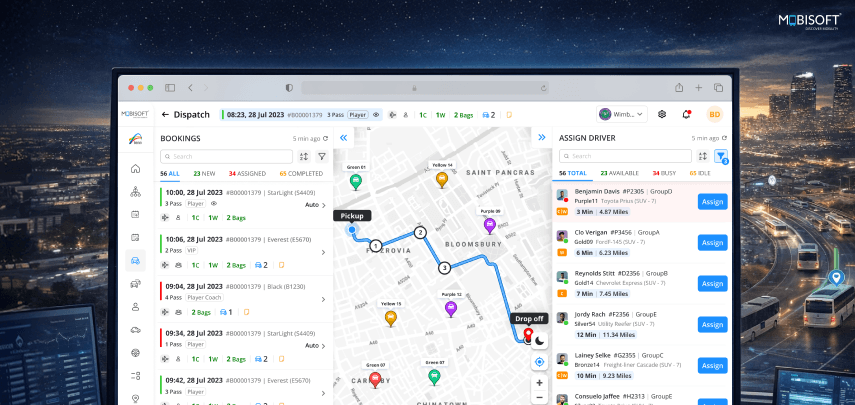
Effective Event transportation management depends on live fleet visibility. The dispatch team needs to know where every active vehicle is, what its current status is, and what its estimated arrival time looks like at every scheduled stop. They need this information in real-time vehicle tracking, without making a phone call to find out.
Most GPS tracking systems in event fleets are configured for general events. They are not calibrated for the specific demands of a high-density, time-critical event operation. A general fleet GPS typically updates vehicle positions every 30 to 60 seconds. In a standard logistics operation, that interval works adequately. In event transport, a shuttle completes a 10-minute loop, and redeployment decisions need to be made in under 60 seconds. A 30-second update creates a visibility gap that makes event transportation software solutions unreliable.
The position data on the dashboard reflects where the vehicle was 30 seconds ago. On a slow suburban route, that difference is negligible. On a congested venue approach road during peak egress, a vehicle can move 400 meters in 30 seconds. A dispatcher making redeployment decisions based on that data is working from an inaccurate picture.
Beyond update intervals, event operations face additional GPS and telematics problems. Geofence alerts configured at the venue level rather than the zone level are too broad to be useful. A geofence that fires when a vehicle enters the venue precinct tells the dispatcher the vehicle is somewhere on site. A zone-level geofence that fires when the vehicle enters a specific loading bay tells the dispatcher the vehicle is in position and loading has begun.
Telematics data feeds not connected to the dispatch platform mean vehicle health data, speed, and idle time live in a separate dashboard that the dispatcher is not monitoring during active operations. Idle time alerts that are not configured mean vehicles sitting beyond their scheduled window are invisible to the command centre until someone reports them manually.
The Solution
A GPS and telematics configuration calibrated specifically for event operations, with update intervals, alert thresholds, geofence boundaries, and platform integration all validated before go-live.
Technical Requirements
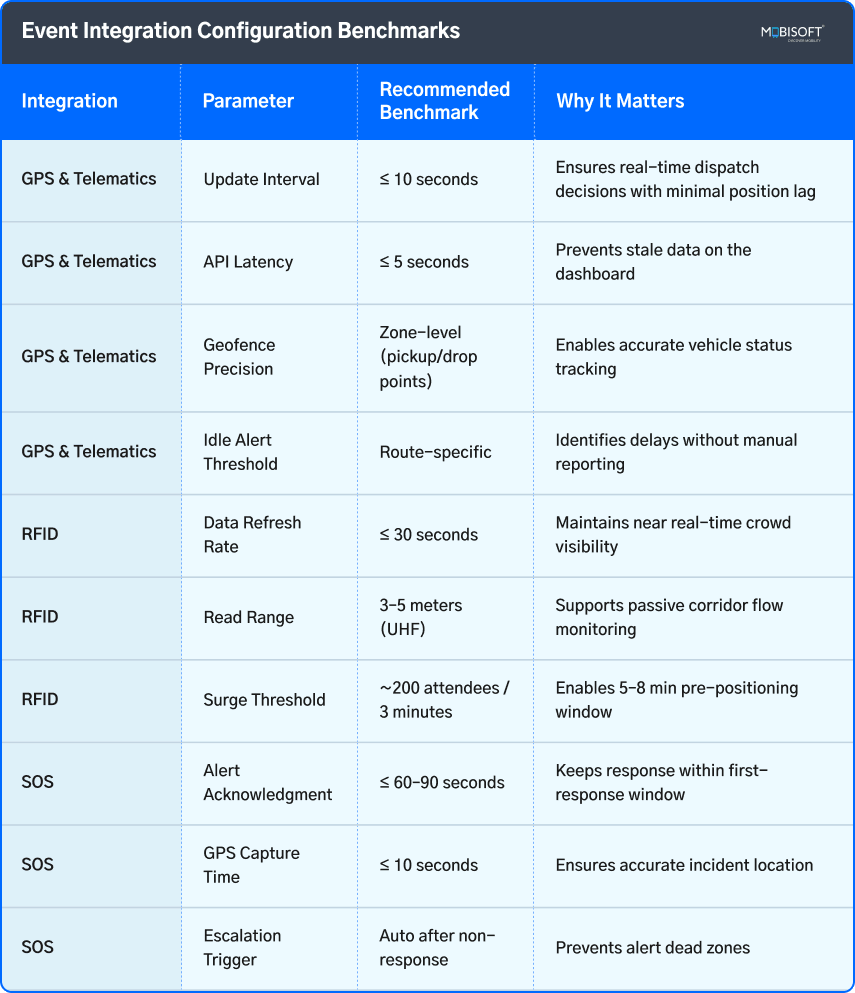
- The GPS update interval must be set to 10 seconds or less for event operations. This is a platform configuration change, not a hardware upgrade. It needs to be confirmed active before any vehicle is added to the live fleet.
- Geofence configuration must reach zone-level precision. Every active pickup and drop-off point requires its own geofence boundary, sized to the actual loading area. Entry and exit alerts for each geofence need to be routed to the dispatch dashboard directly.
- Telematics data integration requires an API connection between the vehicle telematics system and the dispatch platform. Vehicle health data, speed, idle time, and engine status should populate directly on the dashboard alongside real-time GPS tracking for events. The dispatcher should not need to open a separate telematics interface during active operations.
- Alert configuration needs to cover four specific event-relevant conditions. Idle time beyond the scheduled window for each vehicle's assigned route. Speed threshold breach in pedestrian-heavy zones. Geofence entry and exit at each active zone. ETA variance beyond the defined threshold at each scheduled stop.
- Platform API connection latency between the GPS device and the dashboard display needs to be measured and confirmed under 5 seconds. A technically active API connection that takes 15 seconds to reflect position changes is not adequate for event-level dispatch.
GPS and Telematics Go-Live Checklist
Pre-installation:
- Confirm hardware compatibility against vehicle OBD-II port specifications for every fleet vehicle
- Confirm the SIM card data plan is active for the event location and test coverage at the venue and along all active route corridors
- Generate, document, and test platform API credentials in a staging environment before deploying any hardware
- Assign a technology operator who will monitor the vehicle tracking system for the full event day
Configuration:
- Set the GPS update interval to 10 seconds or less in the platform settings
- Create individual geofence boundaries for every active pickup and drop-off zone
- Set entry and exit alert routing to the dispatch dashboard for every geofence
- Specify the idle time alert threshold per route schedule, and confirm routing is active
- Configure the speed alert threshold for every pedestrian-heavy zone segment on active routes
- Set the ETA variance alert threshold and confirm routing reaches the dispatcher dashboard
- Map all telematics data fields to the dispatch dashboard display and confirm they populate correctly
Integration testing:
- Run a live vehicle test and verify GPS position updates on the dashboard at the configured interval
- Verify geofence entry and exit alerts fire correctly and appear on the dashboard within 5 seconds
- Verify all telematics data fields populate correctly, including speed, idle time, and vehicle status
- Measure API connection latency across three separate test runs and confirm it stays under 5 seconds
- Verify ETA calculation updates in real time based on live GPS position data
Event day validation:
- Confirm all vehicles are connected to the platform and showing live position before the first departure
- Confirm the dashboard displays live position for every active vehicle simultaneously
- Confirm all geofence alerts are active across all zones before the venue opens
- Confirm the technology operator is at their dashboard position with monitoring responsibilities active
For a closer look at how an event fleet tracking system handles geofencing, telematics, and real-time dispatch in a single platform, explore the full feature overview.
RFID Integration for Crowd Flow and Transport Demand
The Problem
Crowd surges at pickup zones are the most common and most damaging operational incidents during large event transportation management. The standard response is reactive. A zone supervisor reports a building queue. The dispatcher identifies a vehicle, issues a reassignment, and the vehicle travels to the affected zone. By the time it arrives, the queue has been building for 8 to 12 minutes, and the situation has already become visible to passengers.
The reason this response is always reactive is a data gap. The dispatch team has no advance visibility into crowd movement patterns before they produce a surge at a pickup zone. They manage transport demand based on the planned schedule, not based on what is actually happening on the venue floor.
That gap matters because attendee behavior at large events consistently diverges from the planned schedule. Sessions end early or run late. Popular keynotes create larger-than-forecast egress volumes. Concurrent session endings in adjacent halls send simultaneous demand to adjacent zones. None of this is visible to the dispatch team until the zone supervisor reports it, which is always after the condition has already developed.
RFID in transportation closes that gap. When attendee wristbands or badges carry RFID tags and the venue has readers positioned at session hall exits, primary corridor intersections, and zone entry points, the dispatch platform receives RFID passenger tracking data in real time. This allows the command centre to anticipate transport demand before it materializes at the pickup zone. A reader at the exit of a 3,000-person session hall showing 800 attendees moving toward the north corridor gives the command centre a 5 to 8-minute pre-positioning window. That window is the difference between proactive event transportation management and reactive incident response.
Without an integrated RFID vehicle tracking system, additional problems compound the visibility gap. Session attendance data sits in the event management system and never reaches the transport operation. Zone supervisors become the sole source of crowd density information, creating a structural lag between conditions developing on the venue floor and the command centre becoming aware of them.
The Solution
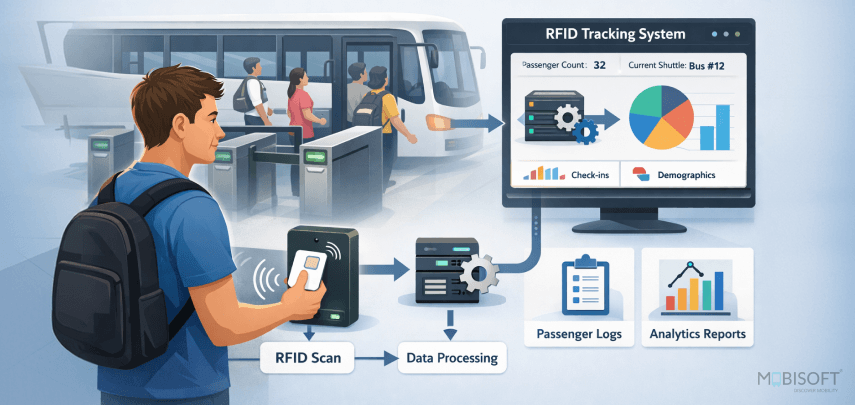
An RFID integration that feeds real-time crowd flow data directly into the event transportation software. It gives the command centre advanced visibility into transportation demand before it arrives at the pickup zone.
Technical Requirements
- RFID reader placement must be mapped against actual crowd flow paths. Readers at main entrances and access control points generate access data, not transport demand insights. Readers at session hall exits, corridor intersections, and zone entry points provide the command centre with actionable intelligence for event transportation management. Placement is the most critical factor in whether RFID delivers useful crowd movement insights or irrelevant access control data.
- Read range and frequency specifications for transport demand monitoring require UHF RFID readers with a minimum read range of 3 to 5 meters. This range ensures reliable passive reading of wristband or badge tags in corridor flow conditions. Lower-frequency readers designed for access control require close proximity reads that are not practical for corridor flow monitoring.
- Data feed integration between the RFID system and the transport dispatch platform ensures zone-level attendee counts and movement direction data updates at 30-second intervals or less. The dashboard should display current attendee counts at zone entry points, movement directions in corridors, and cumulative egress volumes at session hall exits, giving the dispatcher accurate insight into transport demand and crowd flow patterns.
- Surge threshold alert configuration requires defining the specific attendee count or movement rate that triggers a pre-surge warning on the dispatch dashboard. A workable starting threshold for most large events is 200 attendees identified as moving toward a specific pickup zone within a 3-minute window. This gives the dispatcher a 5 to 8-minute pre-positioning window before the front of the crowd reaches the zone.
- Compatibility with the event management platform is required to connect session end times and attendance capacity data to the RFID transport demand forecast. When the platform knows a 4,000-person session ends in 12 minutes, it combines that schedule data with live RFID corridor movement data to calculate a more accurate surge arrival time.
RFID Go-Live Checklist
Pre-installation:
- Review the venue floor plan and map reader placement against actual crowd flow paths with the venue operations team
- Validate reader placement against previous event crowd flow data or venue simulation, where available
- Confirm the RFID tag type is compatible with the reader hardware across all attendee credential formats in use at the event
- Test the API connection between RFID and the transport dispatch platform using simulated data.
- Calculate surge threshold values based on corridor length, session capacities, and the target pre-positioning window
Configuration:
- Map zone-level attendee count fields to the dispatch platform dashboard and verify they populate correctly
- Confirm movement direction data is feeding correctly for all corridor monitoring points
- Set the surge threshold alert to the correct threshold value and confirm that routing reaches the dispatcher dashboard
- Connect session end time data from the event management platform to the transport demand forecast display
- Configure the failover protocol so the zone supervisor manual reporting protocol activates automatically if the RFID feed drops
Integration testing:
- Run a live reader test with tagged credentials and verify accurate zone-level count data appears on the dispatch dashboard within 30 seconds
- Verify the surge threshold alert fires at the correct threshold in a controlled test with known tag counts
- Measure API update latency across three separate test runs and confirm it stays at 30 seconds or less
- Modify a test schedule entry and verify session end time data updates the transport demand forecast correctly
- Simulate a feed loss and confirm that the zone supervisor reporting protocol activates correctly
Event day validation:
- Confirm all readers are active and feeding data to the dispatch platform before the venue opens
- Confirm zone-level count data is visible on the dispatch dashboard
- Confirm surge threshold alerts are active across all monitored zones
- Assign the technology operator to monitor the RFID data feed throughout the event
- Brief zone supervisors on the manual reporting protocol as an active backup to the RFID feed
To understand how RFID crowd flow data fits into the broader logistics layer of a large event, the event transportation logistics software overview covers the full operational picture.
SOS Integration
The Problem
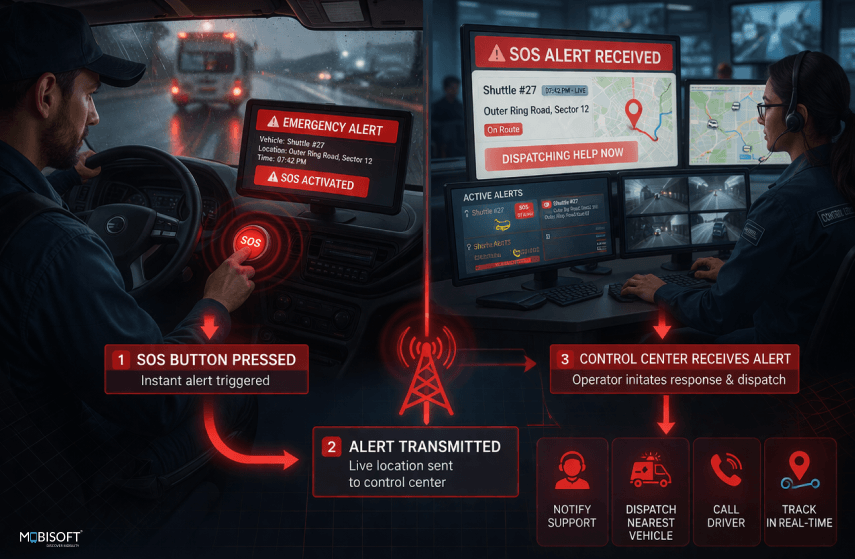
Driver SOS capability exists in most modern event transportation platforms. The operational failure is rarely the absence of the feature. It is the configuration gaps that make the feature unreliable when it needs to work.
The most consequential configuration failure is alert routing. An SOS alert routed to a general platform inbox or a shared notification feed fires into silence. The system records the activation, and the incident log opens. The alert is technically delivered. But the driver sits stranded with no response for 4, 6, or 8 minutes because no one who could act on the alert was watching the channel it was sent to.
In the context of a vehicle breakdown during peak egress with passengers on board, 6 minutes of non-response is not a minor delay. It is an incident that has already escalated beyond the first-response window and will require ops lead involvement to resolve.
Beyond routing, event transport SOS deployments face additional configuration problems. No GPS position capture on SOS activation means the dispatcher knows an alert fired, but not where the vehicle is. The dispatcher calls the driver to ask for a location, adding 60 to 90 seconds to the response time.
No automatic incident log creation on SOS activation means the event log depends on manual entry that frequently gets skipped when the dispatcher is managing multiple concurrent situations. No escalation path configured means if the primary alert recipient does not respond within the target window, the alert does not reach the next person in the chain.
Driver unfamiliarity with the SOS function creates two opposite problems. Accidental activations from drivers who inadvertently press the button create noise in the command centre that erodes confidence in the alert system. Hesitation to use the button in a genuine emergency because the driver is uncertain how it works delays activation and extends the response gap.
The Solution
An SOS integration configured for reliable, fast, and escalating real-time alert delivery with GPS position capture on activation. It helps automate incident logging, a tested two-level escalation path, and a connectivity fallback that preserves alert delivery in low-signal conditions.
Technical Requirements
- Alert routing must be configured for a named individual. Someone who is actively monitoring the transport dispatch platform dashboard for the full duration of the event day. Not a shared inbox. Not a general notification feed. A specific named contact whose primary responsibility during the event includes SOS alert monitoring, confirmed active at their monitoring position before the first vehicle departs.
- GPS position capture on activation must be configured as a mandatory component of the SOS alert payload. The activation should automatically capture the vehicle's current GPS position and include it in the alert displayed on the dispatch dashboard. The dispatcher sees vehicle identity, driver name, current position, and activation timestamp in a single dashboard notification without needing to make a call.
- Automatic incident log creation must activate on SOS button press, pre-populating the log record with vehicle ID, driver name, GPS position at activation, and timestamp. This removes the manual logging step from the dispatcher's task list during the response window and ensures complete records regardless of how busy the command centre was at the time.
- Escalation path configuration requires a second named recipient and a defined escalation window. If the primary alert recipient does not acknowledge the alert within 60 to 90 seconds, the platform automatically escalates to the second contact. The escalation window needs to be short enough to ensure the driver receives a response within the target resolution time.
- Connectivity fallback requires the driver app to queue SOS activations locally when mobile data coverage is unavailable and transmit them with the last known GPS position as soon as connectivity is restored. The driver needs to be briefed on this fallback behavior before event day.
- The false activation protocol requires a one-step cancellation available to the driver within 10 seconds of button press. The cancellation should be confirmed on the dispatch dashboard so the technology operator knows the alert was a false activation.
SOS Go-Live Checklist
Pre-configuration:
- Assign the primary SOS alert recipient as an actively monitored contact on the dispatch dashboard for the full event day.
- Assign a second escalation recipient and set the escalation window to 60 to 90 seconds in the platform settings
- Enable GPS capture on SOS activation in the platform settings and verify it in the field
- Enable automatic incident log creation and map all required pre-population fields correctly
Driver onboarding:
- Have every driver locate and confirm the SOS button on their specific device during the onboarding session
- Have every driver demonstrate SOS activation and false activation cancellation to the technology operator
- Brief every driver on connectivity fallback behavior and flag any known low-signal areas on their assigned route
- Complete and log driver onboarding at least 24 hours before event day
Integration testing:
- Run a live SOS test from each driver device type in use and verify GPS position appears on the dispatch dashboard within 10 seconds.
- Simulate a non-acknowledged alert and verify automatic escalation fires within the configured window
- Trigger a test SOS activation and verify the incident log is created and pre-populated correctly with all required fields
- Test false activation cancellation from the driver device and verify it appears as cancelled on the dispatch dashboard within 10 seconds.
- Activate SOS with the device in airplane mode, restore connectivity, and verify the alert transmits with the last known GPS position
Event day validation:
- Confirm all driver devices are connected to the platform and the SOS function is active before the first departure
- Ensure the primary SOS alert recipient is active and monitoring at their dashboard position
- Secure that the escalation contact is reachable on their designated channel
- Confirm the technology operator is monitoring the SOS alert feed throughout the event, with a clear protocol for alert receipt
For a detailed look at how panic buttons and GPS tracking systems work together to reduce driver response times, this resource covers the technical and operational considerations.
Integration Dependencies and Data Flow
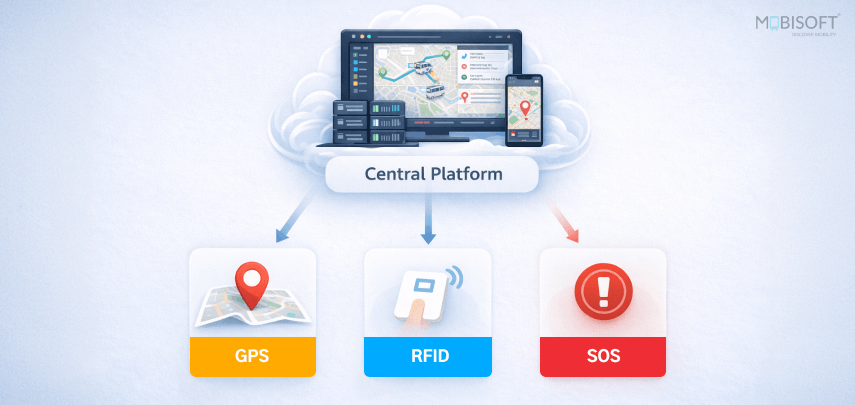
The three integrations covered in this guide do not operate independently. Their operational value compounds when they share a common data layer within the transport dispatch platform. Their failure modes also intersect in ways that make dependency mapping a necessary part of go-live preparation.
GPS Feeds SOS Context
When an SOS alert fires, the GPS position captured at activation is the first piece of information the dispatcher needs to initiate a response. If the GPS integration is not correctly configured, specifically if position data is updating at 30-second intervals rather than 10-second intervals, the position captured at SOS activation may be significantly behind the vehicle's actual location. For a vehicle moving at the time of activation, a 30-second position lag translates to a location error of 200 to 400 meters, depending on road speed. Confirming GPS update intervals are at 10 seconds or less is therefore a dependency for reliable SOS real-time location data, not just a dispatch optimization.
RFID Feeds Dispatch Pre-Positioning
Live vehicle GPS positions combined with RFID crowd monitoring allow the platform to calculate not just where vehicles are, but whether the nearest vehicle can reach a surge zone before the queue exceeds the response threshold. RFID identifies the surge window. GPS identifies the response capability. Without both data feeds active and correctly configured, the pre-positioning calculation is incomplete. The platform may identify a surge developing at Zone B, but cannot accurately assess whether the nearest vehicle will arrive within the target window without real-time transport demand data at 10-second resolution.
SOS Feeds the Incident Log
An SOS activation triggers an incident record that pulls GPS position data automatically as part of the log pre-population. If the GPS integration is incomplete or the API connection has latency issues, the automatic position capture on SOS activation may fail or populate with stale data. The incident log then contains an inaccurate position record that affects both the real-time response and the post-event review accuracy.
Integration Dependency Validation Checklist
- Verify GPS position data is populating the dispatch dashboard at 10-second intervals before starting RFID integration testing.
- Verify RFID crowd flow data is feeding the transport dispatch platform, and surge threshold alerts are active before running the full system integration test.
- Confirm SOS alert routing is reaching the named recipient before running GPS capture and automatic logging integration tests
- Run the full system integration test with all three data feeds active simultaneously, including a simulated SOS activation during a simulated RFID surge condition, and verify that no data conflicts or dashboard display errors occur under combined load
Go-Live Readiness Assessment
The go-live readiness assessment is the final validation step before the command centre opens for event transportation operations. It is structured as a three-gate review that the ops team and technology operator complete together. The system is not declared go-live ready until all three gates are passed.
Gate 1: Hardware Readiness
Install, power, and confirm every GPS device is transmitting to the platform. Install every RFID reader at its confirmed position and verify that it reads test credentials correctly. Install the platform app on every driver device, log in to the driver account, and test the SOS function. Physical installation alone does not pass Gate 1. Each device passes only when it confirms live data transmission to the transport dispatch platform.
The technology operator signs off on Gate 1 by confirming live GPS data from every vehicle on the dispatch dashboard, correct data from every RFID reader in the crowd flow display, and a logged SOS test activation from every driver device type in use.
Gate 2: Configuration Readiness
Set every platform configuration item to event specifications rather than default settings. This covers the GPS update interval at 10 seconds or less, geofence boundaries at the zone level for every active pickup and drop-off point, RFID surge threshold alerts at the calculated event-specific threshold, SOS routing to the named primary and escalation recipients, and idle time, speed, and ETA variance alerts configured and routed correctly.
The technology operator signs off on Gate 2 by walking through every configuration item against the pre-event checklist and confirming each one explicitly. Do not mark any item as confirmed based on assumed settings from a previous event. Check every item for this event, at this venue, with this fleet.
Gate 3: Integration Readiness
Confirm all three data feeds are populating the dispatch dashboard correctly in a live test environment. Validate API connections with live data, not just staging data. Test alert routing end-to-end and confirm receipt at the named contacts. Run the full system test with the technology operator, dispatcher, and ops lead participating simultaneously. This confirms the command centre team can operate the integrated system correctly under simulated event transportation conditions.
The ops lead signs off on Gate 3 by confirming the dispatch dashboard displays accurate live data from GPS, RFID, and SOS feeds simultaneously, all configured alerts fire correctly and reach the right contacts, and the technology operator can demonstrate full system operation without external support.
Go-Live Declaration
Declare the system go-live ready only when all three gates are passed, and all checklist items across Sections 2, 3, and 4 are confirmed. Complete the go-live declaration at least 2 hours before the command centre opens for event day transport operations.
Common Go-Live Failures and How to Prevent Them
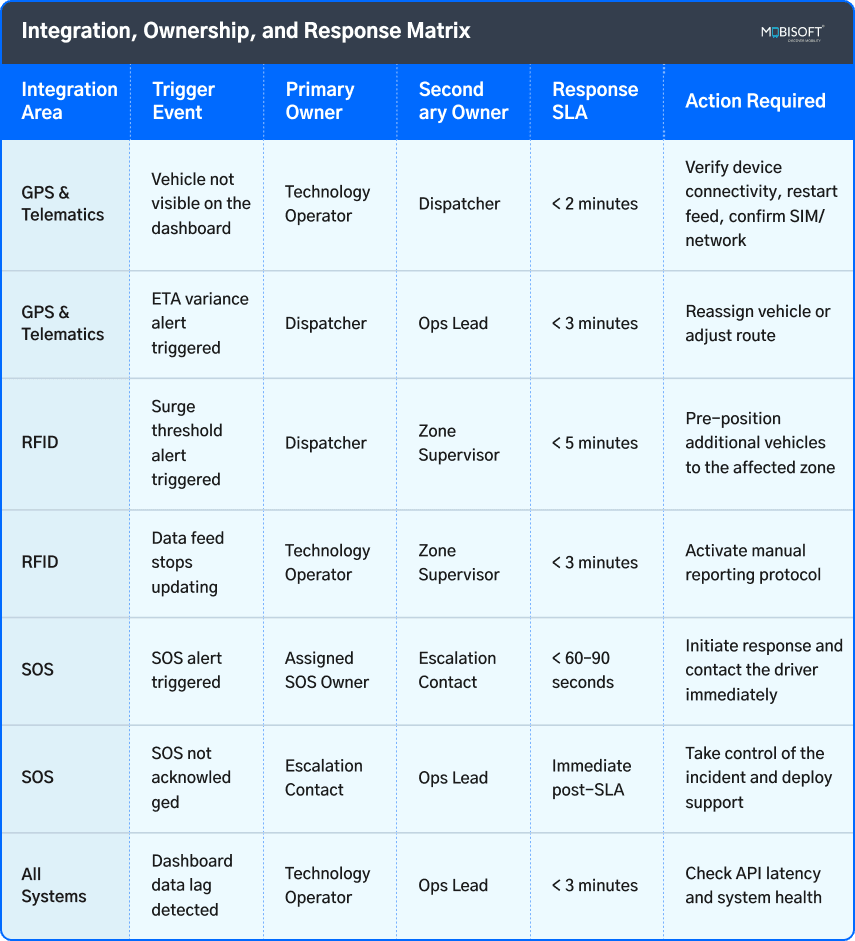
These are the eight most common go-live failures in event transport technology integrations. Each one is preventable. Each one has caused visible operational problems at large events where it went unaddressed.
Failure 1: GPS update interval left at default settings
The 30 to 60 second default interval on most GPS hardware is inadequate for real-time event dispatch. The change to 10 seconds is a platform configuration setting that takes 2 minutes to make. It is frequently overlooked because most teams do not know the default is wrong.
Prevention: Add GPS update interval confirmation as the first item on the configuration checklist. Confirm the setting is active, not just that the change has been made.
Failure 2: Geofences mapped at venue level rather than zone level
A single venue-level geofence tells the dispatcher a vehicle is somewhere on the site. Zone-level geofences tell the dispatcher a vehicle is at a specific loading bay. The operational difference is significant, and the configuration effort is minimal.
Prevention: Create individual geofence boundaries for every active pickup and drop-off zone during pre-event setup. Do not copy geofence configurations from previous events at different venues without confirming that zone positions match.
Failure 3: RFID readers placed at access control points only
Access control reader placement is determined by security requirements. Transport demand reader placement is determined by crowd flow paths. The two rarely coincide and treating them as interchangeable produces RFID data that is irrelevant to event transportation operations.
Prevention: Map reader placement specifically for transport demand purposes, working with the venue operations team to confirm session hall exit positions, primary corridor flow paths, and zone entry points before any hardware is installed.
Failure 4: SOS alerts routed to a shared inbox
A shared inbox is not monitored by a specific individual. During a high-pressure event, it is frequently not monitored at all. An SOS alert that arrives in a shared inbox has no guaranteed response time.
Prevention: Name a specific individual as the primary SOS alert recipient, confirm their monitoring responsibilities in writing before event day, and test the alert routing to their specific device and channel.
Failure 5: No escalation path configured for SOS
A single-point routing configuration for SOS means that one person not acknowledging an alert in time results in no response. This is not an acceptable configuration for a safety-critical function.
Prevention: Configure the escalation path during initial platform setup, confirm the second recipient is active and reachable, and test the escalation by simulating a non-acknowledged alert before event day.
Failure 6: API connections tested in staging but not validated with live data
Staging environment tests confirm that the API connection exists and that data fields are mapped correctly. They do not confirm that live hardware produces data in the format and at the latency the platform expects. Staging validation and live data validation are not the same test.
Prevention: Complete a full live data validation test with actual hardware active on actual vehicles before declaring integration readiness. Measure API latency with live data across multiple test runs.
Failure 7: Driver SOS function not confirmed before event day
A driver who has not used the SOS function before event day either does not know how to activate it under pressure or hesitates to use it because they are uncertain about its behavior. Both outcomes delay activation and extend the response gap.
Prevention: Include a live SOS activation demonstration in the driver onboarding session, completed at least 24 hours before the event opens. Log each driver's completion of the demonstration.
Failure 8: No technology operator assigned for the event day
Without a dedicated technology operator whose primary responsibility is monitoring all three data feeds and responding to integration issues, technology problems that develop mid-event are discovered by the dispatcher when they affect operational decisions rather than being identified and resolved proactively.
Prevention: Assign a named technology operator before event day with explicitly defined responsibilities. Do not assign this role to the lead dispatcher as a secondary task.
For a structured approach to managing incidents when they do occur, this guide on event transportation incident management covers response protocols and escalation frameworks in detail.
Post-Event Integration Review
Each time, event transportation integration performance data improves the next go-live. The post-event integration review converts that data into specific configuration and preparation improvements rather than general observations about what could have gone better. The review should happen within 24 hours of the event's close, while the transport dispatch platform data is complete and operational detail is still fresh.
What to Pull From the Platform
- Review the GPS position data completeness log and identify any vehicles with gaps in GPS tracking, noting when connectivity was lost and restored.
- Check the RFID crowd monitoring feed continuity log for any time windows where crowd flow data stopped updating, and verify whether the zone supervisor manual reporting protocol activated correctly.
- Examine the SOS alert log for every activation during the event, covering GPS position at activation, time to first acknowledgment, escalation path activation where applicable, and resolution status
- Review the API latency log for average and peak latency across each integration feed, flagging any timestamps where latency exceeded the configured threshold
- Check the alert performance log for every configured alert that fired during the event, the time between alert trigger and dispatcher acknowledgment, and any alerts that went unacknowledged within the target window
Three Questions the Review Must Answer
- Did the GPS update interval produce accurate enough position data for real-time dispatch decisions?
If dispatchers made redeployment decisions that were later found to be based on stale position data, the update interval needs to come down further, or the API latency needs to be investigated.
- Did the RFID surge alerts fire early enough to give the dispatcher a meaningful pre-positioning window?
If alert review shows that surge alerts fired after zone supervisors had already reported the condition manually, the threshold needs to be recalibrated to a lower attendee count or movement rate trigger.
- Were SOS alerts acknowledged within the target response window?
Any alert that reached the escalation path because the primary recipient did not acknowledge within the configured window requires a review of the monitoring arrangement for that recipient.
The answers to these three questions translate directly into specific configuration changes, preparation adjustments, or staffing decisions before the next event. An integration review that produces general observations is not an integration review. One that produces specific numbered changes to the configuration checklist is.
Operators managing multiple events can find additional context on building repeatable systems in this overview of logistics technology solutions across the broader transport operation.
Integration Is a Process, Not a Setup
GPS devices, RFID readers, and SOS buttons are hardware. Getting reliable operational value from them in an event transport environment requires configuration work, integration testing, dependency validation, and pre-event preparation that most deployments do not complete fully before go-live.
The ops teams that run the most reliable event transportation operations are not the ones with the most advanced hardware. They are the ones who did the preparation work to ensure their hardware is configured correctly, tested under event conditions, and validated against the transport dispatch platform before the first vehicle departs. The checklist items in this guide represent that preparation work, organized into a framework that makes the go-live process repeatable and auditable rather than dependent on individual team members remembering what needs to be checked.
Purpose-built event transportation platforms support all three integrations within a single system. Pre-built API connectors for leading GPS and telematics hardware remove the custom integration work from the deployment process. RFID crowd flow data ingestion with configurable surge threshold alerts gives ops teams the surge pre-positioning capability that moves surge response from reactive to proactive. SOS alert management with configurable routing, two-level escalation paths, automatic GPS capture, and incident log creation ensures that the safety function the driver app provides is operationally reliable rather than theoretically available.
For agencies and operators, the same integrated platform deploys under their own brand for every client engagement, presenting a consistent and professionally configured technology capability across every event without rebuilding the integration setup from scratch each time.
The checklist is here. The platform supports it. The next go-live is where both get applied.
Integration Ready Before Go-Live. Not After.
Mobisoft's white-label event transportation platform provides pre-built integration support for GPS and telematics hardware, RFID crowd flow data ingestion, and SOS alert management within a single dispatch and fleet management system.
- Pre-built API connectors for leading GPS and telematics hardware with configurable update intervals and alert thresholds
- RFID crowd flow data ingestion with zone-level attendee count display and configurable surge threshold alerts on the dispatch dashboard
- SOS alert management with named recipient routing, two-level escalation paths, automatic GPS position capture, and incident log creation on activation
- Live traffic integration for proactive reroute trigger identification
- Role-based dashboard access for technology operator, dispatcher, and ops lead monitoring functions
- Complete integration performance logging for post-event review and go-live improvement
- White-label deployment under your own brand for every client engagement
Book a Platform Demo


Nitin Lahoti
Read more
Nitin Lahoti is the Co-Founder and Director at Mobisoft Infotech. He has 15 years of experience in Design, Business Development and Startups. His expertise is in Product Ideation, UX/UI design, Startup consulting and mentoring. He prefers business readings and loves traveling.
 Nitin Lahoti
 March 27, 2026