Custom commands let you turn repeatable prompts into a reliable engineering workflow. Instead of rewriting review instructions for every pull request, you define them once and run them with a single slash command.
In this guide, we will create a reusable command for Flutter PR review:
/flutter-code-reviewThe same command design works across AI workflow automation (Cursor, Claude-style prompting), so your team can keep one review process regardless of tool preference.
If you are exploring how AI can streamline your broader development operations, learn more about our artificial intelligence solutions.
Why This Matters?
Manual reviews often drift:
- One reviewer checks architecture, another checks only formatting,
- Important security/performance issues are missed,
- Feedback quality varies from PR to PR.
Custom commands solve this by enforcing:
- a fixed scope
- a fixed checklist
- a fixed report format
What we are Building
We will define commands/flutter-code-review.md to support:
- Default mode: review only uncommitted changes,
- Full mode: review all Dart files in `lib/`,
- Save mode: write a timestamped report to `code_review_reports/`.
Example usage:
/flutter-code-review
/flutter-code-review full
/flutter-code-review save
/flutter-code-review full save
Step 1: Create a Command File
Create this file in your repo:
commands/flutter-code-review.mdThis markdown file is your command contract. It should include:
- command purpose,
- supported arguments,
- processing instructions,
- report template,
- checklist and rules.
Step 1.1: Put the command in the right folder for each AI
To make the Cursor slash commands discoverable in both tools, place the command file in:
.cursor/commands/for Cursor (so it appears in the Cursor command prompt window),.claude/commands/for Claude (so the same command works in Claude workflows).
If you want a single source file, keep one master command and sync/copy it to both folders.
Step 2: Define Arguments Clearly
Use `$ARGUMENTS` so one command can serve multiple needs:
- full: analyze all lib/**/*.dart files.
- save: persist report in code_review_reports/.
- no argos: review staged, unstaged, and untracked changes only.
This gives fast feedback during development and deeper quality gates before merge/release.
Teams building production-grade AI-assisted pipelines can benefit from a structured AI implementation roadmap.
Step 3: Standardize the Report Structure
Keep report output consistent and easy to scan:
- Severity buckets: Critical, High, Medium, Low,
- Tabular findings: file, line, category, priority, issue, suggested fix,
- Short "good practices found" section,
- Summary counts for quick triage.
When every report has the same shape, reviewers fix faster, and trends become measurable.
Step 4: Add Flutter-Specific Review Checks
The command becomes powerful when prompt templates for AI coding reflect your real architecture:
- state management and navigation boundaries (e.g GetX vs GoRouter usage),
- controller/UI separation,
- security basics (secrets, secure storage, URL handling),
- performance checks (`build()` hygiene, rebuild patterns, disposal),
- localization correctness (`LocaleKeys...tr()` usage),
- API integration and error handling patterns,
- database migration safety,
- general Flutter quality and null safety.
This is the key idea: custom commands should encode team standards, not generic advice.
To understand how generative AI can power custom tooling like this at scale, explore our generative AI development services.
Step 5: Save Reports for Auditing
With save, each run writes:
code_review_reports/code_review_YYYY-MM-DD_HH-MM.mdThis helps with:
- PR traceability,
- Recurring issue detection
- Onboarding new reviewers
- Quality tracking over time
End-To-End PR Workflow
- 1. Implement your Flutter changes.
- 2. Run
/flutter-code-review. - 3. Fix Critical and High findings first.
- 4. Re-run until clean.
- 5. Before merging or releasing, run
/flutter-code-review full save. - 6. Attach the saved report to your PR process if needed.
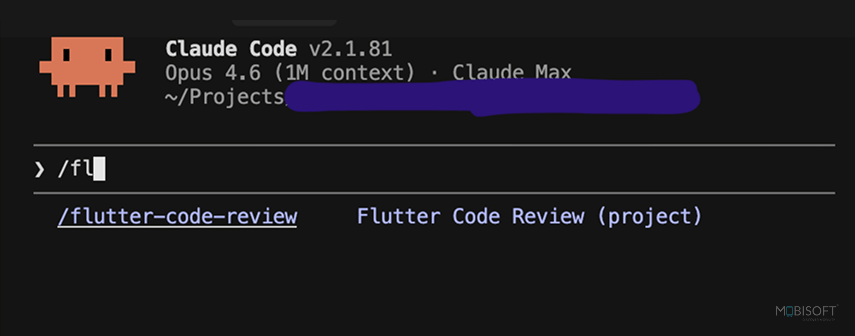
Claude Code: /flutter-code-review custom slash command
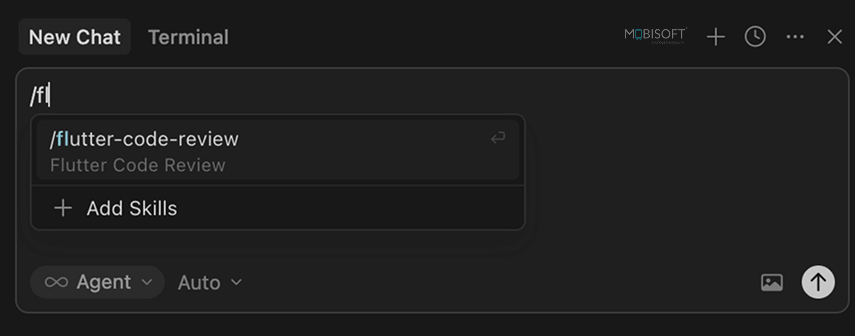
Cursor: /flutter-code-review custom slash command
For teams looking to extend this workflow into intelligent assistants, see how conversational AI solutions can automate review communication and feedback loops.
Best Practices for Cross-AI Command Design
To keep one AI coding workflow across Cursor and Claude-style prompting:
- Write instructions in plain, explicit markdown,
- Avoid tool-specific jargon in core checklist items,
- Enforce deterministic output format,
- Separate scope logic (`full` vs default) from review criteria,
- Use one command file as the single source of truth.
So your workflow stays reliable, even if you change the assistant.Building reliable AI commands at scale requires careful prompt design read more about context engineering for scalable AI agents.
Quick Starter Template
Flutter Code Review
Arguments
- `$ARGUMENTS`: `full`, `save`Instructions
- Determine scope
- Review files against the checklist
- Output severity-grouped report
- Save report if requested
Checklist
- Security
- Performance
- Architecture
- Localization
- UI and overflow prevention
- API integration
- Error handling
- Database and migrations
- Code quality
Start simple, then evolve the checklist from real review pain points.To evaluate which AI model best suits your command workflows, explore this guide on LLM evaluation for AI agents.
Final Takeaway
Custom commands are one of the highest-leverage improvements you can make to PR quality.
Define once, run everywhere:
- One review standard
- Repeatable workflow
- Any AI assistant
Access the full source on GitHub, download `commands/flutter-code-review.md`, and treat it as a starter, reshape it for your project architecture and team rules before you standardize your AI coding automation workflow. For teams ready to scale beyond single commands into full agentic pipelines, explore the top AI agent frameworks for automation.


Prashant Telangi
Read more
Prashant Telangi brings over 15 years of experience in Mobile Technology, He is currently serving as Head of Technology, Mobile at Mobisoft Infotech. With a proven history in IT and services, he is a skilled, passionate developer specializing in Mobile Applications. His strong engineering background underscores his commitment to crafting innovative solutions in the ever-evolving tech landscape.
 Prashant Telangi
 April 10, 2026