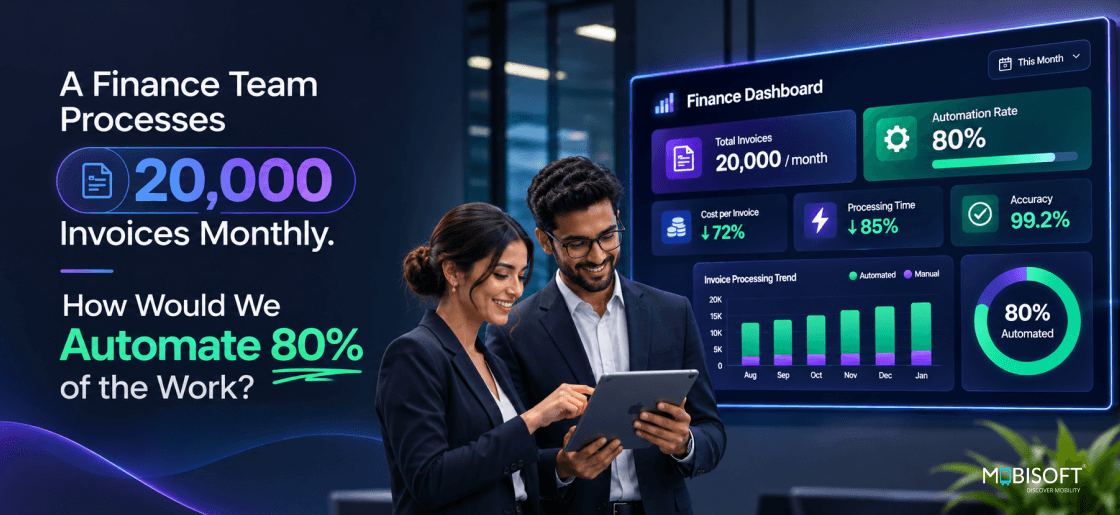
From 1 April 2029, UK VAT-registered businesses must issue and receive B2B and B2G VAT invoices as structured e-invoices. That date changes how you should plan AI invoice processing today. PDFs and scans won't disappear overnight, but reading them will matter less each year. The steps after extraction will matter more. They're also harder to get right.
Those later steps decide whether you reach 80% automation. At Mobisoft, our AI system integration services connect these layers to your existing ERP. Approved invoices then post straight to the ledger without rekeying. Your team keeps authority over every payment above an agreed threshold.
The sections below follow a UK finance team that handles 20,000 supplier invoices a month. You'll see how each layer works and where commercial platforms stop. You'll also see what a realistic business case looks like. By the end, you'll know what to buy, what to build, and what to fix first.
What 80% Automation Actually Means
The 80% figure is easy to quote and easy to misread. It doesn't mean nobody sees 80% of invoices. It means no person has to process the data inside them.
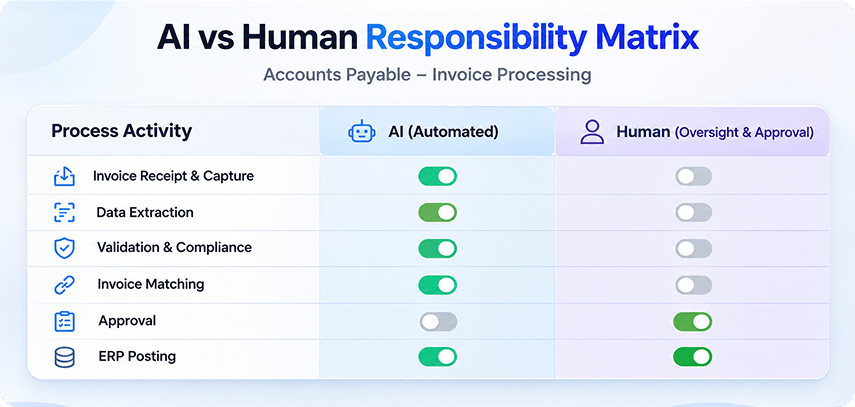
The Work AI Handles Without a Human
For most PO-backed invoices from known suppliers, touchless invoice processing covers six steps.
- Ingestion from email, supplier portals, EDI feeds, or scanned paper.
- Invoice data extraction of header fields and line items from any layout.
- Matching against the purchase order and goods received note.
- GL coding based on your own historical coding decisions.
- Duplicate checks across every channel before payment.
- Payment scheduling against agreed terms and discount windows.
For example, a repeat order from a regular packaging supplier can clear all six steps in a minute. Nobody keys a single field.
The Work That Still Needs Your Team
The remaining 20% is where finance judgement earns its cost. Even the best AI invoice automation leaves this work with people.
- Exceptions where the AI's confidence falls below its threshold.
- Non-PO invoices that need a budget holder's approval.
- Supplier queries about disputed amounts or payment status.
- Authorisation for payments above a set value.
- Fraud reviews when a signal fires, such as a changed bank account.
Take a supplier that emails new bank details alongside an invoice. The system holds the payment. A person then verifies the change by phone.
Why Human Authorisation Stays in Place
Most governance frameworks require a person to approve high-value payments. That won't change. The AI prepares the data, and a person authorises the payment. Both steps sit in the audit trail.
Auditors usually accept this more readily than finance leaders expect. The control point they care about is still there. Only the preparation work has moved.
Setting the approval threshold is a policy decision. We'd treat it as part of your AI business strategy. Agree it with your audit lead before any build starts. Where would you set the line today?
Why Manual Invoice Processing Stays So Expensive
Most finance teams at this volume already run an ERP. Many also use some form of accounts payable automation. Yet invoices still get keyed by hand. The cause sits in the variety of what arrives.
The Supplier Format Problem
At 20,000 invoices a month, you're often dealing with several hundred suppliers. Each one formats invoices differently. Some send clean XML or EDI files. Many send PDFs that are really scanned images.
Template-based capture works for the largest suppliers, where a template pays off. For the long tail, it falls back to manual entry. That's why template-led invoice processing automation stalls. Say you have 600 suppliers and templates for 50. Who keys the other 550?
Where the Bottlenecks Sit
| Process Step | Manual Pattern | AI Fit |
| Receipt and triage | Shared inbox sorted by hand | High |
| Data entry | Keyed from PDF into the ERP | High |
| PO and GRN matching | Manual cross-checks, emails to procurement | High |
| GL coding | Clerk judgement on each line | High |
| Duplicate checks | Basic ERP search | High |
| Exceptions | Email chains and phone calls | Medium |
| Approvals | Email sign-off, slow chasers | Medium |
Consider a single price mismatch on a £12,000 invoice. It can trigger three emails and a call to procurement. Then everyone waits two days. Multiply that by a few hundred exceptions a month.
What the Benchmarks Say
Ardent Partners' 2026 research puts the average cost per invoice at $9.90. Best-in-class teams spend $2.67. The same study found an average exception rate of 19.9%. Top performers held it to 11.8%.
That gap matters at 240,000 invoices a year. For example, a $7 gap per invoice adds up to about $1.7 million a year. Do you know your own cost per invoice?
The Payment Terms Pressure
Regulation is tightening timelines too. The UK's Small Business Protections Bill was introduced in May 2026. It proposes a 60-day cap on payment terms for large firms paying smaller suppliers. It also adds mandatory interest on late payments.
Slow approval chains will cost more under that regime. Say your internal approval takes 14 days on a 30-day term. That leaves barely two weeks to pay. Invoice approval workflow automation guards against late interest and missed discounts.
Why Earlier Automation Attempts Stalled
Most teams at this scale have tried something already. Each earlier tool solved one step and left the hardest one untouched.
Template OCR Breaks on New Layouts
Template OCR reads known formats reliably. A new supplier layout breaks it. So does a redesigned invoice or a poor scan, and it won't recover on its own. For example, a supplier moving its logo can push every field out of place. Someone then builds yet another template. How many templates does your team maintain today?
RPA Moves Data Without Reading It
RPA bots copy values between screens. They can't interpret unstructured documents, so someone still keys the data. Take an ERP upgrade that renames one field. The bot often stalls until it's rebuilt.
Workflow Tools Only Speed Up Approvals
Approval tools route requests faster. They don't touch extraction or validation, which come first. Consider a team that cut approval time by two days. Its keying effort stayed exactly the same. Was that money well spent?
What Changes With Intelligent Document Processing
Intelligent document processing reads an invoice by structure and meaning. It doesn't rely on fixed field positions. It combines OCR and layout analysis with a large language model. For example, it'll find the VAT total on a layout it hasn't seen before.
That's the step earlier tools couldn't take. Our Generative AI consulting services help teams choose and fine-tune the models behind it. A generic model is only a starting point. One tuned on your own supplier history makes straight-through processing safe.
How AI Invoice Processing Works
Intelligent invoice processing isn't one model. It's a set of layers. Each one has a clear job and a clean hand-off. At Mobisoft, we call this the INVOICE model.
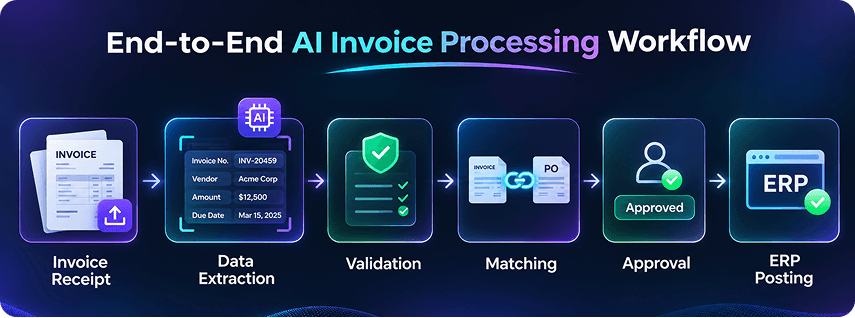
The INVOICE Model in Seven Layers
Each letter stands for one layer of the system.
Ingest
This layer collects invoices from every inbound channel. It gives each one a tracking record. It also runs early fraud checks. For example, it flags a familiar supplier name sent from an unfamiliar email domain.
Normalise
Here the document understanding model extracts header and line-item data. It's trained on your historical invoices. Every correction your team makes feeds back into it. How often do your clerks fix the same supplier's invoices?
Validate
This layer queries the ERP for the matching PO and GRN. It checks quantities and prices across all three documents. This is three-way invoice matching in practice. Next, it assigns GL codes and screens for duplicates against 24 months of history.
Output and Routing
Clean invoices go to approval with a pre-filled package. Invoices with a specific issue go to a targeted queue. For instance, a price mismatch lands with the person who handles pricing queries every day.
Intervene
Reviewers see the exact issue and the AI's suggested fix. Similar past cases appear alongside. Their decision becomes training data. This is where custom accounts payable automation pays back. Each resolved case teaches the system.
Connect
This layer reads PO and vendor master data from the ERP. It writes coded invoices and payment schedules back. If the ERP is offline, it queues the work and retries later.
Evolve
Your team's corrections are batched and used to retrain the models. Reports track automation rates and exception volumes, so you'll see whether the system's improving month by month. Without this layer, accuracy won't improve after launch.
The Three AI Agents Behind the Layers
Three agents do most of the work, and they don't overlap. Each has its own confidence threshold and its own reasons to call a person.
| Agent | Main Job | Escalates When |
| Document understanding | Extracts data from any format | A field scores below 94% confidence |
| Validation and coding | Matches, codes, and checks duplicates | Match or coding confidence is low |
| Payment and workflow | Schedules payments, routes approvals | Value exceeds threshold or bank details change |
These thresholds are sensible defaults. They're what keep AI invoice processing safe at volume. We'd tune them per supplier group after a few months of live data. For example, a trusted utility supplier might earn a lighter review than a new contractor.
Following One Invoice Through the System
Two examples show how the layers behave on real work.
A Routine PO-Backed Invoice
It's 09:14, and a PO-backed invoice from a known supplier reaches the AP mailbox. Within seconds, the system reads 23 fields at 97% confidence. It finds the PO and GRN, then confirms the match. A GL code follows.
It also spots a 1.5% early payment discount. The approver sees one screen and approves in under a minute. Payment is scheduled inside the discount window. The record then posts to the ERP.
A Non-PO Invoice With Ambiguous Lines
Now take a service invoice from a new supplier with no PO. Two line descriptions could fit either consultancy or professional services codes. The system doesn't hand over the whole invoice.
Instead, it raises one targeted question. Both code options appear with past examples. A reviewer usually resolves it in a few minutes, without opening the ERP. Next time, that supplier's invoices are more likely to clear without review.
Connecting to Older ERP Platforms
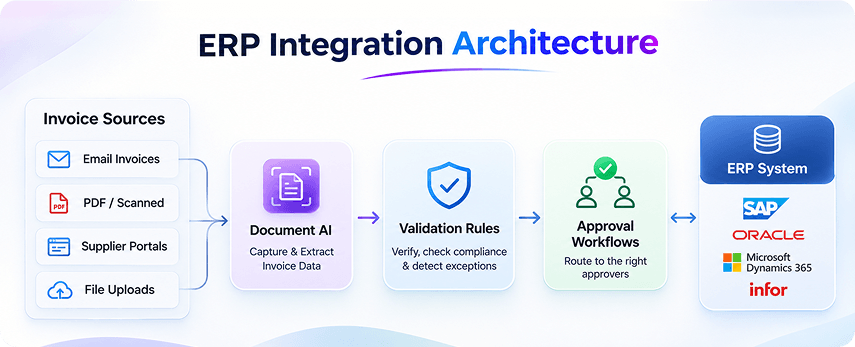
Many finance teams still run an ERP that predates modern APIs. ERP invoice automation integration is harder there, but it's rarely impossible. Where there's no API, file-based links can stand in.
Our guide to AI integration with legacy systems covers those patterns in more detail. Which integration route does your ERP actually support today?
Build vs Buy: Where AP Automation Software Stops
The AP automation software market is mature. For many teams, configuring a commercial platform is the right call. The real question is where each platform's ceiling sits for your invoice mix.
What Commercial Platforms Do Well
These platforms cover the core workflow well. Each offers solid accounts payable automation for standard environments. Which ones are already on your shortlist?
- Tipalti suits mid-market teams with global supplier payments and multi-currency needs.
- Coupa works best alongside its procurement module and strong PO discipline.
- SAP Concur Invoice fits SAP-centred environments with a compliance focus.
- Oracle's AP tools offer the most value inside Oracle ERP estates.
- Basware serves large multi-entity organisations. It bought Australia's Redmap in December 2025.
- Basware also agreed in August 2026 to acquire Trustpair, a payment fraud prevention specialist.
- Medius focuses on SAP and Microsoft Dynamics environments.
- Yooz suits smaller teams that want fast cloud deployment.
For example, a single-entity distributor on Dynamics 365 may find Medius covers most needs.
Where the Ceiling Appears
Platforms tend to stall in three areas.
GL Coding Logic
GL coding in a large organisation goes well beyond vendor-to-code mapping. Cost centres and recharge rules both play a part. Generic rule sets in AP automation software rarely capture local finance knowledge.
Multi-ERP Estates
Businesses that grew by acquisition often run several ERPs. Standard connectors struggle to keep coding and matching consistent across them. Consider a group with SAP at head office and Sage in two subsidiaries.
Industry Document Types
Construction payment applications and time-and-materials invoices need specialist extraction. Platform models aren't usually trained on them. Does your invoice mix include document types like these?
A Simple Decision Framework
| Your Situation | Sensible Route | Typical Ceiling |
| One mainstream ERP, under 15,000 invoices a month | Configure a platform | 65% to 75% at launch |
| One ERP, diverse suppliers, 15,000 to 40,000 a month | Platform plus custom GL model | Around 80% within a year |
| Several ERPs at any volume | Custom integration layer | 80% to 90% within a year |
| Complex coding or industry documents | Bespoke system | 85% or more with learning |
These ceilings aren't guarantees. For example, a 200-invoice sample from your backlog gives a sharper estimate.
What AI-Assisted Development Changes
Mobisoft's engineers use AI-assisted development for integration code and test suites. They also use it for training data labelling. That cuts the engineering cost of a bespoke AP system by 30% to 40%. Delivery that once took nine to twelve months now takes five to seven.
That's why custom builds now make sense at 20,000 invoices a month. Were you told custom invoice processing automation is only for enterprises? That advice may rest on cost assumptions from three years ago.
How to Automate 80% of Invoice Processing in Four Phases
Each phase adds one capability and keeps a clear fallback. Your team keeps its current process until each new step proves itself.
| Phase | Duration | Scope | Indicative Cost |
| 0. Foundation | 4 to 6 weeks | Data audit, ERP API check, supplier analysis | £15,000 to £25,000 |
| 1. Document AI | 10 to 14 weeks | Extraction for the top 50 suppliers | £45,000 to £70,000 |
| 2. Validation and ERP | 8 to 12 weeks | Matching, GL coding, duplicate checks | £35,000 to £55,000 |
| 3. Full deployment | 8 to 12 weeks | All suppliers, exception briefs, payment agent | £30,000 to £45,000 |
After launch, ongoing optimisation typically costs £18,000 to £28,000 a year. Which phase would expose your biggest data problem?
Phase 0: Prepare the Data
What Happens
The team prepares your historical invoice corpus for training. It checks what the ERP API can actually do. It also audits past GL coding for errors and retired codes.
What to Watch
Poor scans of old paper invoices can weaken training. So can coding history full of inconsistent choices. For example, the same software licence might appear under three different GL codes. We'd remove miscoded transactions before any model sees them. Clean data is the base of all intelligent invoice processing.
Phase 1: Automate Invoice Data Extraction
What Happens
Extraction goes live for your top 50 suppliers. In many organisations, they account for well over half of invoice volume. GL coding and ERP entry stay manual in this phase.
What to Watch
Unusual formats beyond the training data cause most early errors. For example, a handwritten delivery note attached to an invoice can confuse extraction. Flag these cases and add them to training. Which suppliers send your messiest invoices?
Phase 2: Add Three-Way Invoice Matching and GL Coding
What Happens
Three-way invoice matching and the GL coding model connect to the ERP. Duplicate detection and structured exception queues go live as well. By the end, around 70% of invoices should process without touch.
What to Watch
ERP write-back usually takes the longest. We'd allocate 30% to 40% of the integration budget to it. Say the vendor quotes eight weeks for posting. We'd plan for eleven. We'd also agree on a manual fallback.
Phase 3: Deploy Across All Suppliers
What Happens
Extraction now extends to every supplier, and it's the biggest step. Exception briefs and the payment agent go live. At this point, 78% to 84% straight-through processing is a realistic launch range.
What to Watch
Non-PO approvals depend on budget holders changing habits. That's a change management task more than a technical one. For example, a budget holder who approves by email today won't love a new portal. Who will own adoption among budget holders?
The Five Risks Worth Planning For
Most AP automation projects underestimate three things. Data preparation, exception design, and ERP write-back each take longer than planned. Have you budgeted for that? Accuracy, though, usually improves after launch.
ERP Write-Back Takes Longer Than Quoted
Posting validation rules are stricter than read-side access. Data mapping often needs several rounds of testing. It's the slowest part of any ERP invoice automation integration. For example, an ERP might reject postings because a tax code field expects another format. We'd run a detailed API check in Phase 0 before fixing the Phase 2 date.
GL Coding Accuracy Starts Below Target
The coding model learns from past decisions, including past mistakes. It's worth cleaning the training set first. Then route known high-ambiguity categories to people, whatever the confidence score says. Take marketing spend split across several cost centres as one such category.
The AP Team Feels Replaced
Experienced AP staff know the invoice operation better than anyone. It's natural for them to feel threatened by a system doing their old tasks. Involve them in exception design from week one. For example, let your senior clerk decide which exception types reach which reviewer.
Supplier Data Breaks Matching
Matching fails when PO references on invoices don't match the ERP. Supplier names that vary between submissions cause the same problem. Two spellings like "ACME Ltd" and "Acme Limited" can look like separate suppliers. Fuzzy matching and a short supplier communication plan fix most cases.
Auditors Join Too Late
Auditors may question AI-processed payments if they first see the system at launch. Bring them into the design phase instead. When did your auditors last review the AP process? Document the AI's role and every human control point in the governance narrative. Consider sharing a sample exception log before go-live.
What the Business Case Looks Like
AI accounts payable automation has one of the clearer business cases in finance technology. Labour costs and missed discounts already show up in your reports. The figures below are a worked example with illustrative numbers. Replace each one with your own baseline.
Worked Example Assumptions
- A UK manufacturer receives 20,000 supplier invoices a month.
- The average invoice value is £1,500.
- The AP team has 14 people at a fully loaded £38,000 each.
- About 10% of supplier spend carries a 1% discount for payment within 10 days.
- The team currently captures 15% of those discounts.
- Roughly 3% of invoices need correction, at about £40 per fix.
- Unrecovered duplicate or erroneous payments cost 0.05% of spend.
Estimated Annual Benefit
The gains fall into three groups.
Labour Capacity
With touchless invoice processing at 80%, the team needs about six people. They handle exceptions, oversight, and supplier queries. That frees eight roles, worth about £304,000 a year. Most organisations redeploy this capacity or absorb it through natural attrition. Where would those eight people add most value?
Early Payment Discounts
Annual supplier spend in this example is £360 million. Discount-eligible spend is therefore £36 million. Raising capture to 60% adds about £162,000 a year. That's before any cost of paying earlier.
Errors and Duplicates
Correction volume falls by about 70%, saving roughly £201,600 a year. Duplicate prevention stops about 80% of unrecovered losses, worth around £144,000.
Investment and Payback
The four benefits total about £811,600 a year. Now assume a £185,000 build and a £42,000 annual run cost. Year 1 spend is therefore £227,000.
Full deployment lands around month nine. So only about a third of the annual benefit arrives in Year 1. That roughly covers Year 1 spend. At full run rate, the build cost pays back in under three months. That's the core case for AI accounts payable automation.
Better supplier relationships and fewer audit findings aren't counted here. Both are real, but they're hard to price in advance. For example, one avoided VAT recovery error might outweigh a month of savings. We'd show these as upside in the board paper.
What to Measure at Each Phase
- Straight-through processing rate, meaning invoices posted without human data handling.
- Average receipt-to-posting time.
- Payment cycle time in days.
- Early payment discount capture rate.
- Error rate on AI-processed invoices, checked through sampled reviews.
- Duplicates caught before payment as a share of all duplicate events.
- Average exception resolution time.
- AP hours per 1,000 invoices.
Who'll own these numbers each month? We'd name one AP lead before Phase 2 starts.
Questions Finance Teams Ask About AP Automation
These questions come up in most evaluations of invoice processing automation. The answers assume the phased approach described above.
How Do We Automate Accounts Payable Processes Without Disrupting Month-End?
Don't start inside the close window. Run extraction alongside manual entry for two or three weeks and compare the results. Switch each supplier group over only when accuracy holds.
For example, you might move the top 20 suppliers first. The rest stay manual through month-end. Automated invoice data entry then grows group by group.
How Does the AI Read an Invoice From a New Supplier?
Intelligent document processing combines three technologies. OCR turns the image into text. Layout analysis finds the header and totals wherever they sit. A language model then interprets ambiguous text in context.
None of this needs a supplier template. Say a supplier redesigns its invoice next month. The model reads the new layout as easily as the old one. Fields below the confidence threshold go to a reviewer with the source location highlighted.
Which ERP Systems Can It Integrate With?
Any ERP with an API or file-based interface can connect. Effort varies by platform.
- SAP S/4HANA and ECC typically take 8 to 12 weeks for production write-back.
- Oracle ERP Cloud and E-Business Suite sit in a similar range.
- Microsoft Dynamics 365 usually takes 6 to 10 weeks.
- NetSuite often takes 5 to 8 weeks.
- Bespoke or legacy ERPs can take 10 to 20 weeks.
Most ERP invoice automation integration effort sits on the write side. Read-side links for PO and vendor data are usually faster. They're read-only and tolerate more delay. For example, PO lookups can run on a short delay without hurting matching.
How Do We Reduce Manual Invoice Processing in the Exception Queue?
Route only the uncertain element, never the whole invoice. If 22 of 23 fields are confident, the reviewer checks one quantity. Prepare the likely fix before the reviewer opens the case.
These two rules usually cut review time to a few minutes per case. Every resolution also feeds retraining. Exception rates at launch often sit around 20%. They fall steadily over the next year. Isn't that a better use of your senior clerks' time?
What Does the 2029 E-Invoicing Mandate Change?
Structured e-invoices will make invoice data extraction easier for in-scope UK suppliers. They won't remove the need for matching or exception handling. Overseas suppliers will still send PDFs.
We'd design the extraction layer to accept both formats from day one. For example, a Peppol invoice and a scanned PDF should reach the same validation queue. The matching and coding layers then keep their value whatever format arrives.
Where to Start This Month
In AI invoice processing, the 80% target is won mostly outside the extraction model. PO discipline, clean GL coding history, and well-designed exceptions decide it. That's also the work the 2029 mandate leaves untouched.
Three steps will show you how ready you are.
- Pull a random sample of 200 recent invoices and sort them by complexity.
- Calculate your current cost per invoice and discount capture rate.
- Ask your ERP vendor what write-back the API supports, then have an engineer test it.
Mobisoft's free AP Automation Readiness Assessment Kit turns the first two steps into a half-day exercise. It includes a baseline calculator and an invoice classification template. You'll also get an ERP integration checklist. Download it at www.mobisoftinfotech.com/ap-automation-kit.
Once your baseline's ready, book a 90-minute Discovery Session with our finance AI engineering lead. You'll get a written architecture recommendation and a business case built on your own numbers.
Frequently Asked Questions
Will we own the AI model Mobisoft Infotech builds for us?
Yes, if the contract says so. We'd name the trained models and labelled invoices as yours. You'd also receive the retraining pipeline, so improvement doesn't depend on us. That keeps a custom accounts payable automation build portable if you change partners.
How do we measure invoice extraction accuracy before trusting AI?
Score each field, since one wrong total outweighs ten right dates. Run invoice data extraction on 200 past invoices, including new suppliers. Don't skip poor scans, where errors hide. Then review every high-value invoice and a small sample of the rest.
How does AI match invoices when our deliveries arrive in parts?
Set matching tolerances before go-live, because deliveries rarely arrive whole. Say a supplier ships 80 of 100 units but bills all 100. The system holds it, or pays for 80 if policy allows. Add a price tolerance to three-way invoice matching too.
What should we ask AP software vendors in a demo?
Ask to run your own 200 invoices through AP automation software, live. Include five from suppliers the tool hasn't seen. Ask what retraining costs, and who owns the corrections you make. Finally, confirm you can export your coded data if you leave.
How would Mobisoft Infotech stop duplicate postings to our ERP?
We'd give every invoice a unique key from the supplier and invoice number. Before every ERP write, the system looks that key up. If the ERP times out, a retry can't post twice. Test it in a sandbox by forcing failures during ERP invoice automation integration.
Who approves invoices when our approvers are away?
Plan for absence and deadlines on day one. Say an approver's away for two weeks with 40 invoices waiting. Rules in your invoice approval workflow automation route them to a named deputy. Keep segregation of duties too, so nobody approves what they coded.
How will our AI handle credit notes and foreign-currency invoices?
Credit notes link back to the invoice they cancel. Set a £300 credit to net against the next payment. In AI invoice processing, euro invoices keep both original and ledger amounts. Any gap above your tolerance goes to a reviewer.
This content is for informational purposes only and may include AI-assisted research or content generation. While we strive for accuracy, information may evolve over time. Readers are advised to independently verify critical information before making decisions.

Nitin Lahoti
Read more
Nitin Lahoti is the Co-Founder and Director at Mobisoft Infotech. He has 15 years of experience in Design, Business Development and Startups. His expertise is in Product Ideation, UX/UI design, Startup consulting and mentoring. He prefers business readings and loves traveling.
 Nitin Lahoti
 November 26, 2026