At most events, the event operations command center is staffed with capable people and supported by working tools, yet decisions still slow down when conditions tighten. Vehicles are tracked, messages move across channels, and updates keep coming in, but there is rarely a clear system defining how information turns into action.
A command center management framework works when decision-making is structured in advance. Roles must carry explicit authority, so responses are immediate and consistent. Information must be filtered and prioritised, so the team sees what requires attention without searching for it. Alerts must indicate urgency with clarity, not interpretation. And every recurring situation should map to a defined response, reducing the need for discussion in critical moments.
This blog builds that operational structure, focusing on how event transport teams can run controlled, responsive systems when timing, density, and expectations all peak at once. To understand how structured systems translate into execution, explore this event transport operations platform designed for large-scale event mobility.
What Is a Command Center in Operations?
Most event ops teams believe they have a transportation command center. They have a room, a few screens, and maybe a shared group chat that gets chaotic by hour two. That setup is not a command centre. It is a coordination attempt without a coordination system behind it.
The distinction matters more than most teams realise until something goes wrong. A functional operations command center has four components working together.
- First, a defined command center team structure where every person knows exactly what they can decide on their own and what requires escalation.
- Second, a real-time operations dashboard that surfaces what is operationally relevant, not every data point that the platform can generate.
- Third, a calibrated real-time alert system that separates conditions requiring immediate action from conditions worth monitoring.
- Fourth, a command center decision making process that helps teams in responding to likely disruptions before those disruptions occur, not during them.
Remove any one of these, and the system starts to crack under pressure. Three failure patterns also show up consistently across large-scale event transport operations:
Role ambiguity
It is the most common of all. Two people give contradictory instructions to the same driver because nobody has defined who holds authority over that decision. Or nobody acts at all because everyone assumes the call belongs to someone else. Both outcomes produce the same result: a delayed response at the worst possible moment.
Information overload
A command center dashboard that shows everything the platform can display requires interpretation rather than enabling decisions. During peak windows, when cognitive load is already high, operators stop reading screens that demand effort to parse.
Absent decision protocol
This is arguably the most costly of all. The team recognises a problem, and spends two or three minutes determining who handles it and how. In a low-stakes moment, that delay is manageable. During peak egress with queues building across multiple zones, it becomes too diverse.
Aviation's operations control centre is worth studying here. Not because event transport and aviation are comparable in scale or consequence, but because the OCC solves the same structural problem. Roles are explicit, and every alert has a designated owner. Decisions follow pre-built procedures. The system does not rely on individual judgment in high-pressure moments because that judgment has already been built into the protocol before operations begin.
Event transport runs a shorter window, handles higher peak density, and carries far more unpredictable variables than an OCC. The architecture still applies. A command centre performs because of the system behind it, and it fails because that system was never built properly in the first place. For a deeper look at how coordinated systems drive real-time decisions, this guide on event mobility orchestration breaks down the operational framework.
The Command Centre Team: Roles and Authorities
Assembling the right people is the easier half of command centre planning. The harder half is defining what each person is actually authorised to do. Without that clarity, the team operates on assumptions, which under operational pressure produce either paralysis or conflict, sometimes both within the same hour.
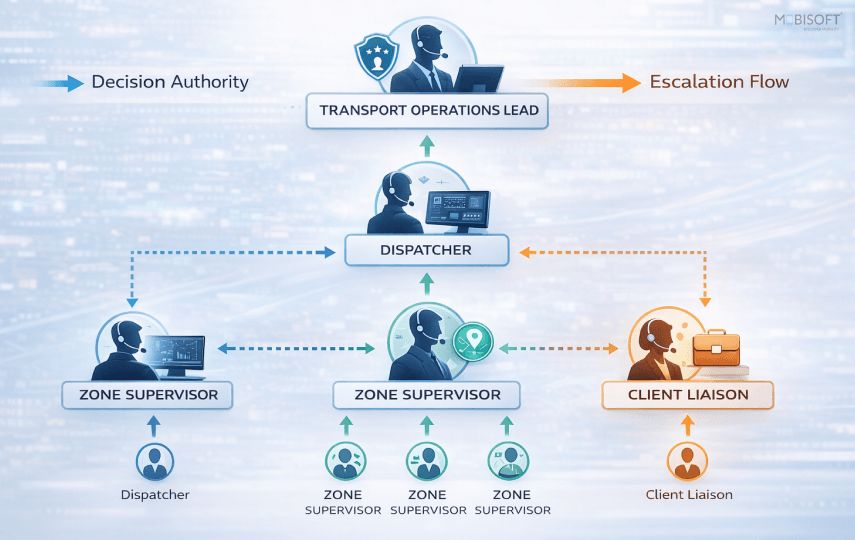
Here is what the four core roles look like when they are properly defined as part of a structured command center workflow process.
Transport Operations Lead: Decision Authority at Scale
This is the most senior decision-maker in the command centre, and the role carries real authority: fleet reallocation, route changes, vendor escalation, and any communication that involves a contract or a sponsor relationship.
What this role does not do is manage individual vehicles. The moment a Transport Operations Lead gets pulled into a single-zone problem, they lose visibility across the full operation. That trade-off is rarely worth it.
The decision authority threshold matters here. As a practical rule, any reallocation involving more than three vehicles, any communication to a VIP or sponsor representative about a transport failure, and any call to a vendor about a contract issue sits with this role and nobody else. When this role is absent or undefined, those decisions climb to event leadership, consuming time and attention that belongs elsewhere entirely.
Dispatcher Role in Real-Time Fleet Coordination
The dispatcher is the operational core of the command centre. They manage vehicle assignments, driver communication, and real-time route adjustments across every active transport stream simultaneously.
We covered the dispatcher's role in automated systems in our extensive blog on Manual vs Automated Event Transportation. In the command centre context, the function goes deeper. The dispatcher is the primary interface between what the platform is showing and what is physically happening on the ground. That gap between data and reality is where most operational errors originate.
Their decision authority, as part of the overall operations decision loop framework, is specific:
- Any single-vehicle reassignment
- Any route adjustment within a predefined zone
- Any direct driver communication
Anything beyond these boundaries escalates immediately to the Transport Operations Lead. The boundary is not a limitation on the dispatcher's competence. It is a protection against the command centre fragmenting into parallel, uncoordinated decisions.
One operational detail that most event transport plans ignore: dispatcher cognitive load. Research on high-load dispatch environments shows that decision accuracy degrades significantly after roughly 90 minutes of sustained pressure. At events running longer than four hours, shift rotation for the dispatcher is not a luxury. It is a planning requirement.
Zone Supervisors as Ground Intelligence Layer
Zone supervisors are the command centre's field intelligence layer, and they carry information that no incident management dashboard can replicate. A gate marshal who abandoned their post, a shuttle ramp backing up faster than the data reflects, a VIP who arrived at the wrong pickup point entirely. These are conditions that become visible in the platform data only after they have already caused a problem.
The reporting structure should be tight as part of a reliable incident response workflow:
- Every 15 minutes during peak windows
- Every 30 minutes during low-demand periods
- Each report covers three things: current queue depth, any active vehicle or personnel issue, and one forward-looking flag.
Zone supervisors also hold limited independent authority. They can redirect a general attendee shuttle to ease pressure at a specific access point without calling the dispatcher first. This keeps radio traffic manageable during the moments when the dispatcher is already handling multiple active situations.
Communication discipline is non-negotiable here. Zone supervisors use a dedicated channel, separate from general event staff communication. Personal phones are not a backup option,but a liability.
Client Liaison for Stakeholder Communication Control
At events with VIP, sponsor, or athlete transport responsibilities, this role belongs in the command centre without exception.
The client liaison owns all outbound communication to external stakeholders. They are the only person authorised to tell a VIP representative or sponsor contact that a transport issue has occurred. This matters because the instinct, when a VIP pickup is running late, is for the dispatcher to call the representative directly. That creates two communication streams producing different information to the same person. The relationship damage from that situation often outlasts the operational problem that caused it.
Beyond managing disruption communication, the client liaison handles pre-event confirmation calls, confirming ETAs with VIP representatives approximately 30 minutes before each scheduled pickup. It is a small step that prevents a significant volume of inbound calls during peak windows.
Command Center Dashboard: What to Show and Why
Most transport dashboards are built to demonstrate capability. They show everything the platform can surface because a full screen looks impressive during a vendor demo. On event day, that same screen becomes a liability. When everything is visible, nothing is prioritised. And a command center dashboard that requires interpretation during peak operations will simply stop being read.
The design of the operational dashboard layer is as consequential as the technology behind it. Here is how to build one that actually drives decisions.
The Three-Layer Information Model
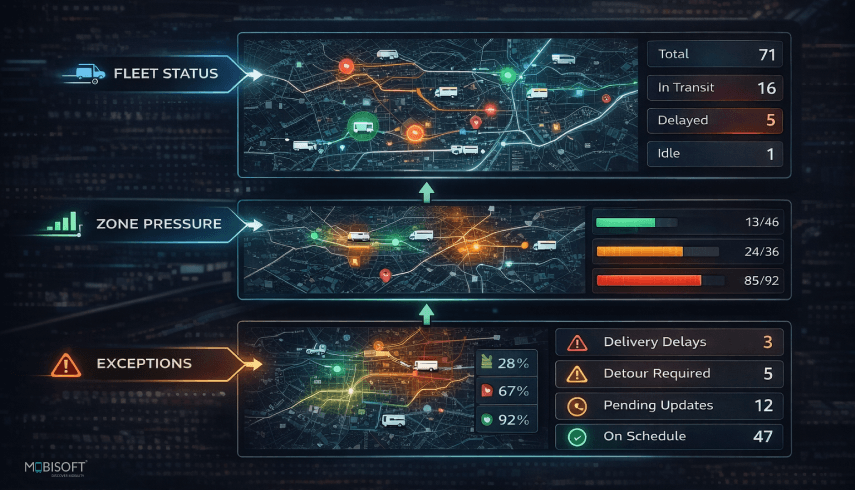
A real-time operations dashboard needs exactly three layers of information, structured in a clear visual hierarchy.
Layer 1: Fleet status
It will show where every vehicle is right now, what its current assignment is, and what comes next for that vehicle. This is the operational foundation of any real-time fleet coordination system. Every routing decision, every reallocation call, every response to a zone pressure alert starts here. Without a clean, current fleet picture, the dispatcher is making decisions on incomplete information.
Layer 2: Zone pressure
At each active transport zone, it shows the current queue depth relative to available capacity. This layer functions as the early warning system within the broader real-time monitoring systems framework. A dispatcher who sees Zone 4 sitting at 80% capacity has a meaningful window to act. One who finds out when it crosses 100% has no window at all. The difference between those two moments is often just better dashboard design.
Layer 3: Exceptions
It catches anomalies and what is currently outside normal parameters. A vehicle that has not moved in eight minutes. A zone that has not reported in twenty. A driver who has not confirmed an assignment. These signals need to be visually separated from the background operational data so they are immediately visible without the dispatcher having to search for them.
Each layer serves a different decision horizon. Fleet status governs the next five minutes. Zone pressure governs the next ten to fifteen. Exceptions require attention right now. The decision support system operations design should reflect that difference clearly.
What Does Not Belong on the Primary Dashboard
Knowing what to exclude is as important as knowing what to include. Several data categories appear on event transport dashboards regularly and belong somewhere other than the primary screen:
- Route history for completed trips: Valuable for post-event analysis, actively disruptive during live operations
- Fuel levels and vehicle diagnostics: Relevant to fleet management, irrelevant to transport coordination during the event window
- Raw driver communication logs: The dispatcher needs the most recent driver status, not a scrollable message history
- Aggregate metrics like total trips completed: Meaningful in a post-event report, operationally useless when zone pressure is building in real time
The governing principle is straightforward. Every data point on the primary dashboard must be capable of informing a decision within the next ten minutes. If it cannot meet that threshold, it belongs on a secondary screen or a post-event report, not in front of the dispatcher during peak operations.
Dashboard Design for High-Cognitive-Load Environments
Research on alert management system design in operational environments shows that operators normalise visual noise within approximately twenty minutes of sustained exposure. Once that normalisation sets in, they stop actively processing what is on the screen. The implication for dashboard design is significant: fewer data points, stronger visual hierarchy, and unambiguous colour differentiation between operational states.
The three-colour model borrowed from aviation works well here. Green indicates the system is operating within parameters. Amber flags a condition that requires monitoring. Red signals a condition requiring immediate action. These states need to be distinguishable at a glance, not after reading a number or parsing a label.
One additional constraint worth enforcing strictly: during peak arrival and peak egress, the primary dashboard must fit on a single screen without scrolling. The moments of highest operational pressure are precisely when nobody has the attention to scroll. If the layout requires it, the design needs to be rebuilt before event day, not adjusted during it.
A dashboard built on these principles does one thing well. It tells the dispatcher what to do next without making them work to figure it out. A well-structured live fleet visibility platform ensures dispatchers always act on accurate, real-time vehicle data.
Alert Management System for Command Centers
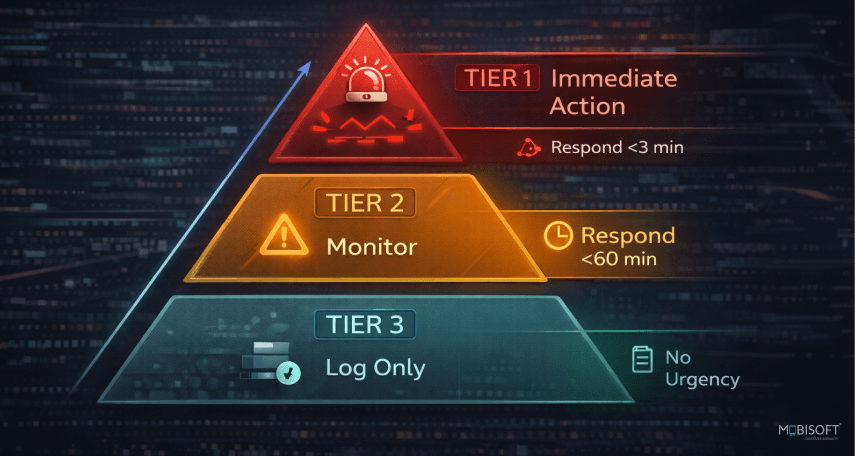
Alert design is where most command centres fail without realising it. It accumulates gradually over the first hour or two of operations, as the team processes a steady stream of notifications that look and sound identical regardless of their actual urgency. By mid-event, critical alerts are being filtered alongside informational ones because the system never taught anyone to tell the difference.
This is not a technology problem. It is an architecture problem, and it has a structural solution.
The Alert Hierarchy
Every event operations command center needs exactly three alert tiers. Not four, not five. Research on tiered alert management system design consistently shows that each additional tier reduces the perceived urgency of the tier below it. Three tiers hold. Beyond that, the hierarchy collapses into noise.
Tier 1: Immediate action required
These alerts interrupt whatever the dispatcher is currently doing. Specific conditions that belong here include:
- A vehicle breakdown with no replacement staged nearby
- A VIP who has not been picked up ten minutes past their scheduled departure
- A zone reporting a queue-to-capacity ratio above 2:1
There is no monitoring of a Tier 1 alert. It demands a response, immediately.
Tier 2: Monitor and prepare
These appear on the dashboard and require acknowledgement, but they do not interrupt active operations. Conditions in this tier include:
- A vehicle running five minutes behind schedule, with a replacement available
- A zone sitting at 75% capacity with no inbound vehicle assigned
- A driver who has not confirmed an assignment but whose vehicle is tracking correctly
Tier 3: Log only
Trip completions, driver check-ins, route confirmations. These populate the operational log and feed the post-event report. They do not appear as active alerts during live operations.
The separation between tiers has to be visually and functionally distinct. If Tier 1 and Tier 2 alerts look similar on screen, the hierarchy is theoretical rather than operational.
The Alert Fatigue Problem in Event Transport
Alert fatigue is well-documented in clinical and operational research. In security operations environments, studies show that operators ignore roughly 62% of alerts when volume is unmanaged. The mechanism is straightforward: sustained exposure to high alert volumes produces cognitive desensitisation. Operators stop distinguishing between alert types and begin treating all of them as background.
Without a robust transportation management system, this plays out in a specific and costly way. A dispatcher who has acknowledged forty amber alerts over two hours begins treating the forty-first as routine. If that forty-first alert is a VIP vehicle that stopped moving 500 metres from the venue, the consequence is significant and entirely avoidable.
The threshold calibration problem compounds this further. Most mobility operations platform tools ship with default alert thresholds that are set too low for live event conditions. A vehicle running two minutes behind schedule does not warrant a Tier 2 alert at an event operating with ten-minute tolerance windows. Thresholds need to be calibrated against the event's specific parameters before go-live, not adjusted reactively once the team is already fatigued.
Alert Ownership
An alert without a designated owner is the most operationally dangerous condition a transportation command center can produce. When responsibility is diffuse, the diffusion of responsibility effect takes over. Everyone in the room assumes someone else has seen it and is handling it.
The ownership structure is simple and forms a core part of the incident response workflow:
- Tier 1 alerts go to the dispatcher and escalate to the Transport Operations Lead if unresolved within three minutes
- Tier 2 alerts sit with the dispatcher to monitor and act on
- Tier 3 logs are reviewed post-event by the Transport Operations Lead
One protocol requirement ties this together: every Tier 1 alert must be acknowledged within 90 seconds. If it is not, it escalates automatically. The platform can surface the alert, but only the protocol ensures it gets acted upon.
Command Center Decision-Making Process (Day-Of Loop)
Every large-scale event transport operation encounters conditions that nobody fully anticipated during planning. A vehicle that was supposed to be available is not. A zone that was expected to be low-pressure becomes the busiest point on the map. A VIP arrival runs fifteen minutes early, and the assigned driver is two zones away. These are not failures of planning. They are the nature of live operations.
You need to ask: whether the team has a repeatable system for responding to them, or whether every response is being invented from scratch under pressure?
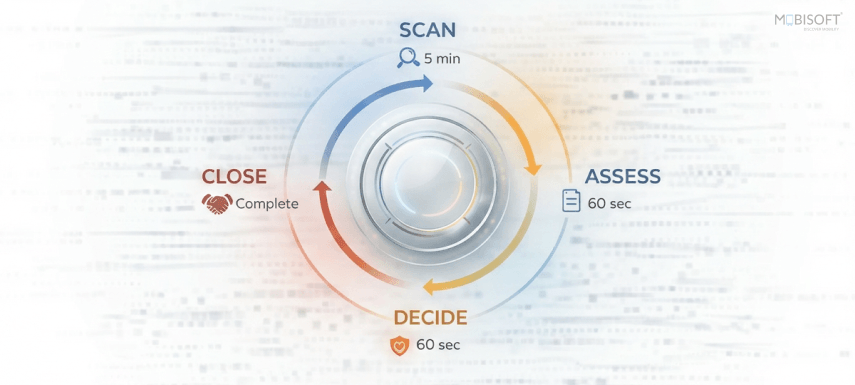
The day-of decision loop answers this question. It is a four-stage cycle that runs continuously from the moment the command centre opens to the moment the last vehicle clears the venue. Its purpose is to replace improvised decision-making with a command center decision-making process and pre-defined response architecture, so that the team spends event day monitoring and adjusting rather than deliberating and reacting.
Stage 1: Scan
The operations decision loop framework begins with a structured scan of the dashboard at defined intervals. Every five minutes during peak windows, every fifteen minutes during low-demand periods. The scan follows a fixed sequence: fleet status first, zone pressure second, open alerts third.
That sequence is not arbitrary. Fleet status provides the operational foundation. Zone pressure identifies where conditions are developing. Open alerts flag what already requires attention. Changing the sequence under pressure, which teams frequently do when a specific problem is drawing focus, leads to missed signals elsewhere on the dashboard.
What the scan produces is a live operational picture that is never more than five minutes old during peak operations. Without that currency, the team is responding to conditions that have already deteriorated further than the data reflects.
Stage 2: Assess
When the scan surfaces a condition outside normal parameters, the dispatcher assesses it against pre-defined thresholds. Is this a Tier 1 condition requiring immediate action? A Tier 2 condition requiring monitoring? Or is it within the event's established tolerance range?
The assessment window is sixty seconds. If it runs longer than that, the condition escalates to the Transport Operations Lead immediately, while assessment continues. Prolonged assessment in a high-pressure environment is almost always a sign that the command center workflow process does not cover this scenario clearly enough, which is useful information for the post-event debrief but not a problem to solve in real time.
Every command centre should have a one-page threshold document built before event day. It lists the specific conditions that trigger each alert tier for this particular event, with this particular fleet size, operating across these specific zones. Generic thresholds pulled from a previous event are better than nothing, but they will misfire against a different operational profile.
Stage 3: Decide
For conditions within the dispatcher's decision authority, the response is immediate and follows the pre-built playbook. A vehicle running eight minutes late has a defined response sequence: identify the nearest available reserve vehicle, dispatch it to the affected pickup point, and notify the client liaison if the movement involves a VIP or priority attendee tier.
For conditions outside the dispatcher's authority, the escalation is also immediate. The dispatcher does not attempt to resolve a situation that belongs to the Transport Operations Lead. Time spent working the wrong lane is time the actual problem is not being addressed.
The command center management playbook does not need to cover every conceivable scenario. It needs to cover the ones that will definitely occur at almost every large-scale event:
- Vehicle breakdown with and without a staged reserve
- Zone capacity breach during peak arrival or egress
- Driver no-show against a confirmed booking
- VIP timing failure due to schedule change or late arrival
- Route closure requiring a real-time diversion
Each scenario has a designated decision owner and a defined first response. That is enough to keep the loop moving through the conditions that account for the majority of event-day disruptions.
Stage 4: Close
After every decision, the loop closes with a log entry. What happened, what decision was made, who made it, and what the outcome looked like within fifteen minutes of the decision.
Closing the loop is not a documentation formality. It serves an active operational efficiency systems function. A single vehicle delay in Zone 3 is a Tier 2 condition. Three vehicle delays in Zone 3 within thirty minutes is a pattern that changes the operational picture entirely, and the dispatcher needs to see that pattern before it becomes a Tier 1 cascade, not after.
Teams that close the loop consistently during operations walk into their debrief with a documented record of what occurred and how the team responded. Teams that do not walk in with reconstructed memory which is a substantially less useful starting point.
Briefings That Actually Prepare the Team
Most command centre briefings follow a familiar pattern. Someone reads through the transport plan, confirms that vehicles are assigned, asks if there are any questions, and wraps up in fifteen minutes. The team leaves feeling informed. They are not prepared.
Being informed and being prepared are different operational states. Informed means the team has heard the plan. Prepared means they have internalised their role within it and rehearsed their response to the conditions most likely to disrupt it. A briefing that ends with "any questions?" has almost certainly achieved the former and not the latter.
The three-briefing model addresses this issue:
T-Minus 2 Hours: Full Team Brief
This is the command center team structure's primary preparation window. Every role is confirmed, the decision playbook is reviewed, and every communication channel is tested and verified operational before the team disperses to their positions.
What this briefing is not: a review of the full transport plan. That review should have happened 48 hours earlier, when there was still time to address structural gaps. The T-minus 2 brief covers only what is directly relevant to today's specific operation, including any last-minute attendee changes, route adjustments, or vendor confirmations that came in after the 48-hour review.
The most valuable tool in this briefing is the scenario question. The Transport Operations Lead poses a specific disruption scenario and asks the team to walk through the response out loud:
"A vehicle breaks down in Zone 3 during peak egress. Who calls it, who decides on the replacement, and what is the first communication to the affected attendee tier?"
Asking that question in the briefing room takes ninety seconds. Discovering the ambiguity during peak egress takes considerably longer and costs considerably more.
T-Minus 30 Minutes: Alignment Check
By this point, the team is in their positions, and the operational picture is live. This briefing is shorter and more specific. The dispatcher pulls up the real-time operations dashboard, and the Transport Operations Lead reviews any open flags: zones with early pressure, vehicles that have not yet confirmed their assignments, VIP movements scheduled within the first thirty minutes of operations.
Any last-minute attendee or route changes that arrived after the T-minus 2 brief are communicated here. The alignment check is also the moment to confirm that every zone supervisor is reachable on their designated channel. A zone supervisor who cannot be raised thirty minutes before operations begin is a field intelligence gap that needs to be addressed before it becomes a live problem.
Mid-Event Check-In: Halfway Point
This briefing is owned by the dispatcher, not the Transport Operations Lead. That distinction is deliberate. By the halfway point, the dispatcher holds the most current operational picture in the room. They have been running the command center decision-making process, managing the alert tiers, and communicating with zone supervisors throughout the first half of the event.
The mid-event check-in covers three things:
- What has happened in the first half
- What patterns are visible in the decision log
- What the second half of the event is likely to require based on current zone pressure and remaining fleet capacity.
If the decision log shows three vehicle delays in the same zone during the first half, the second half requires a different resource allocation posture. If a particular zone supervisor has been flagging queue build-ups consistently, that zone needs closer monitoring during egress. The mid-event check-in is where those adjustments get made deliberately rather than reactively.
One compound benefit of running this briefing model consistently across an event series is worth noting. Teams that follow the same three-briefing structure at every event develop a degree of operational muscle memory that reduces deliberation time meaningfully. Decisions that required discussion at the first event become near-automatic by the fourth or fifth. The briefing model is not just preparation for a single event. Over time, it is how a transport operations team builds genuine institutional capability.
The Transport Operations Lead runs the T-minus 2 brief and the alignment check. The dispatcher owns the mid-event check-in. These responsibilities are not interchangeable, and they should not be treated as flexible depending on who is available on the day.
When the Loop Breaks: Managing Cascade Failures
The operations decision loop framework is designed to handle the disruptions that large-scale event transport reliably produces. It handles them well when conditions arrive sequentially, and within the boundaries the playbook anticipates. Cascade failures are different because they arrive fast and cause damage exponentially. They do not wait for the loop to finish processing the first problem before generating the second and third.
Every command centre team needs to know what a cascade looks like before they are inside one.
What Triggers a Transport Cascade
A single vehicle breakdown during peak arrival is a Tier 1 condition with a defined response. The cascade begins when that response generates its own downstream problems.
Consider this sequence: the replacement vehicle dispatched to cover the breakdown is running four minutes behind. The VIP whose pickup was transferred now waits longer than their representative was told. The general shuttle that was held to accommodate the VIP movement creates a queue build-up at Zone 2. The zone supervisor flags Zone 2 as approaching capacity. The dispatcher is now managing four active conditions that originated from one breakdown.
The Cascade Recognition Threshold
The operations command center needs a clear trigger for entering cascade mode, because the incident management dashboard response protocol changes significantly once that threshold is crossed.
The practical threshold is this: when two or more Tier 1 alerts are simultaneously active in the same zone, or affecting the same attendee tier, the command centre is in cascade mode. At that point:
- The Transport Operations Lead takes operational command immediately; this is not a dispatcher-level situation
- Non-essential vehicle movements are frozen to consolidate available capacity across the affected zones
- The highest-consequence attendee tier is addressed first, regardless of which alert arrived earliest
- The client liaison is notified before the affected VIP or sponsor representative makes contact
- Every decision is logged in real time, not after the cascade has cleared
The instinct during a cascade is to divide the problem. One person handles the vehicle issue, another handles the zone pressure, and a third manages the VIP communication. That approach produces parallel, uncoordinated responses working against the same constrained set of vehicles. Cascade conditions require a single decision-maker managing a coordinated response, not a fragmented team solving adjacent problems independently.
The Resource Reservation Principle
Most cascade failures are made significantly worse by one planning gap: no reserved capacity.
Every event operations command center transport plan should hold a minimum of 10 to 15 percent of total fleet capacity in reserve, specifically for cascade conditions. This reserve is not available for routine operational use. It exists for the moment when the loop breaks and the team needs vehicles that have not already been committed elsewhere.
A reserve consumed by routine operations during the first hour leaves the command centre with no buffer precisely when one is most needed. Building the reserve into the plan before event day, and protecting it operationally throughout the event, is one of the highest-value decisions a Transport Operations Lead can make during pre-event planning.
Building the Command Centre Before Event Day
Everything covered in this blog, the roles, the dashboard design, the alert hierarchy, the decision loop, functions at the level it was designed to function at, only if the groundwork was laid before the command centre opened. Teams that treat pre-event setup as an administrative formality discover its importance the hard way, usually within the first thirty minutes of live operations.
Here is how to build a command center before event day begins.
Platform Configuration
The technology layer requires deliberate setup, not default settings. Before the transportation command center opens:
- Dashboard views must be configured, tested, and confirmed against the three-layer information model
- Alert thresholds must be calibrated to this event's specific tolerance parameters, not carried over from a previous event with a different fleet size or zone structure.
- Zone boundaries must be mapped and labelled within the system, matching the physical layout that the zone supervisors will be working in
- Driver assignments must be loaded and confirmed, with VIP and priority transport bookings tagged separately from the general fleet.
Communication Channel Setup
Three separate channels need to be established and tested before the team arrives on event day: the dispatcher channel, the zone supervisor network channel, and the client liaison channel. These are not interchangeable, and they are not backup options for each other.
A communication channel configured on the morning of the event will develop problems during the first operational hour. It is a pattern that repeats consistently across real-time fleet coordination system deployments when this step is treated as low priority.
The Physical Environment
Wherever the command centre is physically located, three conditions must be met. The team needs unobstructed line-of-sight to the primary dashboard. Phone calls must be possible without disrupting the dispatcher's active operations. And the command centre's physical location must be documented and shared with venue staff, security, and the transport vendor before event day, not communicated on the morning itself.
The Pre-Event Dry Run
Forty-eight hours before the event, the Transport Operations Lead and dispatcher should run a thirty-minute walkthrough of the command center workflow process against the event's specific transport plan. Every role confirms its decision authority. Every alert threshold is verified against the threshold document. The three to five most likely disruption scenarios are walked through against the playbook.
The single most important confirmation in that dry run is that every zone supervisor has tested their communication channel and can reach the command centre clearly. A zone supervisor who goes silent during peak operations is not just a personnel gap. They are a blind spot in the command centre's field intelligence at the moment it is needed most. To understand how these workflows scale across enterprises, explore key transportation management system features that enable structured decision systems.
Establish a Command Centre That Ensures Control
A command centre without architecture is just a room with screens. This blog has built that architecture, and the components are worth restating clearly before event day arrives.
Four things determine whether a command center management framework functions or fails:
- A defined team structure where every role carries explicit decision authority
- A three-layer operational dashboard design built around fleet status, zone pressure, and live exceptions
- A three-tier real-time alert system, calibrated to the event's specific parameters and assigned to designated owners
- A four-stage decision support system operates that replaces improvised responses with a repeatable, pre-built system
Together, these components produce a mobility operations platform that handles the disruptions every large-scale event transport operation will encounter, including cascade failures that exceed routine playbook responses. The teams that build this system before event day spend the event monitoring and adjusting.
There is also a compounding benefit worth recognising. A workflow automation operations approach that runs the decision loop consistently across multiple events builds institutional knowledge that no single-event setup ever accumulates. The playbook sharpens. Alert thresholds get more precisely calibrated. Response times shorten because the team has real operational experience behind them.
The first event is always the hardest. Build the system, run it consistently, and each subsequent event becomes more controlled than the last.
Build Event Transport Systems That Respond Fast
Mobisoft Infotech builds smart real-time monitoring systems designed for the operational realities of large-scale event transport, providing real-time fleet visibility, configurable alert systems, and multi-zone dashboard capabilities that event transport command centres need to function as genuine decision support systems rather than reactive coordination rooms.
Ready to build a command centre that works under pressure?Talk to Mobisoft's event mobility team today.


Nitin Lahoti
Read more
Nitin Lahoti is the Co-Founder and Director at Mobisoft Infotech. He has 15 years of experience in Design, Business Development and Startups. His expertise is in Product Ideation, UX/UI design, Startup consulting and mentoring. He prefers business readings and loves traveling.
 Nitin Lahoti
 April 15, 2026